
You're probably in the familiar position of needing one attraction to do several jobs at once. It has to stop people walking past your stand. It has to give your sales team a natural opening. It has to feel premium enough for clients, simple enough for first-time users, and organised enough that the venue team doesn't start asking awkward questions the day before build-up.
That's where flight simulator hire starts to make sense. Used well, it's not just a spectacle. It gives guests a reason to stay, a reason to talk, and a reason to remember who put them in the cockpit. Used badly, it becomes an expensive queue with no plan behind it.
Most planners already know how to find something eye-catching. The harder part is choosing an attraction that can support measurable outcomes such as dwell time, lead capture, and quality conversations. If you're still comparing options, this roundup of top entertainment for corporate events is a useful starting point because it shows where simulators sit against more passive formats.
The Search for an Unforgettable Event Attraction
A marketing manager planning an exhibition launch usually asks the same question in different words. “How do we bring people in without hiring something that feels gimmicky?” The concern is valid. Plenty of attractions create noise. Far fewer create useful engagement.
Flight simulators tend to work because they give attendees a clear role. They aren't watching somebody else perform. They're sitting in the seat, making decisions, reacting to prompts, and often inviting colleagues to watch. That changes the social dynamic around a stand or event space.
Why simulators hold attention better than static features
A static display can look polished and still struggle to create conversations. A simulator gives your team a built-in opening line. Staff can invite a guest to take part, explain the challenge, comment on their score, or continue the conversation afterwards around the experience they just had.
That matters because corporate event budgets are rarely judged on appearance alone. Internal stakeholders want to know whether the attraction helped your team meet people, qualify interest, and keep visitors engaged long enough to move from curiosity into an actual sales or relationship-building conversation.
The right attraction doesn't just fill floor space. It creates a repeatable interaction your team can use all day.
Where planners usually get stuck
The biggest hesitation isn't usually the experience itself. It's everything around it.
Planners want to know whether a simulator will fit the venue, whether the supplier can handle safety paperwork, how staffing works, what happens if there's a technical fault, and how to prove the hire was worth it afterwards. Those are sensible questions. They're also the difference between a novelty booking and a proper event tool.
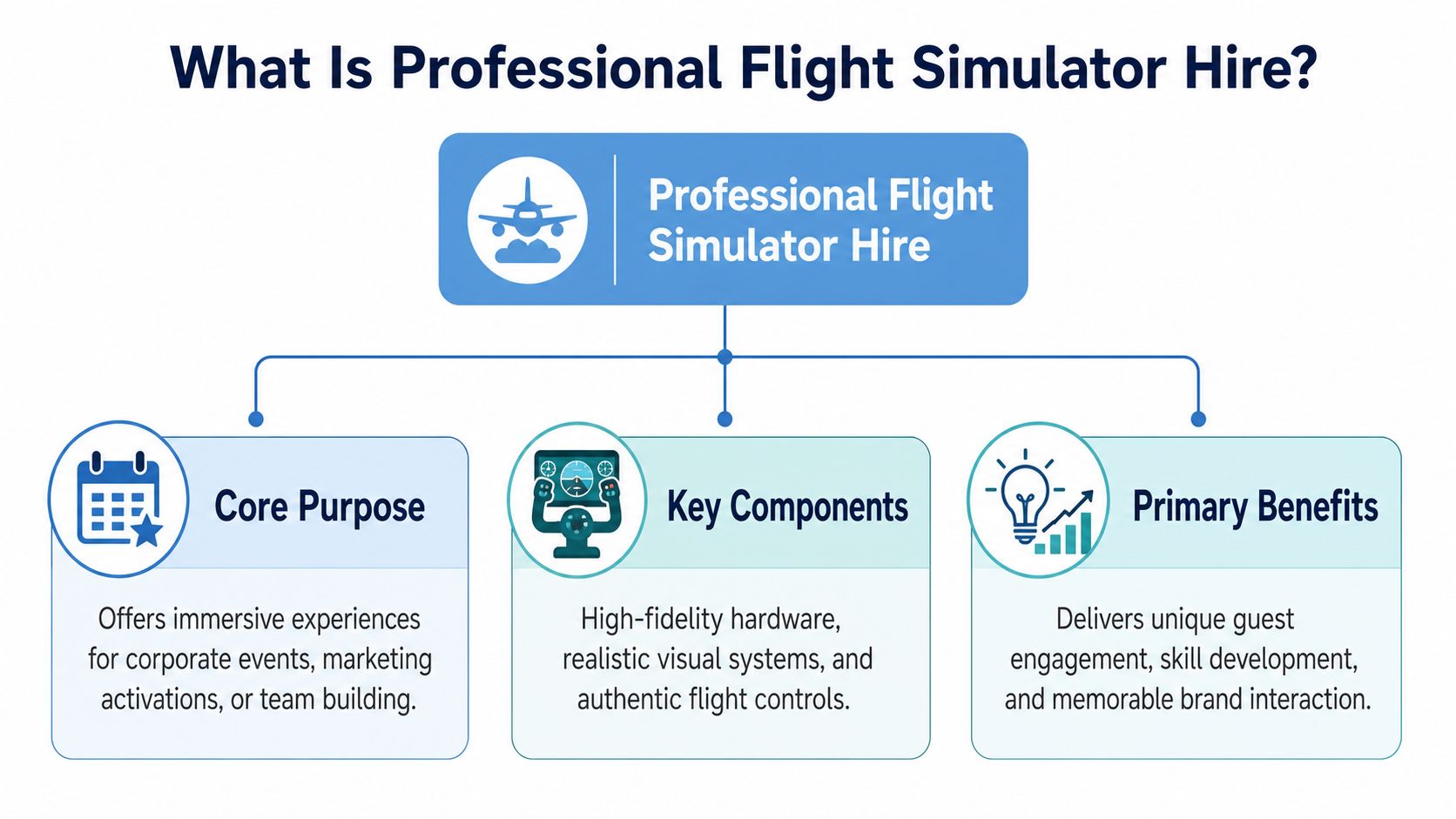
What Is Professional Flight Simulator Hire
Professional flight simulator hire sits a long way from a games console with a screen and joystick. For events, the benchmark is reliability, realism, and managed delivery. Consider the contrast between filming on a phone and filming with a proper broadcast camera. Both can capture an image. Only one is built to perform under pressure in front of clients, guests, and production teams.
The wider market helps explain why standards matter. The United Kingdom's commercial and military flight simulation market was valued at USD 0.43 billion in 2024, with a projected 4.22% CAGR through the forecast period, according to Market.us research on the UK flight simulation market. That ongoing investment reflects a serious ecosystem around simulation, training, and upgrade quality.
What separates professional from consumer-grade
A professional event simulator usually combines several elements:
- Authentic controls: Yokes, throttles, pedals, switches, and button layouts that feel deliberate rather than toy-like.
- Visual immersion: Large displays, wraparound visuals, or integrated cockpit views that help guests forget they're standing in an exhibition hall.
- Structured operation: An operator or instructor keeps people moving, explains the task, resets scenarios, and protects the guest experience.
- Show-ready build quality: The unit has to survive transport, setup, repeated use, and continuous public interaction.
A strong supplier also wraps the hardware in service. That includes delivery, install, testing, troubleshooting, staffing, and pack-down. If you want to see what that kind of event-led offer looks like in practice, simulator hire options for corporate events show the turnkey model planners usually need.
What guests actually experience
From the attendee's point of view, the best setup feels intuitive within seconds. They sit down, get a quick briefing, take off, complete a challenge or short route, and leave with a story.
That's why realism has to be balanced with accessibility. Full cockpit detail is impressive, but if the supplier can't make the first minute easy for a novice, the experience stalls. Good event flight simulator hire keeps the depth for those who want it and the simplicity for everyone else.
Practical rule: For events, realism matters most when it improves confidence, immersion, and conversation. If it slows throughput without adding value, it's the wrong kind of realism.
Choosing Your Mission Simulator Types and Event Goals
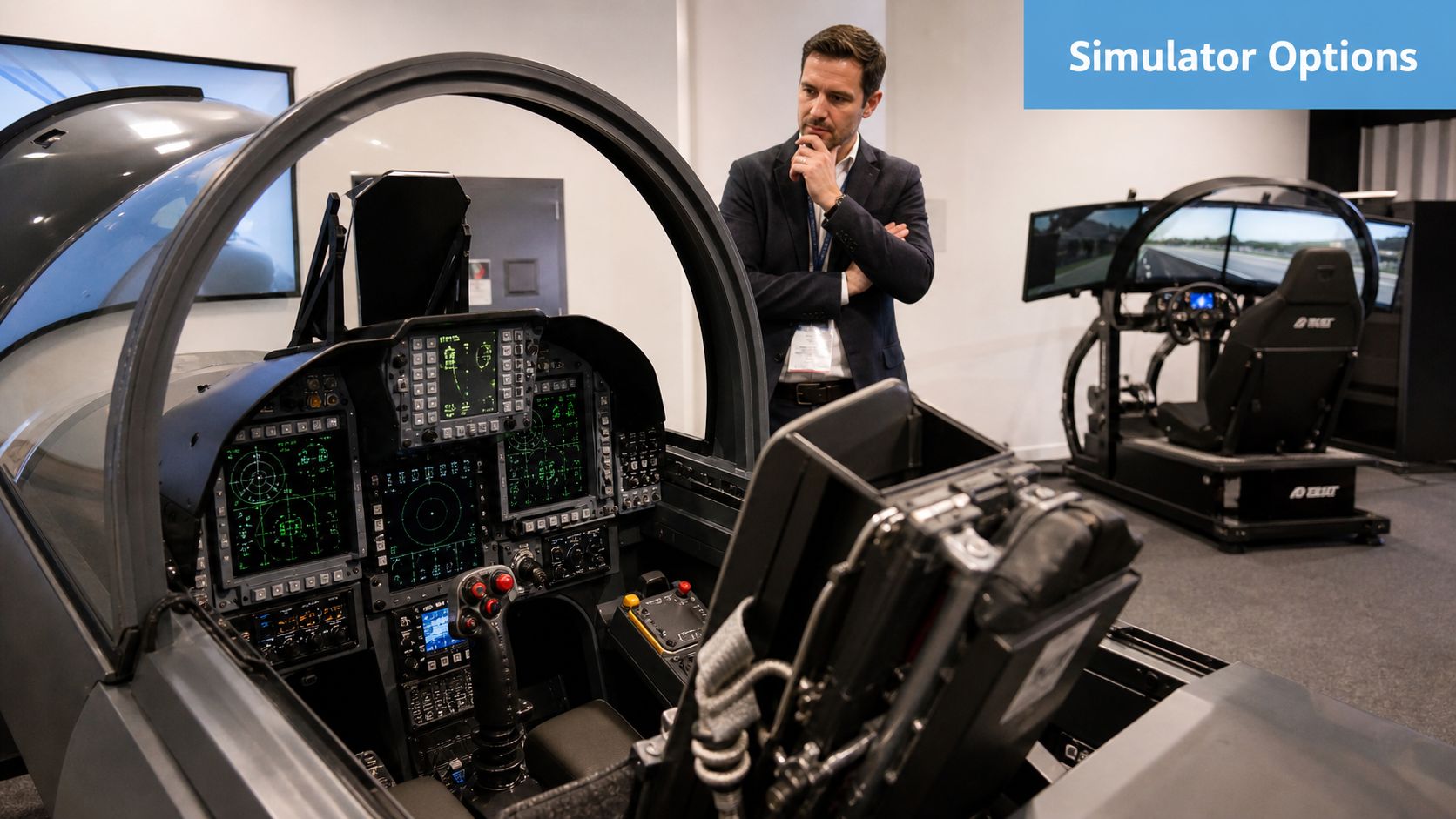
The right simulator depends on what success looks like for your event. A planner running a client hospitality evening needs something different from a team handling rapid footfall at a trade show. Start with the objective, then match the hardware.
Motion versus static
A motion simulator adds physical movement to the experience. It's usually the stronger choice for VIP entertainment, premium launches, and events where the attraction itself is a headline feature. The movement helps build anticipation around the queue and gives onlookers something to watch.
A static simulator is often the better operational choice when you need dependable throughput, simpler venue approvals, and a lighter footprint. It still creates immersion, but usually with fewer access and loading complications.
Here's a practical comparison:
| Simulator type | Best fit | Watch-outs |
|---|---|---|
| Motion cockpit | VIP events, product launches, premium hospitality | More demanding on access, setup, and venue checks |
| Static cockpit | Exhibitions, conferences, staff engagement days | Less theatrical from a distance |
| VR flight setup | Compact activations, flexible branded experiences | Needs careful queue and user management |
| Multi-crew simulator | Team building, collaboration-led sessions | Takes longer per group if briefed properly |
Jet, helicopter, or something broader
Aircraft type changes the feel of the activation.
A jet simulator usually delivers the strongest instant recognition. Guests know what they're looking at. It works well when the event needs glamour, precision, or a modern aviation feel.
A helicopter simulator is useful when hovering, control sensitivity, or specialist operations fit the story better. It often suits defence, engineering, offshore, emergency services, and technical audiences because the experience feels more task-based.
A broader aviation setup, especially one designed for mixed audiences, tends to work best when you want inclusivity. Not every guest wants a hardcore cockpit challenge. Some want a short, memorable turn with a clean explanation and a photo opportunity afterwards.
Realism standards and what they mean for events
At the training end of the market, only Flight Simulation Training Devices certified as EASA/UK CAA Level D qualify for professional flight training hire in the UK, because they deliver the highest fidelity with full-motion capability and accurate aerodynamic modelling, as outlined by Simtech's explanation of Level D simulator standards. That level isn't required for events, but it's a useful benchmark.
For planners, the lesson is simple. Ask what kind of realism the unit is offering. Some event rigs are built for spectacle. Others are built with more accurate controls, cockpit logic, and handling. Neither is automatically right or wrong. The choice depends on your audience and objective.
A quick decision filter
Choose your simulator by asking:
- Who's using it: General attendees, senior clients, internal teams, or specialist audiences?
- What matters more: Throughput, theatre, teamwork, or technical authenticity?
- How much support is needed: Self-explanatory experiences work differently from instructor-led ones.
- What will bystanders see: A simulator that looks active from across the hall usually attracts more casual attention.
The Flight Plan Logistics Safety and Venue Requirements
This is the part that makes many first-time planners hesitate. The good news is that logistics are manageable when they're handled early and properly. The bad news is that they can't be improvised during build-up.
A 2025 UK Health and Safety Executive report noted that 34% of simulator-related incidents in 2023–24 stemmed from inadequate on-site briefings or venue mismatch. That's the clearest reason to treat venue compatibility and operating procedures as part of the attraction, not an afterthought.
Venue questions to answer before you confirm anything
A simulator may fit the floorplan and still fail on access. I've seen planners focus on footprint and forget loading bay timings, service lift sizes, turning circles, and corridor pinch points. Those details decide whether install is smooth or stressful.
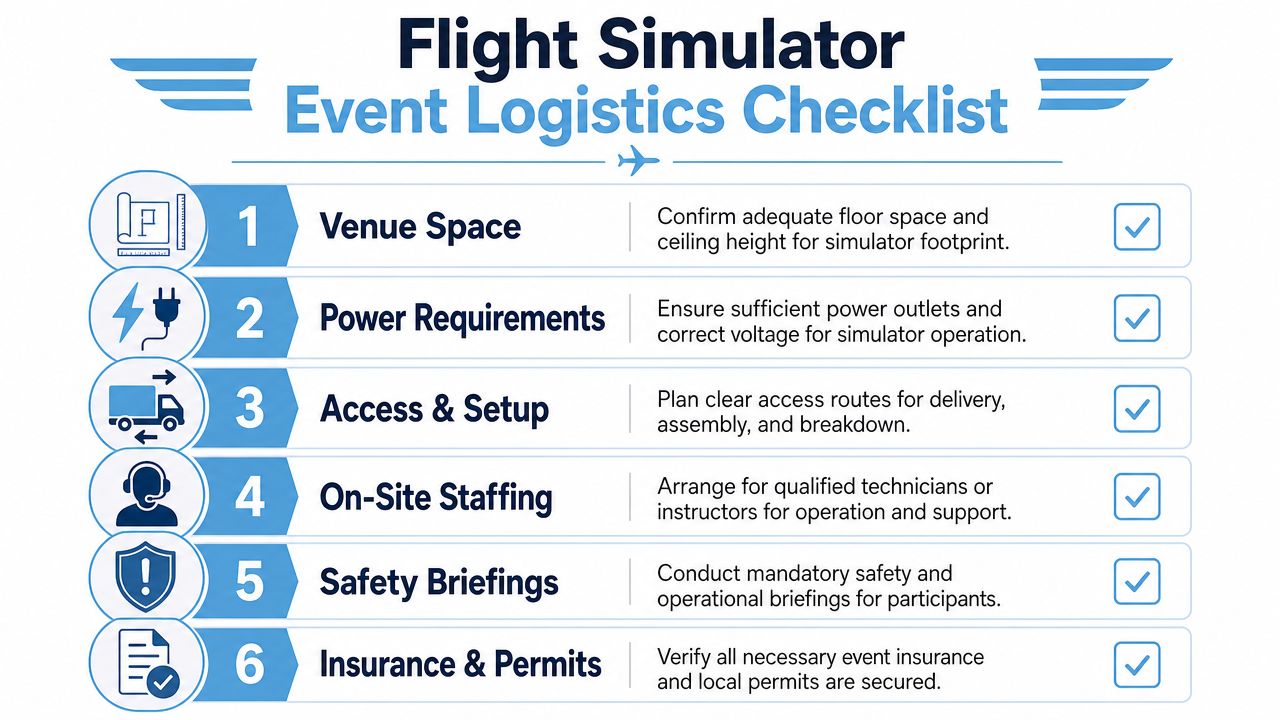
Use this pre-booking checklist:
- Access route: Confirm loading bay rules, delivery windows, door widths, lift dimensions, and any steps or ramps between unload point and event space.
- Floor loading: Ask whether the venue needs weight data, especially for motion units or older halls with stricter load constraints.
- Ceiling height: Cockpit structures, overhead screens, branding headers, and raised platforms all affect clearance.
- Power provision: Check what supply is available at the exact stand or room position, not just in the venue generally.
- Noise environment: Simulators need operator communication, so very loud halls may require headset comms or a revised layout.
If you need a planner-friendly summary of the practical points suppliers should confirm, flight simulator requirements for events is the sort of reference document worth reviewing before sign-off.
The safety paperwork that actually matters
Most venue teams will ask for some version of the same documents. You shouldn't have to write them yourself, but you do need to know they exist and are adapted to the setup.
Look for these as standard:
- Risk assessment: Identifies foreseeable hazards around operation, queuing, access, and participant use.
- Method statement: Explains how delivery, build, operation, and breakdown will happen safely.
- Insurance documents: Public liability and related cover should match the scale of the event.
- Operating procedure: Covers briefings, supervision, age or mobility considerations, and shutdown steps.
PSW Events, for example, states that it provides complete delivery and is backed by £10 million products, employee, and public liability insurance, which is the sort of operational detail planners usually need from any supplier before venue approval.
A simulator is only “plug and play” if someone else has already done the planning properly.
Staffing and on-the-day control
A flight simulator shouldn't be left as an unmanned object unless the format has been designed specifically for that. Most event setups benefit from a dedicated operator who can brief users, keep the line moving, reset scenarios, and intervene if someone is uncomfortable.
That staffing role affects more than safety. It protects the experience. Guests need short, confident instructions. Your event team needs somebody who can liaise with venue staff, troubleshoot quickly, and adapt the running order if traffic changes.
What works and what doesn't
What works
- Short user briefings before guests sit down
- Pre-agreed queue management and viewing space
- Venue sign-off completed before delivery day
- A supplier who asks detailed logistical questions early
What doesn't
- Assuming all exhibition halls can take the same unit
- Treating floor load and access as “production issues”
- Letting sales staff operate a simulator without training
- Discovering power limitations during setup
Understanding the Costs of Flight Simulator Hire
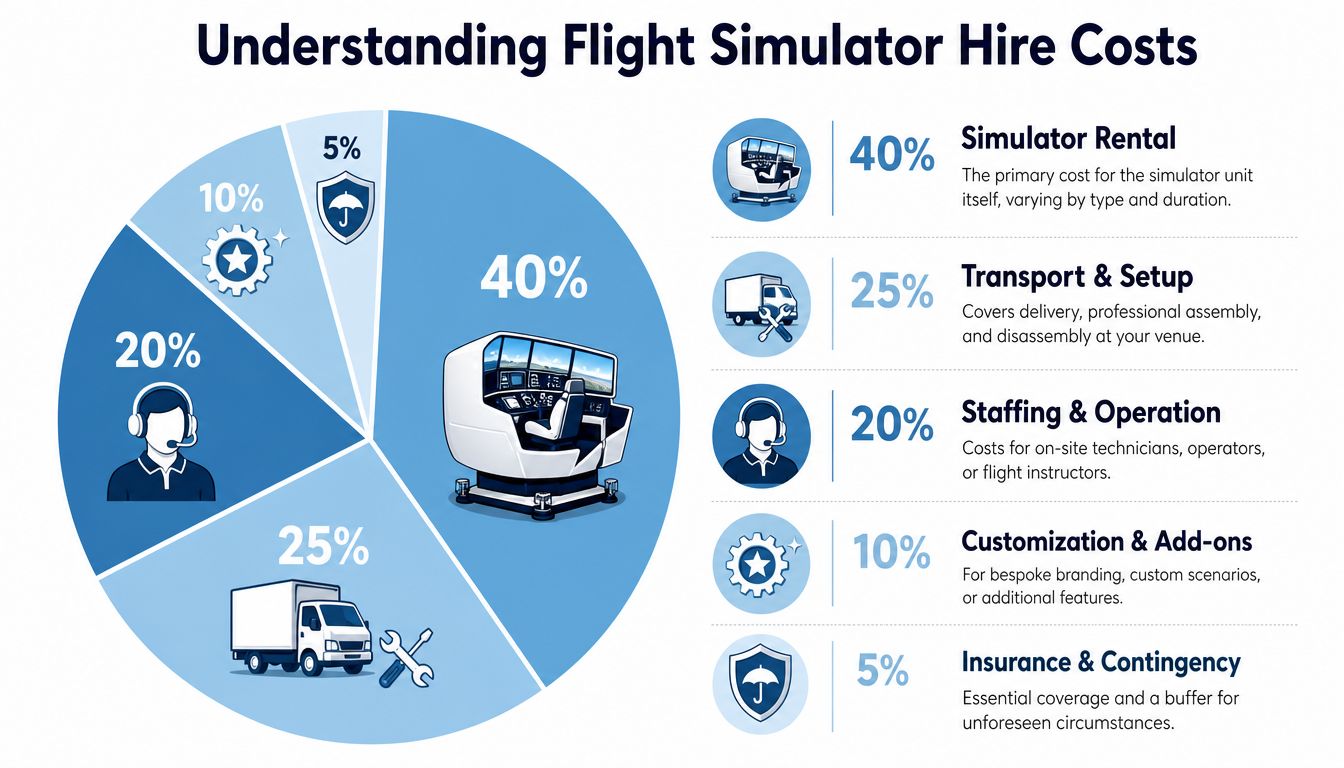
Pricing makes more sense when you separate the simulator from the service wrapped around it. Planners often compare quotes as if they're hiring a single object. In reality, you're usually buying equipment, transport, technicians, operation, setup time, and risk management in one package.
In the UK, flight simulator hire for corporate events typically ranges from £112.50 to £225 per hour for single-unit access, with professional-grade setups such as a converted Airbus A320 cockpit sitting toward the upper end because they use OEM data packs and realistic motion, according to Leading Edge Aviation's Airbus A320 simulator hire information.
What drives the quote up or down
The biggest factor is usually the type of simulator. A compact static unit is simpler to transport and install than a full cockpit with motion. The next driver is duration. A short hire can still carry meaningful setup and staffing costs, so the hourly figure doesn't tell the whole story on its own.
Other common price factors include:
- Branding: Custom decals, wrapped panels, scoreboard overlays, or branded challenge screens
- Staffing model: Technician only, operator only, or instructor-led delivery
- Travel and venue conditions: Distance, access restrictions, build timing, and overnight storage
- Complexity of the activation: Competitions, data capture flow, multiple user modes, or integrated AV
Cheap quotes and expensive quotes are rarely solving the same problem
A lower quote may still be right if your event is informal, low-risk, and focused mainly on light entertainment. But if the simulator is the centrepiece of the activation, a stripped-down package can become expensive in other ways. Poor queue flow, weak staffing, or unreliable setup often costs more than the saving looked worth.
Here's a useful way to compare suppliers:
| Budget question | Why it matters |
|---|---|
| What's included in setup and breakdown? | Prevents surprise labour and timing costs |
| Who operates the simulator on site? | Affects safety, throughput, and guest confidence |
| What level of branding is possible? | Determines whether the attraction supports campaign goals |
| What's the contingency plan for faults? | Shows how resilient the activation will be |
| How is ROI measured around the experience? | Helps justify spend internally |
If internal stakeholders are pressing on value, it helps to frame the conversation around engagement design rather than hourly hire alone. That's why resources on experiential marketing ROI and event measurement can be useful during planning, especially when finance teams want more than a line item and a photo.
Budget check: Ask what the quote is designed to achieve, not just what object it provides. That's where the real cost difference sits.
From Brief to Booking A Simulator Hire Checklist
A simulator booking usually goes wrong before anyone signs the contract. The brief is often too vague. “We want something interactive” doesn't tell a supplier enough to recommend the right format, staffing model, or measurement plan.
The Event Industry Council's 2024 UK exhibitor survey found that 68% of planners struggle to quantify engagement ROI for interactive attractions, and only 12% cite specific dwell-time data from simulators. That's why your booking process should include measurement from day one, not after the event.
Step one starts with the commercial goal
Write down the main outcome in plain language. Is the simulator there to attract footfall, start conversations with a defined audience, entertain existing clients, support a launch theme, or create a competitive team challenge?
Be specific. A stand designed for lead capture needs a different user flow from a hospitality lounge where relationship-building matters more than queue volume.
Build a brief a supplier can act on
Include the practical information suppliers need to assess fit:
Event type and audience
Exhibition stand, internal conference, client event, roadshow, or private function. Also state whether users will be general attendees, invited guests, or staff.Venue details
Give the hall, room, floor level, access notes, and any restrictions you already know.Desired experience style
Fast-turnaround challenge, premium cockpit session, branded competition, or team-based activity.Operational expectations
Will your staff scan leads before entry? Will the supplier manage the queue? Do you need a leaderboard or branded screen flow?
Decide what you'll measure before the event opens
In this situation, many teams lose the argument internally. They hire something interactive and then fail to collect comparable data.
Track outcomes such as:
- Dwell time bands: Short stay, engaged stay, and deep interaction
- Lead capture points: Before the session, after the session, or during follow-up conversation
- Session completion: Useful for understanding whether the format is too long or too complex
- Sales conversations started: Count meaningful interactions, not just scans
- Content moments: Photos, clips, and social-friendly assets created around the activation
A simple post-event review works best when everyone agrees on the definitions beforehand. “Engaged visitor” should mean the same thing to the sales team, agency, and supplier.
Final booking checks before sign-off
Before you approve the hire, confirm:
- What arrives on site: Simulator unit, screens, branding, barriers, flooring, staff, spare parts
- Who owns each responsibility: Venue liaison, power order, RAMS submission, lead capture device, operator breaks
- What the run-of-show looks like: Install, testing, live hours, downtime, pack-down
- How success will be reviewed: Daily debrief, post-event summary, or internal reporting template
The planners who get the most from flight simulator hire usually aren't the ones with the biggest budgets. They're the ones who define what the attraction has to do before they ask for a quote.
Frequently Asked Questions for Event Planners
How many guests can use one simulator in an hour
It depends on the simulator type, the length of each session, and how much briefing is required. A short challenge format moves people through far faster than an in-depth cockpit experience. Ask suppliers to describe the intended session flow rather than promising a generic throughput number.
Can the experience be branded
Usually, yes. Branding might appear on the external unit, waiting area, digital screens, scoreboards, or challenge messaging. The practical question is whether the branding supports the guest journey or just decorates the hardware.
What happens if there's a technical issue on the day
A professional supplier should test before live hours, bring someone who can operate and troubleshoot the unit, and have a clear recovery process. Ask this directly before booking. The answer tells you a lot about how the day will run.
Is there a minimum hire period
Often there is, especially once transport, setup, and staffing are involved. Hourly pricing is helpful for orientation, but many event bookings are quoted as a package because the operational work sits around the live hours.
Do guests need any flight experience
No. For events, the experience should be designed for beginners first. A good operator can make a novice feel comfortable quickly while still giving enthusiasts enough realism to enjoy it.
Is flight simulator hire suitable for exhibitions as well as parties
Yes, but the setup should change with the environment. Exhibition activations need queue discipline, lead capture logic, and visible theatre. Private events usually prioritise immersion, fun, and guest hosting.
If you're planning your first flight simulator hire, the safest approach is simple. Tie the experience to a business goal, check the venue early, and insist on a supplier who can talk as clearly about operation and measurement as they can about the cockpit itself.