
A lot of event briefs start the same way. The stand needs more footfall. The conference drinks reception needs an activity that gets people talking. The hospitality suite needs something better than a screen in the corner and a bowl of branded sweets.
That's usually the point where clients start looking at whether to hire a golf simulator.
It's a smart option, but only when it's planned properly. The machine itself isn't the product. Its true value comes from how well it fits your venue, your audience, your event KPIs, your branding, and the practical details that decide whether the experience feels premium or frustrating. A poor setup becomes a queue with no flow. A well-run setup becomes a live content point, a conversation starter, and a lead-generation tool.
Most guides stop at features. Event professionals need more than that. They need to know what works on busy exhibition floors, what goes wrong in low-ceiling venues, what a quote includes, and how to compare mobile hire against fixed-location bay options without guessing.
Transforming Your Event with Interactive Entertainment
At a typical exhibition stand, people glance, nod politely, and keep walking. Staff work hard to start conversations, but unless there's a reason to stop, most attendees won't stay long enough to engage properly.
Put a golf simulator on that same stand and the atmosphere changes. One person steps up to hit. Their colleagues stop to watch. Someone asks how the scoring works. Another wants to beat the first shot. The stand stops behaving like static floor space and starts behaving like a live attraction.
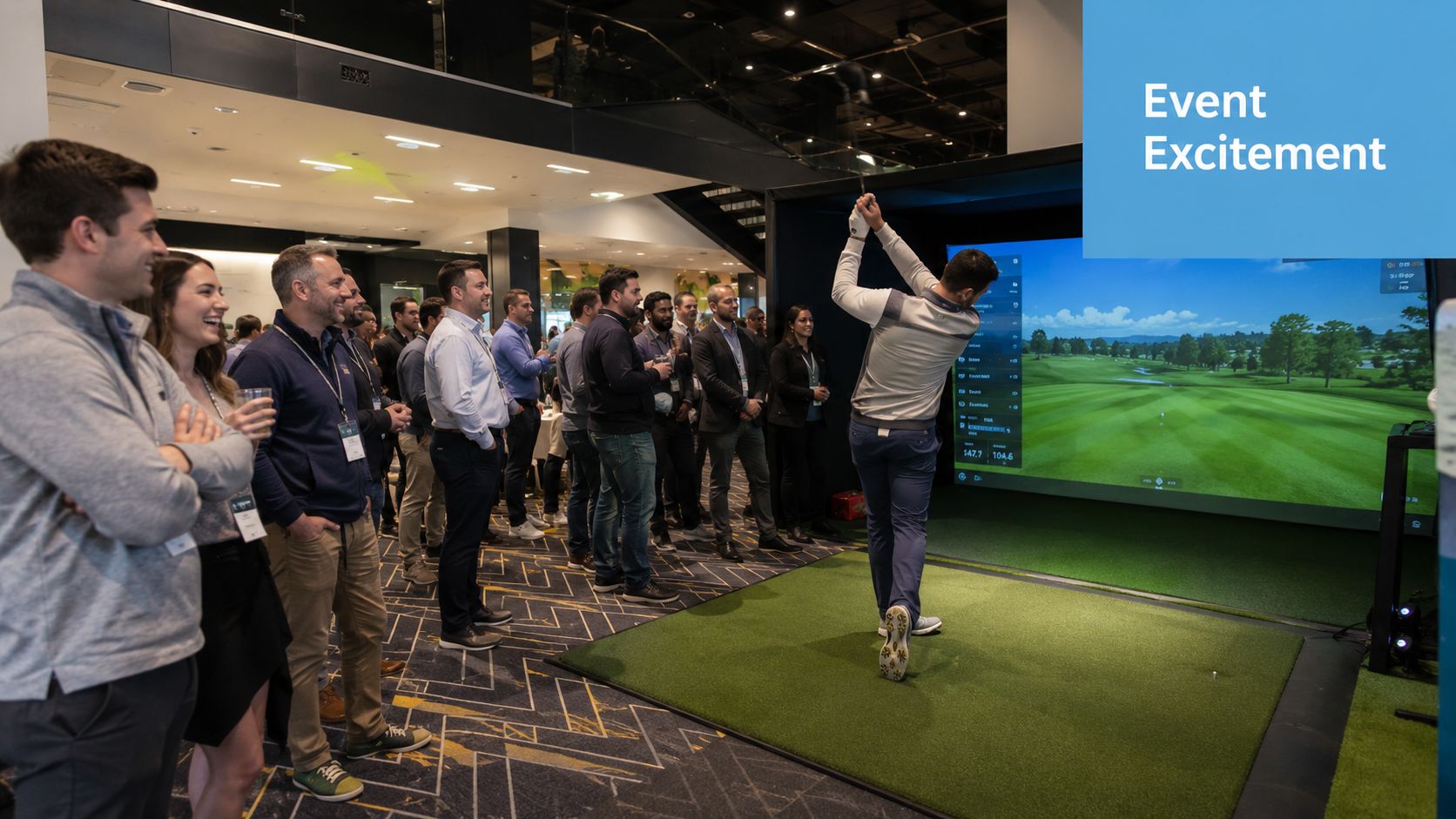
That shift matters because people remember what they do far more clearly than what they walk past. A simulator gives guests a role. They're not just receiving your message. They're participating in it.
From passive stand to active crowd
The strongest event activations create a reason to pause, then a reason to stay. A golf simulator does both. It attracts attention visually, then holds attention through participation, competition, and conversation.
That's why it fits naturally within experiential marketing for branded live engagement. The goal isn't just to entertain. It's to create a branded interaction that feels personal and memorable.
A good simulator activation doesn't sit beside the event. It becomes part of how guests experience the brand.
Where the change is most noticeable
Where a simulator tends to outperform more passive entertainment is:
- Trade show stands: It creates visible activity, which draws in attendees who might otherwise walk by.
- Corporate parties: It gives mixed groups something easy to join without needing specialist knowledge.
- Hospitality lounges: It adds structure to informal networking and gives hosts a useful conversation opener.
- Product launches: It keeps people on-site longer while your team has time to engage properly.
The main lesson is simple. If your event feels too static, a golf simulator doesn't just add movement. It creates interaction with purpose.
Driving Event Success Why a Golf Simulator Works
A golf simulator works at events because it gives organisers something many attractions don't. It combines spectacle, participation, and structure in one format. That makes it useful for more than entertainment.
At exhibitions, the first job is getting people to stop. At internal events, the first job is breaking social stiffness. At hospitality events, the first job is giving guests a shared activity that doesn't feel forced. A simulator handles all three well because it creates a natural focal point.
It supports the KPIs event teams actually care about
Event teams rarely hire an attraction just because it looks good. They hire it because they need outcomes. In practice, a golf simulator helps with:
- Footfall to the stand: People notice movement, screens, applause, and informal competition.
- Dwell time: Waiting for a turn, watching a leaderboard, and comparing shots keeps groups engaged.
- Lead capture: Competitions give staff a clean reason to collect names and details.
- Brand recall: Guests remember the challenge they took part in, not just the banner behind it.
- Team interaction: Shared play lowers the pressure for guests who don't enjoy formal networking.
The technology matters because it changes the experience
Professional-grade hire simulators use radar-based launch monitors operating at a minimum 120Hz, capturing 12+ data points per millisecond, and supporting real-time leaderboards with <200ms latency for competitive formats with up to 100 concurrent players, according to TrackMan simulator technical specifications.
That spec isn't just technical theatre. It directly affects how the event feels. Fast feedback keeps people engaged. Accurate shot tracking reduces disputes. A responsive leaderboard gives the activity a live-event quality rather than making it feel like a novelty game.
Different event formats use the simulator differently
For a trade show stand, the best use is often short-format play. Closest-to-the-pin challenges and fast head-to-head contests move people through without losing energy.
For team building, the simulator becomes a social equaliser. Good hosts can set up formats that let confident golfers enjoy the accuracy while complete beginners still have fun. The key is avoiding formats that expose inexperienced guests or slow down the room.
For corporate hospitality, the simulator works best when it complements the wider guest journey. It gives people something to do between conversations, food service, or presentations. It also helps hosts introduce guests to each other without forcing small talk.
Practical rule: If you're using a simulator for lead generation, don't treat the game and the data capture as separate tasks. Build the competition entry into the experience from the start.
There's also a broader market reason this format keeps appearing at UK events. The UK indoor golf simulator market is projected to reach £235 million by 2030, with a 10% compound annual growth rate, reflecting a shift towards technology-driven, weather-proof entertainment, as noted in this UK indoor golf simulator market projection.
If you're planning a sports-themed activation or looking at competitive entertainment more broadly, it helps to view a golf simulator as part of a wider corporate sports entertainment mix for live events, not as a standalone gimmick.
Choosing Your Simulator Types and Technology Explained
Not every setup is right for every event. When clients say they want to hire a golf simulator, the next question should always be: what kind?
Some systems are built around technical accuracy. Others are better suited to quick-play entertainment. Some formats work neatly in a conference hall. Others are built for outdoor use or temporary structures. Choosing the wrong one usually shows up in slower queues, confused guests, or a setup that feels oversized for the space.

Radar-based versus camera-based systems
The simplest comparison is this. A radar-based system is like a capable all-round event vehicle. It handles varied conditions well and suits flexible deployment. A camera-based system is more like a precision instrument. It can be excellent, but it often demands a more controlled setup.
Radar-based systems such as TrackMan are widely used when clients want reliable shot tracking, strong presentation value, and a polished competition format. They're a strong fit for branded activations and corporate events where guest flow matters as much as technical detail.
Camera-based systems can offer excellent visual and club-data insight, particularly when the environment is tightly controlled. For some event formats, they're a good choice. But for corporate hire, what matters most isn't theoretical lab precision. It's whether the setup is dependable, intuitive, and easy for a mixed audience to use.
Open bay versus enclosed setup
The hardware is only half the decision. The physical format matters just as much.
An open-bay setup suits indoor exhibitions, conference foyers, and branded spaces where visibility is part of the appeal. People can see the activity from across the room, which helps attract attention.
An enclosed setup works better when you need environmental control, stronger visual separation, or a more immersive feel. Outdoor events often benefit from this approach because the simulator becomes a self-contained attraction rather than an exposed technical installation.
Questions worth asking suppliers
Before you confirm a booking, ask these:
- What audience is this built for? Serious golfers, mixed corporate guests, or complete novices?
- What format is recommended? Fast-play challenge, leaderboard competition, or longer session play?
- How visible should the activation be? Open-floor theatre or enclosed immersion?
- How much operator input is needed? Some systems need stronger hosting to keep traffic moving.
For many organisers, the right answer is a managed event package rather than trying to compare hardware names in isolation. That's why it helps to look at providers offering golf simulator hire formats for events and exhibitions rather than focusing only on the underlying tech.
Essential Logistics and Site Requirements
The fastest way to ruin a simulator booking is to assume the venue will “probably be fine”.
It won't be, unless someone checks properly. Golf simulators are forgiving in some areas, but not in the basics. Space, height, access, and a stable setup area are critical. If any of those are wrong, the guest experience suffers immediately.

The minimum space requirement
A golf simulator hire requires a minimum floor space of 5×4 metres with a 3.2-metre ceiling height, according to UK golf simulator site requirement specifications.
Those figures matter because they reflect how people swing, not how compact the equipment looks in a brochure. The screen, mat, tracking gear, player stance, and safety margin all need room to work together.
What goes wrong in low venues
Ceiling height is usually the detail clients underestimate. A ceiling below 3.0m is a critical failure point because it can force players to alter their swing, reducing launch angles by 10 to 15% and degrading the experience.
That doesn't just affect confident golfers. It affects everyone. Guests become hesitant, swings get shorter, and the attraction stops feeling natural. The simulator may still be technically installed, but it won't perform properly.
If a guest looks up before they swing, the venue is already compromising the activation.
The practical site checklist
Use this checklist before signing off any space:
- Measure the clear footprint: Don't rely on venue plans alone. Check the usable area after furniture, drape lines, staging, and cable routes.
- Confirm ceiling height at the actual play point: Bulkheads, rigging, lighting bars, and decorative features can reduce effective height.
- Check access routes: A suitable room is useless if the equipment can't get from the loading bay to the final position smoothly.
- Assess the floor surface: The area needs to be level and stable so the screen, mat, and tracking equipment sit correctly.
- Review surrounding traffic: A simulator needs enough separation from audience flow to keep the experience safe and comfortable.
Indoor and outdoor reality
Indoor installations are usually simpler because the environment is controlled. Outdoor events can work very well, but they demand tighter planning around surface conditions, weather protection, and how the attraction integrates with the rest of the build.
The best planners treat the simulator like a live technical feature, not like a prop. That mindset prevents last-minute compromises and protects the guest experience.
Analysing Costs and Typical Hire Packages
Most clients start with one question. What does it cost to hire a golf simulator?
The short answer is that half-day hires starting from £599 and full-day hires starting from £949 are established entry points in the UK corporate and event hire market, according to UK golf simulator rental pricing examples. There's also a listed example of £750 for a portable Trackman simulator at a special event or corporate function.
Those figures are useful, but they're only the starting point. The key planning question isn't “What's the base rate?” It's “What's included, what's excluded, and what will this cost once the event spec is final?”
The base package rarely tells the whole story
A quote can look competitive and still leave out important items. In practice, event costs often move because of branding requirements, setup complexity, transport, software configuration, and staffing expectations.
One of the most overlooked issues in this market is total cost of ownership for short-term hire. Industry analysis notes that hidden software licensing and setup fees can inflate the quoted £599 to £600 rental price by 20 to 30%, while software subscriptions in some cases can run at £200 to £500 per year, and transport logistics may be billed separately, as discussed in this analysis of simulator ownership and hidden hire costs.
That doesn't mean every supplier adds these costs late. It means clients should ask clearly whether the quote is all-inclusive.
A simple comparison table
| Package | Typical Duration | Starting Price (Guide) | Common Inclusions |
|---|---|---|---|
| Half-day mobile hire | 2.5 hours of simulator time | £599 | Simulator setup, gameplay, event use |
| Full-day mobile hire | 5 hours of simulator time | £949 | Longer event coverage, simulator operation |
| Portable Trackman event hire | 3 hours | £750 | TrackMan-powered simulator for special events or corporate functions |
What to ask before approving the quote
Some suppliers are transparent from the start. Some expect clients to know what to ask. Use these questions to keep comparisons fair:
- Is the quoted price fully inclusive? Ask whether software, setup, breakdown, and operator time are already included.
- Are transport and access charges separate? Difficult venues often create extra logistics costs.
- What branding is included? Basic logo placement and bespoke branded presentation are not the same thing.
- What happens if timings move? Event overruns, delayed access, and changed build schedules can affect labour costs.
- What support is on-site? A lower quote may assume a lighter service level than you need.
Cheap simulator hire often becomes expensive when the supplier prices the hardware first and the event reality second.
The other useful comparison is against fixed-location play. Earlier market analysis for indoor venues notes typical bay hire rates in major UK cities at roughly £30 to £40 per hour off-peak and over £50 per hour at peak times, with fixed venue bay hire often averaging £35 to £50 per hour inclusive in the same broader discussion of market economics and hire formats. That's helpful context when deciding whether your audience should travel to a venue or whether the experience needs to come to your event.
Branding Staffing and Insurance Considerations
A simulator can have excellent hardware and still underperform if the service around it is weak.
For corporate events, the attraction needs to feel managed, branded, and safe. Guests shouldn't be left guessing where to stand, how to take part, or whether the queue is moving. The best results come when the simulator is treated as a hosted brand experience rather than a self-service game.

Branding should support the interaction
Branding works best when it appears in the places guests notice during participation. That might include the enclosure, surrounding graphic panels, score displays, competition signage, or the screen content around the game itself.
What doesn't work is overloading the setup with logos while ignoring the flow of the experience. If branding gets in the way of readability, safety, or ease of play, it weakens the activation.
A few useful principles apply:
- Keep the message short: Competition names, campaign lines, and sponsor identity need to be readable at a glance.
- Brand the touchpoints: Focus on entry points, score moments, and photo opportunities.
- Match the event aesthetic: A simulator should look integrated into the stand or venue, not dropped in as an afterthought.
On-site staff do more than operate the kit
Experienced event staff are one of the biggest differentiators between an average hire and a strong one. They manage guest flow, explain the format quickly, keep nervous players comfortable, reset the pace when queues build, and make sure the attraction keeps supporting the event objective.
At trade shows, good hosts know when to entertain and when to hand a prospect to your sales team. At internal events, they know how to keep the competition lively without making it exclusive.
The host is often the difference between a simulator that attracts a crowd and one that converts that crowd into meaningful engagement.
Insurance is not the place to compromise
Corporate clients should treat insurance as a core selection criterion, not a back-office detail. A professional supplier should be able to provide clear documentation and confirm that their operation is set up for live events, public interaction, and venue compliance.
For larger organisations and agencies, comprehensive public liability cover is usually essential because it protects guests, venues, and the client brand if something goes wrong. It also signals that the supplier understands how corporate event delivery works in practice.
Your Decision Checklist for Hiring a Golf Simulator
The easiest way to make a bad simulator booking is to buy on headline price alone. The better approach is to assess the full event fit.
A golf simulator can be a strong choice for exhibitions, conferences, hospitality, and staff events, but only when the supplier, setup, and format align with your actual brief. The checklist below is the one worth using before you approve a quote.
Event fit and audience
Start with the purpose, not the hardware.
- What outcome matters most? Decide whether the priority is footfall, dwell time, networking, team interaction, or lead capture.
- Who is playing? A room full of golfers may want more realism. A mixed audience usually benefits from a simpler, faster, more welcoming format.
- How long should each interaction last? Exhibition stands usually need quick turnover. Hospitality spaces can often support longer play windows.
Venue and operations
Many bookings succeed or fail at this point.
- Confirm the venue can support the simulator safely. Check clear footprint, real ceiling height, access route, and floor condition.
- Review where queues will form. A good activation needs waiting space that doesn't block the stand or walkway.
- Ask who manages setup and breakdown. You want clarity on timing, responsibility, and event-day support.
Cost and quote transparency
A realistic quote should answer more than “how much”.
- Is the price all-inclusive? Ask specifically about setup, breakdown, transport, software, and operator time.
- What branding is included? Basic event-ready branding and bespoke production are different scopes.
- Are there likely add-ons later? If anything is provisional, get it listed before approval.
Service quality and risk
A strong supplier should feel like an operational partner.
- Will trained staff be on-site? Hosted delivery improves guest experience and protects the flow of the event.
- Is insurance documentation available? Don't leave this until the venue asks for it.
- Can the supplier adapt the experience to your brand and audience? The best setups are flexible without becoming complicated.
If you want a useful reference point for how to think about risk more broadly, this piece on Washington small business insurance advice is a practical reminder that coverage should match the activity, venue exposure, and operational reality rather than being treated as a generic tick-box.
Ask for the event plan, not just the product list. That's where you see whether the supplier understands delivery.
When those points line up, hiring a golf simulator becomes much easier to justify. You're not just booking a game. You're commissioning a managed experience that can hold attention, support brand goals, and give people a reason to engage.
If you're planning an exhibition, conference, hospitality event, or branded activation and want expert support, PSW Events can help you hire a golf simulator with the logistics, branding, staffing, and compliance handled properly from the outset.