
You're probably looking at an event floorplan right now, wondering how to stop your stand becoming another lit backdrop with a looping promo video. The aisle will be busy. Competing stands will have coffee, screens, giveaways, maybe a reactive game. None of that guarantees people stop, stay, and remember who you are.
That's where racing simulator motion earns its keep.
A static simulator can attract interest. A motion simulator changes the way people talk about the experience afterwards. Attendees don't just watch a car on a monitor. They feel braking, cornering, kerb strikes, and chassis movement through the seat and platform. For a marketing director, that difference matters because it turns passive attention into active participation. Active participation is what creates queues, conversations, repeat attempts, and the kind of footage people share.
This isn't a guide for home sim racers comparing hobby rigs. It's for event professionals who need to match technology to outcomes: footfall, dwell time, lead capture, brand recall, queue flow, and a setup that works inside real venues with real time pressure.
Beyond the Screen: Why Motion Is Your Next Big Crowd-Puller
The first hour of a live event usually decides whether a stand draws a crowd or gets passed by. Attendees scan fast. If the experience looks passive, they keep walking. A motion racing simulator changes that equation because it creates visible activity before anyone reads a headline or talks to staff.
On an event floor, movement acts like a beacon. People notice the platform working, hear the mechanical response, and look over to see why others have stopped. That gives your team something more useful than background interest. It gives them a live focal point that naturally gathers participants, spectators, and prospects in one place.
A screen shows content. A motion rig creates a moment.
That distinction has practical value for event teams. The person in the seat gets the hands-on experience, the people nearby get a show worth watching, and brand staff get an easy opening for conversation. Used well, the simulator becomes less like a demo station and more like the centre of the stand.
Event ROI rarely comes from one touchpoint. It usually comes from a sequence. Someone drives. Their colleague films it. A small crowd forms around the leaderboard. A staff member uses the wait time to qualify interest, book a follow-up, or steer people into a wider product discussion. The simulator is doing more than entertaining guests. It is creating the conditions for longer dwell time and better sales conversations.
Motion delivers strongest results when it is planned as an engagement tool, not treated as stand decoration.
The market shift behind that is straightforward. Audiences are now familiar with immersive experiences from consumer venues, branded activations, and competitive gaming environments. Motion no longer feels niche or experimental to most event attendees. For marketers, that reduces the risk of the technology feeling like a gimmick and increases the chance that it feels current, premium, and worth joining.
Where it fits best
Motion usually earns its floor space when the brief includes goals like these:
- Stand-out visibility: You need a strong visual draw from the aisle, not another screen people glance at and ignore.
- Premium positioning: You want the brand to feel engineered, performance-led, or high value.
- Repeat engagement: You need competitive mechanics such as lap times or leaderboards to bring people back.
- Sales-led hospitality: You want guests occupied for a few minutes while your team starts useful conversations and captures details.
The commercial case is simple. Racing simulator motion is not just about making the drive feel realistic. It helps event teams create a stronger attraction, hold attention for longer, and give sales staff more chances to turn footfall into measurable pipeline.
How Motion Simulators Create Unforgettable Experiences
Watching racing on a screen is like watching a rollercoaster on television. You understand what's happening, but your body stays unconvinced. Motion changes that by feeding physical cues to the brain at the same time as the visuals and audio.

What the attendee actually feels
Modern motion platforms try to mimic the information your body expects during driving. The key cues are usually:
- Acceleration: The rig tilts or shifts to suggest the car is loading up under throttle.
- Braking: The seat dives forward to create the sense of weight transfer.
- Cornering: The platform rolls or sways to signal lateral load.
- Road texture: Smaller movements and vibrations suggest kerbs, bumps, and surface change.
This is why a good motion rig feels convincing even in a compact footprint. It isn't trying to drive across the hall. It's delivering timed physical cues that match what the eyes see.
Why timing matters more than drama
For events, the best motion profile usually isn't the most exaggerated one. Short public sessions work better when the rig feels sharp, immediate, and readable. If the platform over-moves, guests can spend their first lap adapting instead of enjoying it.
That matters because most event users aren't trained drivers. They need quick immersion. The motion has to make sense within seconds.
A simple way to think about it is this:
| Experience layer | Static simulator | Motion simulator |
|---|---|---|
| Visuals | Strong | Strong |
| Audio | Strong | Strong |
| Physical feedback | Limited | High |
| Spectator appeal | Moderate | High |
| Emotional impact | Moderate | Higher |
Why event teams should care
Marketing teams don't buy motion because they want to discuss vestibular systems on site. They buy it because physical feedback changes behaviour.
Guests stay longer. Spectators become participants. Staff have more natural openings to talk. The experience becomes easier to film, easier to remember, and easier to build a branded competition around.
A screen shows speed. Motion makes speed believable.
That's the primary value of racing simulator motion at events. It gives the attendee a physical memory, not just a visual one. And physical memories tend to travel further after the event, in conversations, in social clips, and in the simple phrase every organiser wants to hear: “You should try that.”
Decoding Degrees of Freedom for Your Event
When suppliers talk about degrees of freedom, they mean the directions a motion platform can move. For event buyers, this isn't abstract engineering language. It directly affects realism, footprint, queue speed, and how premium the attraction feels on the day.
According to Solo Motor Controllers' explanation of motion simulator DOF, modern high-fidelity rigs are commonly built around six degrees of freedom, which include surge, sway, heave, pitch, roll, and yaw. Simpler 2-DOF systems usually provide pitch and roll, while 3-DOF and 6-DOF systems can better reproduce braking dive, cornering loads, and directional changes.
What each DOF level means in practice
A buyer doesn't need to memorise all six axes. What matters is what the guest feels.
2-DOF
This is the straightforward option for public-facing fun. The platform usually tilts forward and back, and side to side.
That gives enough movement to suggest braking and cornering without overcomplicating the experience. For family days, public events, and high-throughput stands, 2-DOF can be the right balance between spectacle and simplicity.
3-DOF
A 3-DOF rig adds another movement axis, often improving the sensation of bumps, load transfer, or directional response. That extra layer can make the experience feel more “car-like” without the cost, space, and setup complexity of full 6-DOF.
This is often the sensible middle ground when a brand wants something more credible than a novelty ride but doesn't need a full engineering showcase.
6-DOF
This is the premium end. With surge, sway, heave, pitch, roll, and yaw available, the platform can create a much fuller approximation of vehicle motion.
For a product launch, a motorsport hospitality setting, or a technical brand demonstration, 6-DOF gives you a noticeably richer motion envelope. It's the version that feels least like “seat movement” and most like coordinated chassis response.
Motion Platform DOF Comparison for Events
| DOF | Movements | Best For | Footprint | Immersion Level |
|---|---|---|---|---|
| 2-DOF | Pitch, roll | Family days, quick-play activations, high throughput events | Smaller | Good |
| 3-DOF | Pitch, roll, plus one added motion axis | Mid-tier branded activations, hospitality, more credible race feel | Moderate | Better |
| 6-DOF | Surge, sway, heave, pitch, roll, yaw | VIP launches, premium motorsport experiences, technical demos | Larger | Highest |
How to match DOF to your event brief
The mistake many buyers make is assuming more DOF automatically means better ROI. Sometimes it does. Sometimes it doesn't.
Use this logic instead:
- Choose 2-DOF if queue speed matters more than technical realism.
- Choose 3-DOF if you want stronger authenticity without making the install too demanding.
- Choose 6-DOF if the simulator itself is part of the brand statement.
Practical rule: Buy the level of motion your audience will notice, not the level they'll never have time to appreciate.
A guest on a short exhibition session may respond more strongly to a well-tuned 3-DOF system than a poorly briefed 6-DOF rig. The event context matters as much as the specification sheet.
Questions worth asking suppliers
Before approving a motion package, ask:
- Who is the audience? Public visitors, clients, staff, or motorsport-savvy guests?
- How long is each session? Short sessions favour clarity and repeatability.
- What's the role of the rig? Crowd-puller, hospitality feature, or technical centrepiece?
- What are the venue constraints? Access, ceiling height, and floor loading all matter.
That turns DOF from a buzzword into a planning tool.
Choosing the Right Motion Technology and Actuators
The number of axes tells you what a simulator can do. The hardware tells you how well it does it. These factors allow event buyers to separate polished motion from motion that merely looks dramatic on a supplier quote.
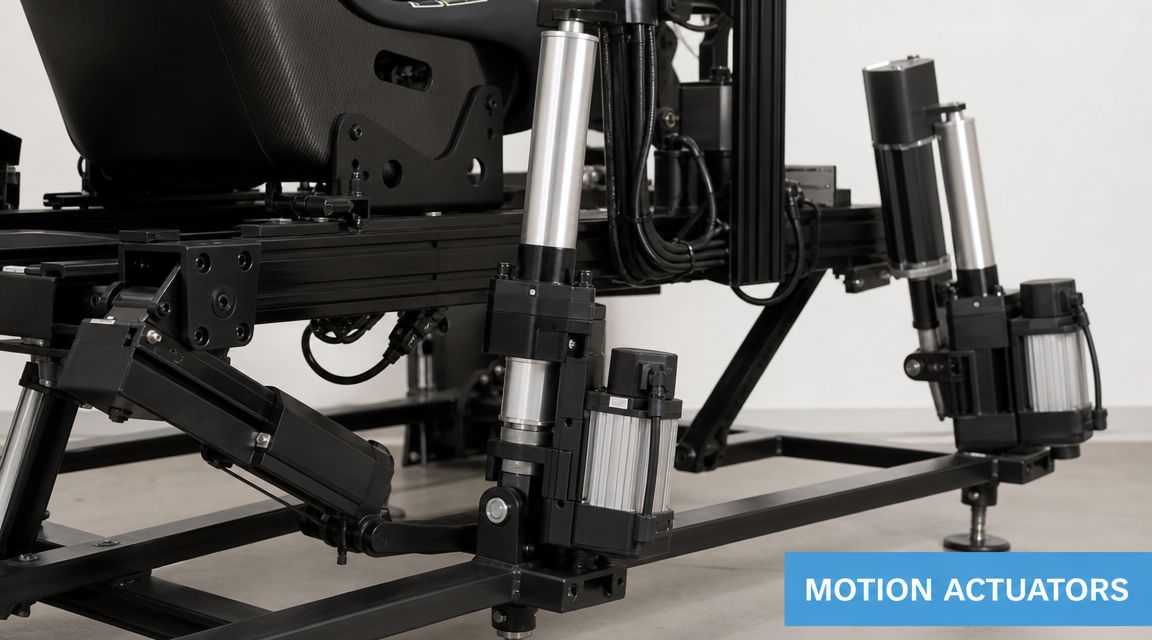
Speed beats oversized movement
A common buying mistake is assuming longer travel always means a better experience. In practice, the quality of racing simulator motion depends heavily on how quickly the system responds.
Industry guidance highlighted in this motion cueing discussion says realistic systems should avoid “mushy” lag and use actuators with at least ~200 mm/s velocity. The same discussion explains the core trade-off: a fast, shorter-travel system often feels more realistic than a slower, longer-travel one because the human vestibular system is more sensitive to the onset of movement than to large sustained displacement.
For event work, that's vital. Guests often get a brief session. If the platform is slow to react, the first impression is softness rather than realism.
What to look for in a supplier proposal
When you review a quotation, don't stop at “full motion” or “6-DOF”. Ask what is generating the movement.
Look for clarity around:
- Actuator response: Fast cue delivery matters more than dramatic brochure language.
- Calibration software: The rig needs tuning, not just power.
- Repeatability: Public events demand consistency over many back-to-back sessions.
- Recovery behaviour: The platform should settle cleanly between users.
If your team works with technical production partners, it can help to understand the broader engineering principles behind integrated motion systems. A useful overview is this guide to Sheridan Tech for mechatronic development, which gives context on how mechanical, electronic, and control elements come together in complex moving equipment.
Platform design changes the feel
Not all motion architectures behave the same way.
According to SimCraft's comparison of racing simulator motion architectures, Stewart-platform-style systems typically use six actuators in a triangular arrangement to create six degrees of freedom, but the axes are mechanically coupled. That means pitch, roll, and yaw aren't independently controlled in the same way. By contrast, centre-of-mass rotation systems preserve rotational integrity more effectively and are often positioned for higher-fidelity driver feedback.
For events, the practical difference is this:
- Coupled platforms can be excellent when you need compact spectacle.
- Independent-feeling motion systems are better when the brief calls for technically credible feedback.
That doesn't mean one is universally right. It means the design should match the use case.
A quick visual reference helps when discussing hardware quality with stakeholders:
Hire outcomes, not just hardware labels
The strongest procurement conversations focus on attendee experience and operational fit.
Ask the supplier how they tune the rig for:
- Short exhibition runs
- Mixed ability users
- Fast reset between sessions
- Queue-heavy public use
If you're comparing ready-to-hire options, a practical reference point is this page on motion seat simulator hire, which shows the sort of event-focused package buyers should expect to discuss: motion response, delivery, staffing, and setup rather than hobbyist spec-sheet language alone.
Driving Event ROI with Racing Simulator Motion
A marketing director usually asks the right first question: does this earn its floor space?
A motion rig can, but only when the experience is built to serve event KPIs. At a trade show, nobody is buying "motion" as a technical feature. They are buying attention, queue density, longer conversations, better lead capture, and content that keeps working after the hall closes.
The market is moving in that direction. Analysts cited by Sim Racing Studio project strong growth in racing simulators over the next few years, which matters for event teams because it shows simulator experiences are now familiar, credible, and easier for visitors to engage with on a branded stand. That lowers the barrier to participation and makes the activation easier to sell internally as a serious marketing tool rather than a novelty.

Where the return actually shows up
The strongest returns usually come from four areas.
Footfall
Motion gives you visible movement above the noise of a busy hall. A static screen competes with every other static screen. A rig that pitches and rolls gives passers-by an instant cue that something live is happening.
Placement matters. Put the simulator where aisle traffic can read it in two seconds, then support it with a large timing screen or leaderboard so people understand the challenge without needing an explanation from staff.
Dwell time
Dwell time rises when the simulator creates a reason to stay after the first glance. Competition does that well.
One person drives. Two colleagues watch. Another waits for a turn. A sales rep has three to five minutes to start a useful conversation without forcing it. That is a much better commercial environment than handing out brochures to people who are already walking away.
Lead capture
The cleanest lead mechanic is tied to participation.
Good examples include:
- Fastest lap prize draws
- Scheduled finals for qualified entrants
- Team challenges between clients, departments, or partner groups
- Branded follow-up emails with results, rankings, or lap clips
That approach works because the form is part of the experience. Visitors are not being stopped for data before they understand the value exchange.
Content and brand recall
Motion creates body language. People brace, laugh, overcorrect, celebrate, and call colleagues over to watch. That gives your content team material with energy and context, not just a person sitting still behind a wheel.
For sponsors and exhibitors, that matters. The stand becomes easier to photograph, easier to film, and easier to remember.
A good motion activation should do two jobs at once. Pull people in on the day, and give the sales team a reason to follow up after the event.
Build the conversion path before build-up day
The simulator is the stage piece. The ROI comes from the operating model around it.
I usually map it like this:
| Event goal | Motion-based tactic |
|---|---|
| Increase footfall | Position the rig on an open aisle edge with visible motion and a results screen |
| Grow dwell time | Run short sessions with a rolling leaderboard and clear replay moments |
| Capture leads | Register drivers before entry or gate result delivery through a branded follow-up |
| Support sales conversations | Staff the queue and post-drive area with people briefed to qualify interest |
If your team is shaping the internal business case, this guide to measuring experiential marketing ROI gives a practical framework for connecting live engagement to commercial outcomes.
If the rig sits within a larger branded footprint, involve your exhibition stand designers early. The simulator performs best when queue flow, sightlines, screen placement, and meeting space are designed together rather than added late.
What works in practice
The best event setups keep the drive format short, the queue visible, and the call to action obvious. They also match intensity to audience. A public expo crowd often responds better to motion that feels exciting but approachable, while a smaller VIP audience may value higher fidelity and longer coached sessions.
What usually underperforms is easy to spot:
- Sessions that run too long and kill throughput
- No leaderboard or no obvious score mechanic
- Staff focused on the hardware instead of qualification
- Registration that feels separate from the game
- Motion settings that intimidate first-time users
The commercial test is simple. If the simulator creates a crowd but gives your team no way to capture intent, it is theatre without pipeline. If it captures data but nobody stops to watch, it is a form with expensive hardware attached.
The best event activations do both.
The Event Planner's Checklist for Hiring a Motion Simulator
Hiring a motion simulator gets easier when you stop thinking about “the rig” and start thinking about the complete operating environment. Most problems on event day come from logistics, access, staffing, or queue design, not from the game itself.

Venue and technical checks
Get the practical basics locked down first.
- Space planning: Confirm the operational footprint, not just the physical size of the rig. You need room for ingress, egress, queueing, and staff.
- Power access: Ask what supply is required on site and where the nearest source needs to be.
- Load-in route: Check door widths, lifts, ramps, and build schedules. A simulator that fits the stand plan can still fail the access plan.
- Ceiling and sightlines: Motion rigs need physical clearance and visual impact. Don't hide the movement behind walls or truss.
If the simulator is part of a larger exhibition build, involve your stand partner early. Teams looking at integrated layouts can get useful planning ideas from specialist exhibition stand designers who think in terms of visitor flow, not just set construction.
Operations and guest handling
The best event rigs are easy for the guest. That usually means more work behind the scenes.
Ask the supplier about:
- On-site staffing
- Session management
- Cleaning and reset between users
- Briefing for first-time drivers
- Fallback plans if software or hardware needs a reset
One practical example in the market is racing simulator hire, where the event package includes delivery, setup, and operational support rather than leaving the organiser to run specialist equipment alone.
Checklist shortcut: If the supplier can't explain who manages the queue, the briefing, and the reset, the activation plan isn't finished.
Safety, insurance, and branding
These conversations should happen before deposit stage, not the week before the event.
Make sure you confirm:
- Safety protocols: How are guests seated, supervised, and assisted?
- Insurance position: Ask for evidence of relevant cover and event-ready documentation.
- Branding options: Can the seat, rig, leaderboard, game interface, or surrounding set be branded?
- Audience suitability: How are age, mobility, and comfort considerations handled on site?
A simulator becomes far more valuable when the branding extends beyond a logo panel. Leaderboards, staff uniforms, race naming, and prize mechanics all help turn a generic attraction into a branded experience.
Answering Your Top Motion Simulator Questions
Do I need a huge area?
Usually, no. You need enough room for the rig, safe access, queueing, and staff operation. The right footprint depends on the platform type and surrounding set build, so ask for the full operational space, not just the seat dimensions.
Is motion suitable for everyone?
Mostly, yes, but it should be managed properly. Some guests prefer gentler motion, and some events benefit from a tuned-down profile. For public activations, comfort and consistency usually matter more than maximum force.
Should I always choose the most aggressive motion setting?
No. Research discussed in this simulator training and motion analysis suggests that effectiveness depends on the user and session length, and that performance gains come from cue timing and fidelity, not necessarily large movements. For short public activations at venues such as ExCeL London, tuning for high throughput and repeatable guest experience is often more useful than chasing maximum realism.
How should I budget for it?
Budget by outcome, not just by rig type. The overall cost sits in the full package: delivery, install, derig, staffing, branding, and how polished the guest experience feels. A cheaper rig that slows the queue or needs constant intervention can cost more in missed opportunity than a better-managed activation.
If you're assessing racing simulator motion for an exhibition, hospitality build, or branded activation, start with the event objective first. The right system is the one that fits your audience, venue, queue model, and lead capture plan. That's what turns motion from an eye-catching feature into a working event asset.