
You're often in the same position when a golf simulator first comes up in a planning meeting. The sales team wants something that pulls people onto the stand. Marketing wants dwell time, data capture and brand visibility. The venue team wants to know whether it will fit through the loading doors and clear the ceiling. Finance wants a reason this isn't just another “nice to have”.
That's where most generic hire guides fall short. They talk about launch monitors, screens and game modes. They don't help you decide whether a golf simulator for hire will earn its space at a conference, exhibition, client event or team day.
Used properly, it can. Used badly, it becomes an expensive queue with no follow-up plan.
Why a Golf Simulator is Your Next Event's MVP
A busy event floor has a pattern. People scan, slow down, make eye contact, then keep walking if nothing gives them a reason to stop. Static branding rarely changes that. A live, playable attraction does.

A golf simulator works because it creates a natural centre of gravity. One person swings. Several others watch. A colleague films it. Someone from your team starts a conversation while guests wait for their turn. That sequence is far more useful than footfall that passes by without interaction.
The category itself is moving from niche to mainstream. The United Kingdom golf simulator market was valued at USD 118 million in 2025 and is projected to reach USD 437 million by 2034, with a 16.1% CAGR, reflecting a shift towards year-round, tech-driven indoor experiences, according to UK golf simulator market analysis. For planners, that matters because it shows this isn't a novelty booking trend. It's part of a wider change in how people want to engage with sport and entertainment indoors.
Why it performs better than passive stand engagement
A good simulator activation gives people a job to do. Beat the leaderboard. Hit the target. Represent your team. Enter your details to log a score. Those mechanics are simple, but they create momentum.
If you're comparing options across the wider category, it also helps to review other event sports attractions for hire to see where golf sits against reaction games, skills challenges and spectator-led formats. Golf usually wins when you want broad familiarity, clean branding opportunities and a format that suits both competitive guests and complete beginners.
Practical rule: If an attraction doesn't create a conversation while people are waiting, it won't pull its weight at a corporate event.
For exhibitions and branded experiences, a simulator is rarely the whole answer on its own. It works best as part of a wider engagement plan that includes staffing, lead capture and a clear event objective. That's why many planners look at broader corporate sports entertainment options rather than booking a standalone game without context.
Where it fits best
A golf simulator for hire tends to outperform in settings where you need a balance of spectacle, participation and measurable interaction:
- Trade shows and exhibitions where you need attendees to stop and stay
- Corporate hospitality where networking matters more than pure gameplay
- Brand activations where visual branding on-screen and around the bay matters
- Team events where a low-pressure shared activity beats forced icebreakers
What doesn't work is hiring one because “it'll be fun” and leaving the rest vague. The attraction is strong. The outcome depends on the brief.
Defining Your Goals Before You Book
Before you ask about screen size, software or whether guests can play St Andrews, decide what the simulator needs to do for the event.
That sounds obvious, but it's usually where budget gets wasted. A planner asks for a golf simulator for hire, the supplier quotes a package, and nobody has pinned down whether success means leads, networking, staff engagement, hospitality or visibility.
If your goal is lead generation
A simulator can support lead generation well, but only if the game mechanic serves the data capture process. Short formats usually work best. Closest-to-the-pin and longest-drive challenges are simple to explain and quick to rotate, which keeps throughput moving.
What doesn't work is making the golf too serious. If every guest needs a long briefing, practice swings and a full virtual hole, queues build and your team spends more time managing the line than starting conversations.
For lead-focused events, build the experience around these points:
- Entry point first. Decide when you want attendee details captured. Before play, after play or for prize entry.
- One clear challenge. A single objective is easier to understand than a menu of options.
- Visible scoring. Guests engage more when they can instantly see where they stand.
- A follow-up reason. Prize draws, finals or post-event score summaries help justify continued contact.
If your goal is networking
Networking events need a different rhythm. You don't want a hard sell and you don't want a highly technical golf setup that intimidates non-golfers. You want guests to join in casually, talk while others play and move in and out without feeling they've interrupted a competition.
The best networking activations give people something to do with their hands and something easy to talk about. Golf does both.
In that setting, the right choice is often a relaxed open format with staff guiding people in and keeping it light. You're not chasing perfect ball data. You're creating a social anchor.
If your goal is team building
For internal events, the simulator should encourage mixed participation. Senior leaders, new starters and non-golfers all need to feel they can join without embarrassment. Team-based scoring usually lands better than individual ranking because it lowers pressure and keeps support levels high.
A few practical choices make a difference:
- Use short rounds so people aren't standing idle
- Mix teams deliberately instead of letting departments stay in their own groups
- Offer simple coaching prompts from the host so beginners get a quick win
- Keep a visible leaderboard if competition is part of the brief
If your goal is premium entertainment
At some events, especially private client functions or hospitality evenings, the simulator's job is to add quality and polish rather than collect data. In those cases, atmosphere matters more than aggressive throughput. Guests should feel invited, not processed.
That usually means better finishing, cleaner branding, tidier cable management, smarter staffing and a layout that allows spectators to gather comfortably.
The question to ask internally is simple. What would make this booking feel successful the day after the event? If your team can answer that in one sentence, you're ready to compare hire options properly.
Choosing the Right Simulator Type and Package
Not every simulator format suits every venue or audience. Choosing one is a bit like choosing a vehicle. Sometimes you need the polished, enclosed setup. Sometimes the compact system that gets into awkward spaces is the smarter call.
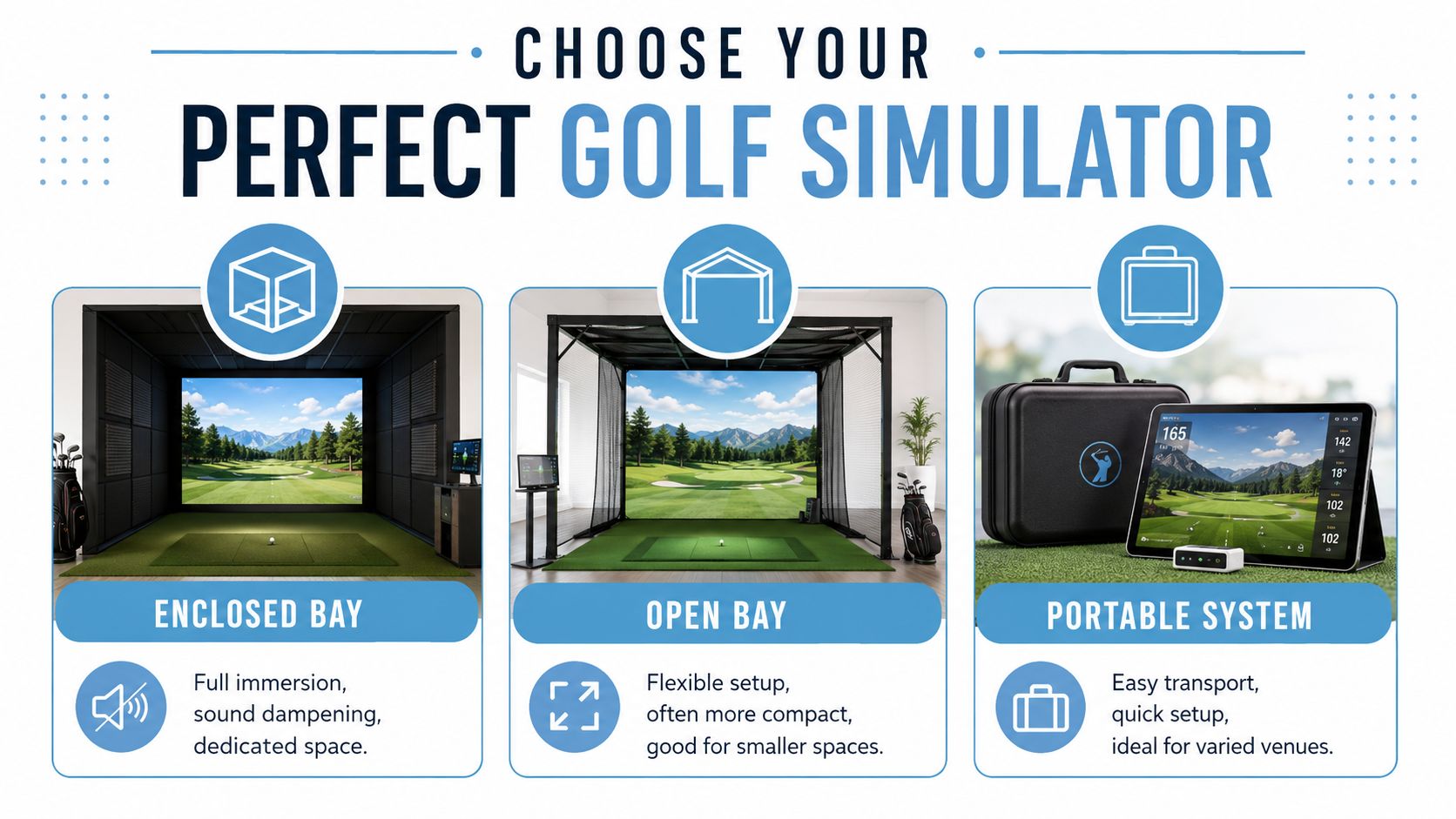
Enclosed bay versus open bay
An enclosed bay creates immersion. It looks more premium, contains the visual environment better and often feels more substantial for hospitality spaces or private event areas. It also gives the guest more confidence because the strike zone is clearly defined.
The trade-off is footprint. Enclosed builds usually need more room around them, more careful load-in planning and more commitment from the floorplan.
An open bay is often better for exhibitions. It invites spectators, allows staff to speak with people at the edge of the activation and can be easier to integrate into an open stand design. It generally feels less intimidating for passers-by.
What it doesn't give you is privacy or the same sense of immersion. In a noisy hall, that matters.
Portable systems and compact builds
Portable formats are useful when the venue is awkward, the event moves between sites, or the simulator has to fit around an existing room layout rather than dominate it.
They're also useful if your event team needs speed. Faster builds and more flexible positioning can solve problems that a larger rig can't.
A practical comparison looks like this:
| Simulator type | Best fit | Main advantage | Main trade-off |
|---|---|---|---|
| Enclosed bay | Hospitality, premium client events, dedicated activation zones | Strong visual impact and immersion | Needs more space and planning |
| Open bay | Exhibition stands, conference breakout areas, high-visibility spaces | Better spectator flow and easier conversation | Less contained feel |
| Portable system | Multi-site roadshows, awkward rooms, compact installs | Flexible setup and easier logistics | Lower visual presence |
Premium analytics versus easy-play formats
The technology question often gets overcomplicated. Most guests don't care what sits behind the screen. They care whether the experience feels smooth, fair and easy to join.
That said, the launch-monitor type changes the experience:
- Premium radar-led systems suit golfer-heavy audiences, sponsor activations and events where data quality matters
- Simpler play-focused systems suit mixed audiences, casual engagement and events where speed is more important than technical depth
If your guest list includes serious golfers, detailed shot data can add credibility. If it's a broad corporate crowd, too much data can slow things down.
Ask yourself whether the audience wants to analyse their swing or just enjoy taking it. That answer usually decides the tech tier.
What should be in the package
The best way to compare quotes is to ignore the headline price first and look at what's included. A cheaper package can become expensive quickly if key operational pieces are missing.
Check for these items in any golf simulator for hire proposal:
- On-site staffing so someone is managing guest flow, safety and basic coaching
- Delivery and installation with timings that fit your venue schedule
- Branding options including screen graphics, leaderboards or physical wraps
- Clubs and accessories suitable for mixed users
- Health and safety documentation requested by venues or production teams
- Breakdown and removal that won't clash with event close
If you're comparing suppliers or formats, it helps to review a specialist simulator hire service that shows how different packages are structured across event types. The key is matching the package to the brief, not defaulting to the largest setup available.
Mastering Venue Logistics and Technical Requirements
Many bookings fail, not because the simulator isn't attractive, but because someone assumed any open space would do.
That assumption causes trouble in UK venues all the time. Around 60% of central London exhibition spaces have height restrictions under 3.5m, which creates a real obstacle for standard simulator rigging, as noted in this guidance on hiring golf simulators for UK venues. If your venue has a low ceiling, the first question isn't “can we make it work?” It's “what verified compact option is available, and what swing format does it support?”
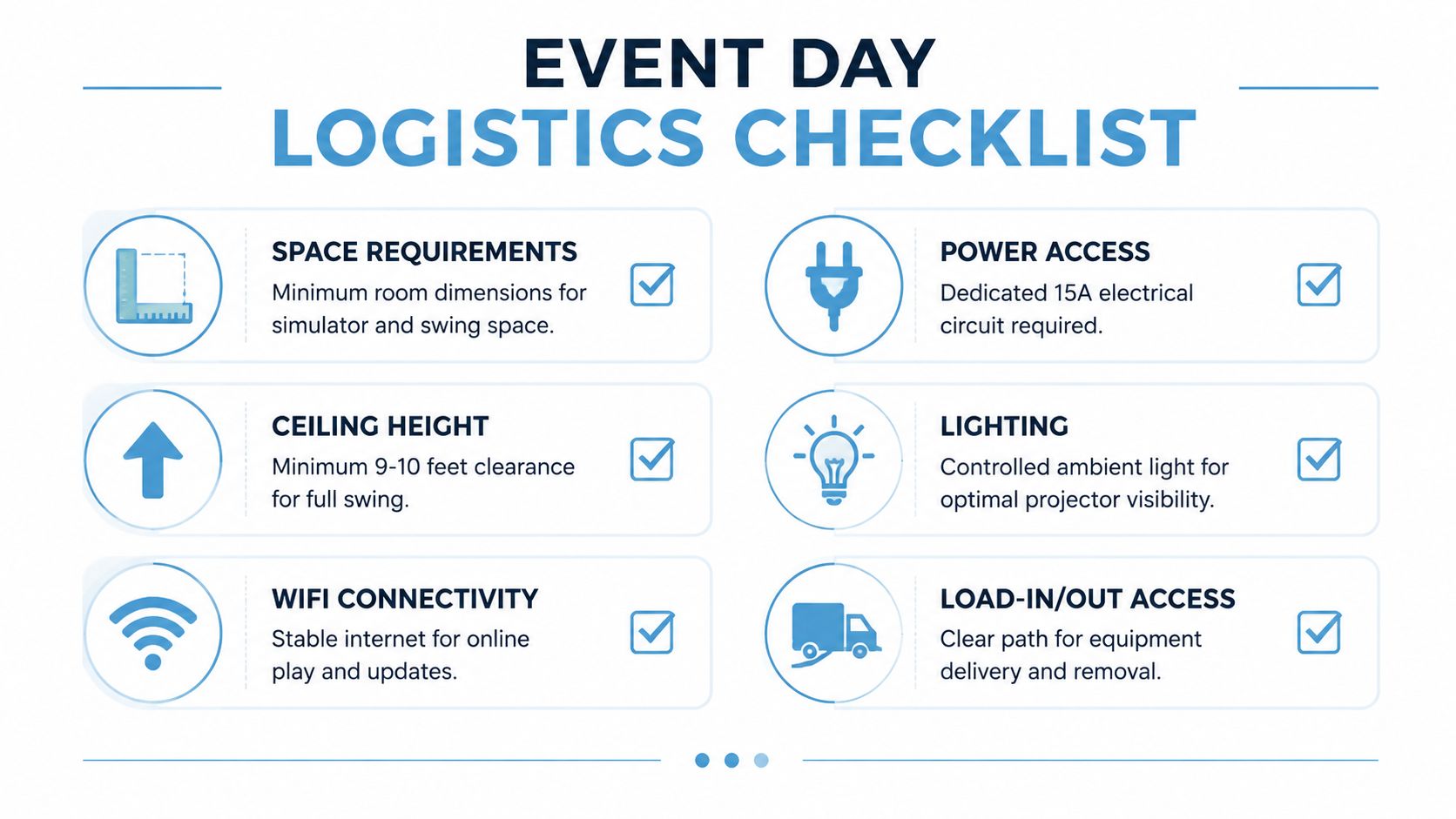
Ceiling height is the first gate
Planners often focus on floor space because that's what appears on venue plans. Ceiling height matters just as much. A room can look spacious on paper and still be unusable if guests can't swing freely and safely.
Historic halls, hotel meeting rooms and city-centre exhibition spaces are frequent problem venues because beams, lighting trusses, chandeliers and soffits reduce usable height even when the published room spec sounds acceptable.
Ask for verified clearance data from the supplier, not assumptions. If the supplier offers a low-profile or compact format, ask what type of swing it supports and whether guest experience changes as a result.
The practical site survey questions
A proper site survey doesn't need to be complicated, but it does need to be specific. If your supplier doesn't ask detailed questions, push for them.
Use this checklist with both the venue and the supplier:
- What is the true usable ceiling height? Ask for the lowest point in the activation area, not the headline room height.
- Where are the power points? You need to know location, not just availability.
- How does load-in work? Lifts, corridors, ramps and door widths can all become bottlenecks.
- What lighting can be controlled? Bright ambient light can affect screen visibility.
- What's directly behind or beside the activation? Queues and swing zones need separation from public walkways.
- Who signs off risk assessments? Venues differ on timing and paperwork expectations.
Power, AV and connectivity
Many simulator issues are really AV issues in disguise. Projection, screens, control systems and any digital leaderboard all rely on clean integration with the surrounding event setup.
If the simulator sits inside a larger stand build or conference production, your AV team and simulator supplier should speak directly before event day. That becomes even more important when power drops, lighting states and display content need coordination. Teams handling broader venue technology projects often think in a similar way, which is why guidance on AV integration for UK office relocations can be surprisingly relevant to event planners dealing with system compatibility, cable routes and infrastructure constraints.
Site note: A simulator that technically fits but disrupts power, lighting or visitor flow is not a successful fit.
Don't ignore the swing arc and crowd edge
A golf simulator isn't just a screen and mat. It needs a safe participant zone and a spectator edge that doesn't interfere with the swing path.
That's where rough sketches often fail. The bay might fit, but once you add a host, a queue, club storage, side barriers and a small viewing area, the footprint grows. In exhibition halls, that can start eating into neighbouring stand space or access aisles.
If your room is tight, compact configurations may solve the issue, but only if that's established early. For planners working across multiple simulator types, a technical checklist such as these flight simulator requirements is a useful reminder that interactive attractions always need more real-world operating space than a simple floorplan suggests.
What works in awkward venues
A non-standard venue can still work if the format is adapted early. Lower-profile rigs, more open hitting zones, shorter clubs for novice formats, and tighter queue management can all help.
What doesn't work is forcing a standard setup into a compromised room and hoping guests adjust. They won't. They'll either feel unsafe, or they'll avoid the experience entirely.
Budgeting Branding and Maximising Event ROI
A planner signs off £8,000 for stand space, graphics and staffing, then hesitates over the simulator because it looks like an optional extra. In practice, the simulator is often the part that gives the stand a measurable return. If it keeps prospects at the stand longer and gives your team a reason to start and continue conversations, it supports the numbers that justify the wider event spend.
There is a commercial case for this format when the objective is defined properly. Interactive sports attractions can increase attendee dwell time by 40% and lead capture by 25% at UK trade shows, according to golf simulator hire guidance for B2B activations. Those are useful metrics for corporate planners because dwell time and lead volume are already familiar to sales and marketing stakeholders.
Start with the cost per outcome
A headline hire fee is only part of the decision. What matters is what the package helps you achieve, and what it includes operationally.
Venue pricing gives a rough reference point. Public bay hire in the UK often sits around £30 to £40 per hour off-peak, with higher rates in major cities, as outlined in this GolfBays guide to golf simulator venue economics. That is useful context, but event pricing works differently. A corporate package may include delivery, crew, setup, derig, insurance paperwork, branded assets, host staffing, software setup and lead-capture support. Two quotes can look close on paper and still deliver very different value on site.
I advise planners to calculate three numbers before they book:
- Cost per meaningful conversation
- Cost per qualified lead
- Cost per minute of stand dwell time
That changes the discussion quickly. A simulator that produces 80 strong conversations can be easier to defend than a cheaper attraction that creates noise but no follow-up value.
Where the return usually shows up
The strongest ROI usually comes from five practical areas:
- Longer engagement time because guests stay for their shot, watch scores and compare results
- Better sales access because your team gets a natural window to ask qualifying questions
- Clearer branding exposure through screens, challenge naming, bay panels and prize messaging
- Cleaner lead capture when entry mechanics collect contact details before play
- More usable content because guests film their swings, leaderboard moments and prize wins
The trade-off is straightforward. If the activation is treated as entertainment only, the return is hard to prove. If it is built around lead capture, hosted conversation and branded competition mechanics, it becomes easier to defend in a budget review.
A simulator earns its place in the budget when it is tied to a metric the business already tracks.
Ask suppliers questions that affect margin, not just setup
A supplier quote should answer more than availability and hire duration. It should show how the activation will perform commercially.
| Category | Question to Ask |
|---|---|
| Format | Is the experience configured for lead generation, VIP hospitality, or general footfall? |
| Throughput | How many participants can realistically play per hour in this format? |
| Branding | What is included on-screen, on the bay, and around the competition entry point? |
| Staffing | Is a host included, and can they manage queue flow and participant briefing? |
| Data capture | Can guests register before play, and how is that data exported after the event? |
| Reporting | What event data will we receive afterwards? Participant count, entries, top scores? |
| Build schedule | How long do install and breakdown take, and are venue waiting charges extra? |
| Contingency | What happens if access times change or the venue asks for a layout revision? |
Throughput matters more than planners often expect. A polished setup that only gets a small number of people through the bay can still work for VIP hospitality, but it may underperform at a busy exhibition where lead volume is the target.
Branding should help the stand work harder
Branding is not just decoration. Good branding tells people what the challenge is, what they can win, where to register and what your company wants them to remember afterwards.
That can be as simple as a nearest-the-pin competition with a branded leaderboard and prize prompt. It can also include practical merchandise that supports the activation rather than cluttering it. For team challenges or prize bundles, branded caps are an easy fit, and you can find event hats from Dirt Cheap Headwear if you need giveaway stock that people will wear.
Build the approval case around commercial logic
Internal sign-off usually gets easier when the simulator is framed as part of the event strategy, not a line item for amusement.
A strong approval note covers four points clearly:
- What the activation needs to achieve
- Which metrics will be tracked on the day
- How branding, staffing and data capture support that goal
- What the follow-up process is after the event
At PSW Events, that is usually where the conversation becomes productive. Finance teams do not need convincing that guests enjoy golf. They need a credible case for why this format will hold attention, create sales conversations and return better value than another passive stand feature.
Ensuring a Flawless Execution and Post-Event Success
A well-bought simulator can still underperform if event-day delivery is loose. The final stretch is about control. Clear timings, clear staff roles and clear post-event ownership.
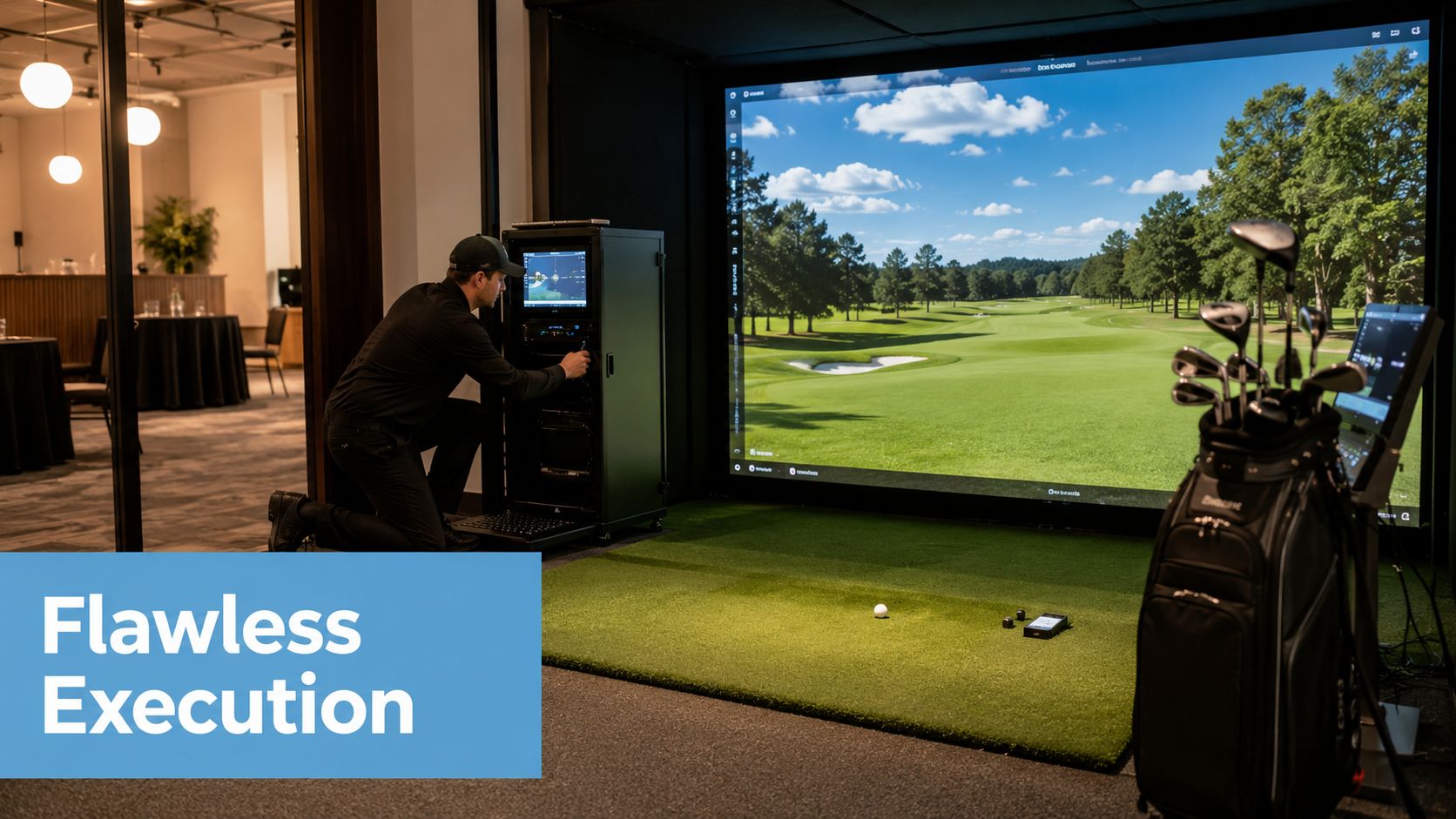
Brief the on-site team properly
Your event staff need more than the schedule. They need to know the purpose of the activation. Are they driving registrations, hosting VIPs, moving a queue quickly, or encouraging relaxed participation?
The best on-site hosts do three things well. They make the simulator feel approachable, they keep guests flowing without rush, and they know when to hand a conversation over to your sales or account team.
If you're evaluating a provider, ask whether staffing is part of the package or an optional extra. For corporate bookings, the value rises sharply when the experience includes lead capture and branding support rather than just basic bay access. That's one reason venue-style rates of £30 to £40 per hour off-peak don't tell the full story for event use, as noted in the earlier golf sim venue business model deep dive.
Keep the event-day checklist short and strict
Use a simple run sheet covering:
- Access and setup timing with named venue contacts
- Final bay position marked on the floorplan
- Power and connectivity checks before guests arrive
- Club management and safety brief for hosts
- Lead capture process tested with real entries
- Prize or leaderboard rules confirmed in writing
One supplier option in this space is PSW Events, which provides simulator hire with planning, installation, staffing and H&S support for corporate events. That kind of end-to-end scope can be useful when the activation sits inside a larger show build and you don't want multiple contractors arguing over ownership.
Don't waste the follow-up
The event isn't finished when the last guest swings. If the activation was meant to generate leads or deepen relationships, the handover after breakdown matters as much as the setup.
After the event: Review who played, who qualified as a real prospect, what conversations started, and what action your team takes next.
A short post-event review should cover participation quality, not just volume. Which guests stayed longest? Which conversations turned into meaningful opportunities? Which branded elements got noticed? That's the information that strengthens the next event brief.
A golf simulator for hire is easy to book. Making it commercially useful takes better planning than most guides admit. When goals, format, logistics and follow-up line up, it stops being a crowd-pleaser and starts acting like a proper event asset.
If you're planning a corporate event and need to test whether a golf simulator will fit the venue, support lead capture or suit your audience, start with the brief and the floorplan before you compare packages. That's where the smart decisions happen.