
The popular advice is simple: choose the simulator with the most movement, the biggest cockpit and the loudest brochure. For UK events, that advice is wrong. A full motion flight simulator succeeds when it attracts the right guests, keeps them comfortable, moves people through efficiently and gives your team something useful to measure afterwards.
That changes the buying decision. You're not commissioning a training device for professional pilots. You're designing a public experience for people with different ages, confidence levels and tolerance for motion. Controlled immersion beats maximum intensity when the commercial objective is engagement rather than technical spectacle.
Why More Motion Does Not Always Mean Better Events
A powerful motion platform can look impressive during a supplier demonstration, but a trade show floor isn't a private test session. Guests arrive tired, distracted and often unfamiliar with simulators. Some will want to take control immediately. Others will be interested but wary of nausea, confined spaces or looking inexperienced in front of colleagues.
Simulator sickness research and user discussions indicate that exposure conditions can materially affect comfort and tolerance, as highlighted by this discussion of motion sickness among pilots and simulator users. For an event planner, the practical implication is clear. If an aggressive profile makes people leave the queue, the extra movement has reduced your activation's value.
Practical rule: Set motion intensity around the least confident likely participant, not the most enthusiastic aviation fan.
Optimise the experience, not the specification sheet
The useful measures are operational:
- Throughput: How many suitable guests can participate during the live window?
- Dwell time: Do visitors stay long enough to understand the brand or message?
- Completion rate: Do participants finish the experience comfortably?
- Lead quality: Can the activation create a meaningful conversation or permission-based follow-up?
- Audience spread: Does the attraction work for more than one narrow demographic?
A controlled take-off, bank and landing sequence may outperform a dramatic turbulence setting because guests can follow the story of the flight. A clear briefing, an easy first control input and a calm recovery period often do more for satisfaction than adding another physical effect.
This is especially important for mixed corporate audiences. A simulator can be a strong draw for aviation enthusiasts, but the primary value comes from making the experience accessible to people who didn't arrive intending to fly. Moderated motion, shorter turns and an operator who explains what's happening can broaden participation.
Design for queue behaviour
Queue abandonment usually starts before the guest enters the cockpit. If people can't see how long a session takes, whether the experience is suitable for them or what happens after landing, they'll move on to another stand.
Use visible session information, a host outside the simulator and a simple opt-out route. Avoid pressuring guests who report discomfort. Keep water, seating and open space nearby, and brief staff to recognise when someone needs a pause rather than another attempt.
The UK market's scale confirms commercial interest, but it doesn't answer the event ROI question. MarketsandMarkets projects the UK simulator market to rise from $640.7 million in 2025 to $985.4 million by 2030, with a projected 9.0% CAGR (MarketsandMarkets UK simulator market data). That growth supports the category, not every individual activation. Your brief still needs to prove that the chosen motion profile will keep people participating.
How Full Motion Flight Simulators Work
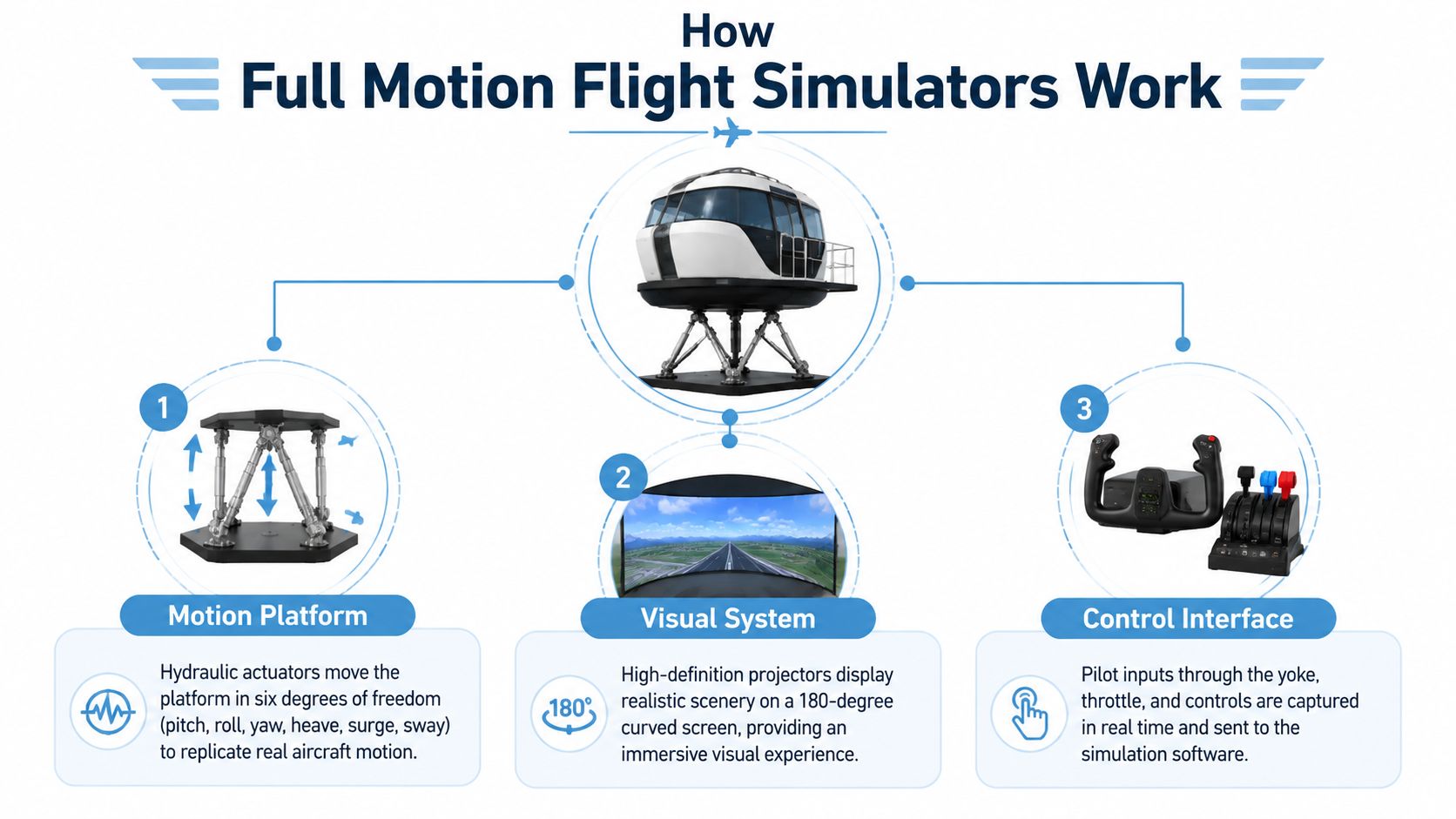
A full motion simulator combines three coordinated systems: a motion platform, a visual system and responsive controls. The platform creates physical cues, the visual system shows the aircraft's environment, and the controls let the participant influence the flight. Software synchronises each response so movement, imagery and aircraft behaviour remain consistent.
The motion platform
Serious systems commonly use six degrees of freedom, covering pitch, roll, yaw, heave, surge and sway. A UK university installation reported a six-degree-of-freedom motion simulator reproducing physical sensations across all six axes, including acceleration and orientation cues (CAA guidance and UK FSTD list).
The cockpit does not travel continuously like an aircraft. Its platform has limited movement and relies on onset cues. A brief movement as acceleration begins, or a carefully timed tilt during a bank, tells the body what the aircraft is doing. The system then resets discreetly while the visual scene continues.
For events, tuning matters more than maximum movement. Poor cueing feels random and increases the chance of discomfort. Well-tuned motion reinforces what the guest sees and does, giving the operator a clearer way to manage short turns and mixed audiences.
Visuals and controls
The visual system supplies the outside world, including the runway, horizon, terrain and weather. Suppliers may use enclosed displays, projection systems or wide fields of view. Ask to see the exact configuration from the seated position. A brochure claim about “immersive visuals” says little about what guests will experience.
The controls provide the participant's route into the flight. A yoke and throttle suit an aeroplane scenario, while cyclic and collective controls support a helicopter brief. Control loading can add resistance and response, but event planners should prioritise intuitive operation over a technically complex cockpit that needs a long tutorial.
Connectivity also belongs in the technical brief if the simulator uses online content, remote monitoring or digital lead capture. Event teams reviewing mobile resilience can use this Fleetalyse blog on SIM cards when planning connectivity for the venue.
Fixed base, aeroplane and helicopter formats
A fixed-base simulator keeps the cockpit stationary and relies on visuals, sound and controls. It suits venues where floor loading, power, access or audience comfort make motion impractical. A full motion configuration adds physical cueing, but it also increases installation complexity and the need for clear sickness-management procedures.
Aeroplane simulators usually support a structured journey, such as taxi, take-off, flight and landing. Helicopter simulators create a different rhythm, with hovering and manoeuvring that can suit short, high-energy turns. Choose the aircraft around the event story and expected throughput, not the most recognisable cockpit.
Measurable Benefits for Corporate Events and Brand Activations
A full motion flight simulator should earn its floor space through behaviour you can observe and record. The attraction must do more than create a crowd. It should help people stop, participate, talk about the brand and give your team a credible next action.
Footfall is only the first signal
Movement, sound and a cockpit silhouette naturally create curiosity on an exhibition floor. That visual pull can help a stand compete with neighbouring displays, but footfall alone isn't a result. A crowd that watches for a few seconds and leaves has limited value unless the activation is designed to convert attention into participation or conversation.
Place the simulator where it can be seen without blocking the stand's main access. Use a host to connect the flight challenge to the brand proposition. For example, an engineering business might frame the experience around precision and decision-making, while a travel brand might use destination selection and visual storytelling.
The UK simulator market is forecast to reach $985.4 million by 2030, up from $640.7 million in 2025, according to MarketsandMarkets' UK market forecast. That indicates demand for simulation technology, but your event report still needs its own measures.
Dwell time and lead capture
The experience gives staff a natural reason to start a conversation. A participant can share what they attempted, compare scores with colleagues or discuss the destination and scenario. Those moments are more useful than a generic badge scan because the interaction has context.
Build capture into the flow, without making it feel like a form before the reward. Possible mechanisms include:
- Pre-flight registration: Collect only the information needed to manage turns and consent.
- Post-flight follow-up: Offer a result, image or digital certificate in exchange for permission to contact the participant.
- Leaderboard entry: Use a branded score screen to create repeat visits and friendly competition.
- Staff handover: Move the guest directly from the cockpit to a representative who can continue the conversation.
For a wider framework on connecting interactive experiences to commercial outcomes, see PSW Events' guidance on experiential marketing ROI.
Brand association needs consistency
A simulator can position a company as a leader in technology, but only if the branding appears throughout the journey. Apply the identity to the cockpit exterior where permitted, the welcome screen, scenario selection, score display and follow-up asset. A generic aircraft with a logo stuck on the side feels like hired entertainment. A coherent experience feels commissioned.
Team-building works particularly well when the operator gives one person control and another person a navigation, observation or scoring role. Private celebrations need a lighter touch. Guests should be able to watch, laugh and participate without needing aviation knowledge.
Measure what matters to the brief: qualified conversations, completed sessions, opt-ins, repeat attempts, content interactions and post-event enquiries. Don't report “buzz” as a substitute for evidence.
Venue Space Power and Logistics Requirements
The simulator's footprint is only one part of the venue decision. You need room for the equipment, the safety perimeter, the queue, the operator and the guests who are waiting or recovering after a session.
Start with the venue's technical manager, not the sales brochure. Ask for written confirmation of floor loading, power availability, ceiling clearance, loading access and permitted operating hours. Requirements vary by system, so your supplier must validate the final specification before you sign off the floor plan.
Check the site before booking
Use a site survey or a detailed venue pack to confirm:
- Floor capacity: Establish whether the floor can support the platform and guest loads, particularly in older buildings or temporary structures.
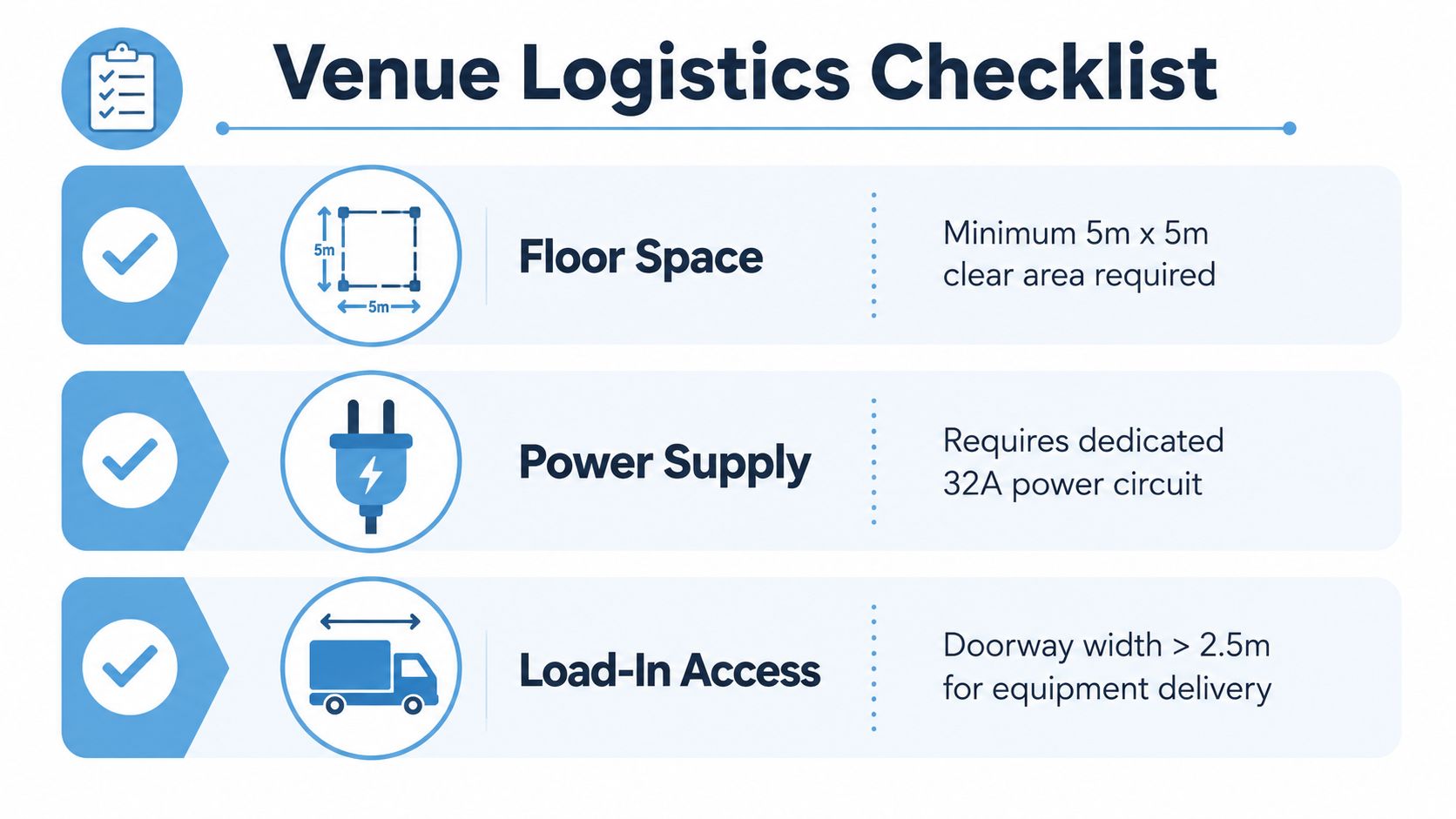
- Clear operating zone: Allow space around moving components, barriers, staff and queue movement. The supplied infographic specifies a minimum 5m x 5m clear area, but treat that as a planning reference to verify with the chosen supplier, not a universal rule.
- Ceiling clearance: Check the highest operating position, lighting rigs, sprinkler heads and suspended signage.
- Power provision: The supplied planning reference identifies a dedicated 32A power circuit, while the technical requirement for your specific simulator may differ. Confirm the circuit type, location, testing and cable route.
- Load-in route: Measure doors, corridors, lifts and ramps. The supplied checklist uses doorway width greater than 2.5m as a reference for equipment delivery, but the supplier should confirm the packed dimensions.
- Noise and neighbours: Find out whether movement, fans, sound effects or announcements could disrupt a conference programme.
Plan the human flow
A comfortable activation needs a clear entrance and exit. Keep the queue away from the simulator's moving envelope, and avoid forcing participants to cross behind the equipment. Provide seating where practical, especially for conferences with long programme days or public events with children and older guests.
Accessibility needs to be addressed during design, not on the event morning. Ask how guests transfer into the cockpit, whether alternative controls or assisted access are available, and whether the experience can be adapted for people who can't tolerate movement or confined seating. If the answer is “everyone can use it” without an operating plan, keep asking questions.
Build installation into the schedule
Delivery, assembly, testing, calibration and operator briefing all take time. Breakdown has its own risks, particularly when the event closes late and the venue imposes a fixed collection window. Include a technical rehearsal before doors open, and keep the public away until the supplier has signed off the system.
PSW Events' flight simulator requirements guide can help structure the early venue conversation. Use it alongside the supplier's method statement, risk assessment and final equipment dimensions.
Choosing the Right Simulator for Your Event Brief
The right simulator depends on the audience, the venue and the job the attraction must perform. A helicopter can create quick visual drama, while an aeroplane cockpit may support a more considered scenario. Full motion adds immersion, but fixed base can be the better operational decision when space, power or comfort dominates the brief.
| Event Type | Recommended Simulator | Session Length | Throughput Priority |
|---|---|---|---|
| Trade show | Compact motion aeroplane or helicopter experience | Short, repeatable turns | High |
| Conference | Aeroplane simulator with guided challenge | Moderate, scheduled turns | Medium |
| Product launch | Branded motion simulator with custom scenario | Short to moderate | Medium to high |
| Team-building day | Aeroplane or helicopter with scoring format | Structured team rotations | Balanced |
| Private party | Accessible motion or fixed-base option | Flexible guest-led turns | Comfort first |
Match motion to audience
For a trade show, minimise briefing time and make the result easy to understand. A short helicopter manoeuvre or aeroplane landing challenge can generate repeat attempts without creating a long queue. At a conference, you can give participants more guidance and link the challenge to a workshop or leadership theme.
Product launches justify more customisation. Brand the outer shell, screens, leaderboard and scenario, then make sure the flight task reinforces the product message. Don't spend the budget on a wrap if the audience can't see it from the aisle.
Team-building requires a format that gives non-pilots a role. A captain can fly, another participant can handle directions, and a third can track performance or make decisions. That creates collaboration instead of a silent turn-taking exercise.
Fixed base remains a valid choice
Choose fixed base when the venue is tight, the event needs rapid throughput or your audience includes many people likely to be uncomfortable with motion. The experience can still deliver strong visual engagement and a clear brand narrative. Motion is an advantage only when the production can operate it safely and comfortably.
A useful event memory system can support post-session sharing and content collection. EventUploader's event memory hub is relevant when you want the activation to continue beyond the physical cockpit.
Before booking, ask the supplier to state plainly:
- What physically moves?
- Which controls does the guest operate?
- What is the recommended session format?
- How is motion adjusted for novice participants?
- What staffing and access conditions apply?
Real Event Scenarios and Case Study Examples
The strongest event plans treat the simulator as part of the programme, not a self-contained object dropped onto a floor. The following scenarios are planning examples, not measured case studies. They show how different briefs change the production choices.
Trade show activation
A technology supplier wants to attract decision-makers without creating an impenetrable stand. The team positions a motion simulator at the visible edge, uses a host to invite people into a short landing challenge and displays the current score outside the cockpit.
The host asks one qualifying question before the flight, then passes the participant to a representative after the result. The simulator operator keeps the movement controlled and the briefing concise. Staff record completed sessions, meaningful conversations and permission for follow-up, rather than counting every person who glanced at the screen.
Corporate conference
A conference organiser schedules flight challenges between plenary sessions. Small groups rotate through the experience, with one person flying and others handling route decisions or observing the result. The operator moderates motion because participants have different levels of confidence and some are moving directly between other activities.
The timetable matters more than spectacle. A late-running session can disrupt the entire programme, so the producer uses fixed slots, a visible waiting area and a clear cut-off for new participants.
Product launch
A brand wants the cockpit to feel like part of the campaign rather than a hired attraction. The supplier applies approved graphics, creates a branded flight route and links the result screen to a controlled content journey. The activation team checks that the custom work doesn't obstruct access, ventilation or safety markings.
The leaderboard encourages repeat visits, but staff still need to guide the conversation towards the product. A score is a hook, not a marketing strategy.
Private celebration
A family event includes adults, teenagers and younger guests. The operator offers an explanation before entry, lets participants choose a gentler experience and provides a nearby recovery area. Guests who don't want to fly can watch the screens and take part in the social competition.
That flexibility protects the atmosphere. A motion simulator should add to a celebration, not become the activity everyone avoids after the first uncomfortable turn.
Pricing Models Costs and Booking Tips
Suppliers generally quote full motion flight simulators in one of two ways: a day rate for a defined event period, or a managed package covering delivery and operation. A multi-day hire may suit exhibitions or touring activations, while a single-day booking can be simpler for a conference or private celebration.
Dry hire can look cheaper, but it shifts responsibility to your team. You may need to arrange transport, installation, technical supervision, branding, barriers, risk documentation and collection. A staffed package usually costs more because it includes people who operate the system, manage guests and respond to technical or comfort issues.
What changes the quote
The biggest variables are practical:
- Venue location: Travel distance, accommodation and access windows affect delivery planning.
- Installation complexity: Difficult loading routes, stairs, restricted lifts or tight rigging windows increase labour.
- Hire duration: Longer bookings may require additional operating plans, servicing or overnight security.
- Customisation: Cockpit wraps, branded screens, bespoke scenarios and leaderboard integration add design and production work.
- Staffing: A high-throughput activation needs hosts, operators and a clear queue-management arrangement.
Use PSW Events' equipment rental rates guide to frame the wider equipment conversation, then request a simulator quote against the same scope.
Brief suppliers properly
Send the event date, venue, postcode, access times, audience type, expected operating window, available floor plan, power information and branding requirements. State whether you need a turnkey service or already have production staff. Ask for exclusions, cancellation terms, insurance documentation, risk assessments and the exact equipment configuration.
Book early for busy exhibition and conference periods. Availability, transport and venue approvals all need to align, and last-minute substitutions can change the experience you intended to deliver.
PSW Events provides mobile motion and flight simulator hire with planning, branding, logistics, installation, on-site staffing and health and safety support. If you're ready to test the brief against a real venue, visit PSW Events and discuss the audience, access conditions and engagement target before choosing the simulator.