
The booking is confirmed, the venue plan is nearly signed off, and the marketing team has promised an experience that will stop delegates in their tracks. Then someone asks the practical questions: will the rig fit through the loading doors, can the floor take the motion system, what happens if the emergency stop is pressed, and can a wheelchair user take part without being treated as an afterthought?
A reliable flight simulator setup is more than a cockpit, a screen and a game build. At UK exhibitions, conferences and brand activations, the result depends on disciplined site planning, controlled commissioning, safe operation, accessible design and evidence that the installation performed as agreed. The most impressive visual system can still fail if the queue blocks an exit, the display loses alignment or the operator can't explain the motion controls.
Defining Site Requirements and Fidelity Standards
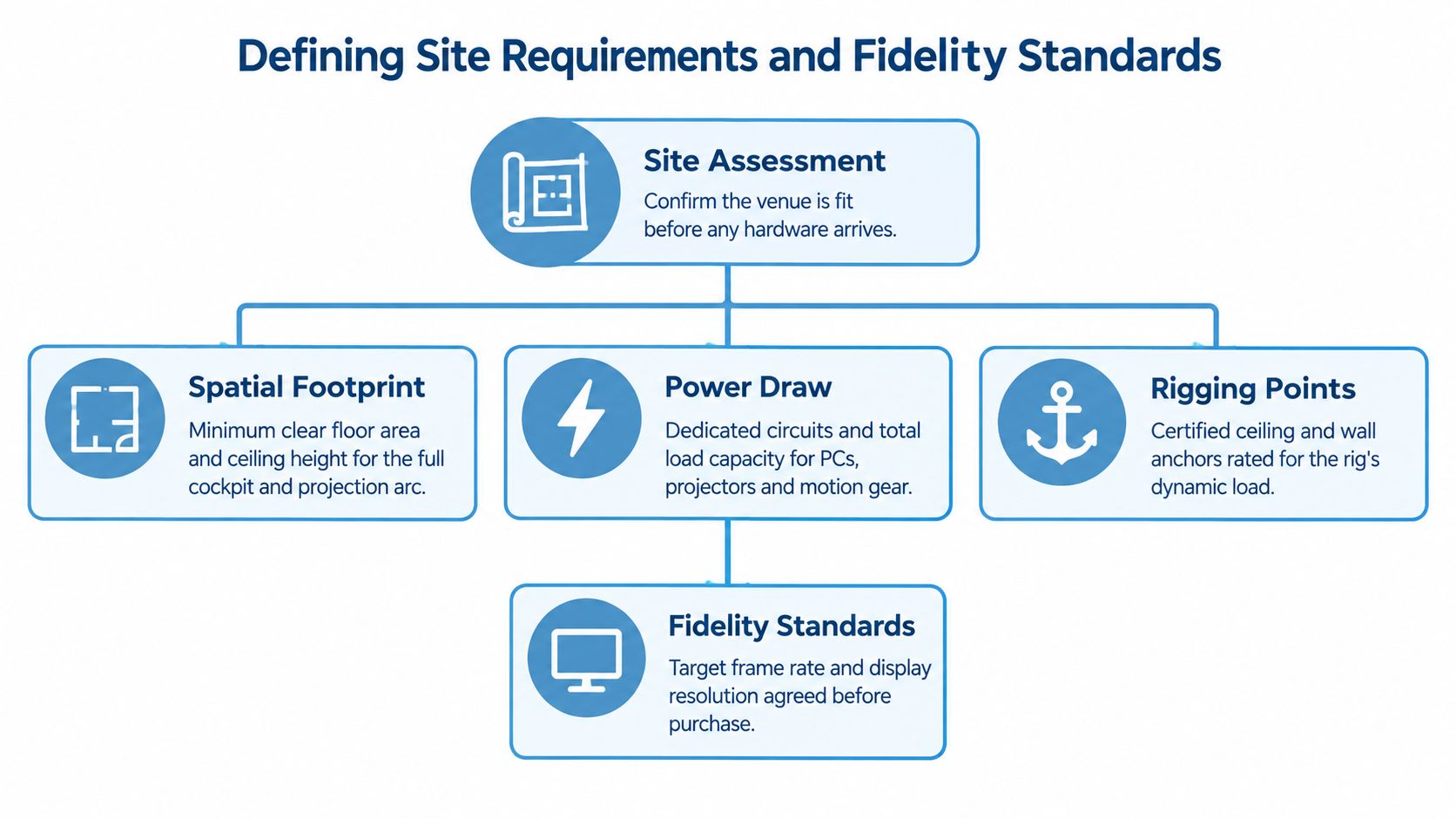
The venue survey should happen before equipment is booked. Ask for the loading route, door dimensions, lift capacity, floor construction, ceiling height, power distribution, network restrictions, fire routes and any venue rules covering suspended equipment. A static VR cockpit may have a modest physical footprint, while a motion or helicopter rig needs a defined movement envelope around the seat, controls and display.
Draw the simulator on the venue plan at its largest operating position, not its parked position. Include the operator station, queue, accessible approach route, emergency access and space for a guest to transfer from a wheelchair if the design allows transfers. A tidy footprint on paper can become a pinch point once cases, branding, cable ramps and a live queue are added.
Match the system to the experience
UK civil aviation rules distinguish several types of flight simulation training device, including full flight simulators, flight training devices, and basic instrument training devices, meaning a commercially branded simulator is not automatically an aviation-training-qualified device. The CAA material on flight simulation training device categories is useful even when the attraction isn't being used for approved pilot training.
That distinction prevents a common procurement mistake. A corporate activation doesn't need to pretend to be a certified training device, but its specification should still state what the guest will feel and control. Define the aircraft configuration, control response, visual field, cockpit layout, scenario length and whether motion is essential or merely desirable.
A practical specification might compare:
- Static cockpit: strong physical presence, straightforward access and lower mechanical complexity, but less physical feedback.
- VR configuration: flexible visuals and a smaller display requirement, although headset hygiene, tracking and sensory comfort need active management.
- Motion cockpit: compelling acceleration cues and a premium feel, with greater demands on floor control, restraint procedures, maintenance and supervision.
- Projection or multi-screen system: shared viewing and strong brand visibility, but more demanding alignment, ambient-light control and calibration.
Electrical planning needs the same discipline. List the simulator computer, secondary PCs, displays or projectors, motion equipment, ventilation, charging equipment and lighting. Ask the venue for confirmed circuit capacity rather than assuming a nearby socket is suitable. Separate sensitive computing equipment from high-demand motion equipment where possible, label every connection and keep spare capacity for safe operation rather than designing to the breaker limit.
For a practical UK specification template, the flight simulator requirements guide can sit alongside the venue technical pack. It should support the conversation, not replace a site survey or the supplier's engineering documentation.
Executing the Hardware Build and Software Calibration
A manufacturer specification describes what a system can do in controlled conditions. It doesn't prove that the equipment is correctly assembled, safely connected or ready for a public show after transport. Temporary installations change during unloading, reconnection and last-minute branding work, so acceptance has to follow the build.
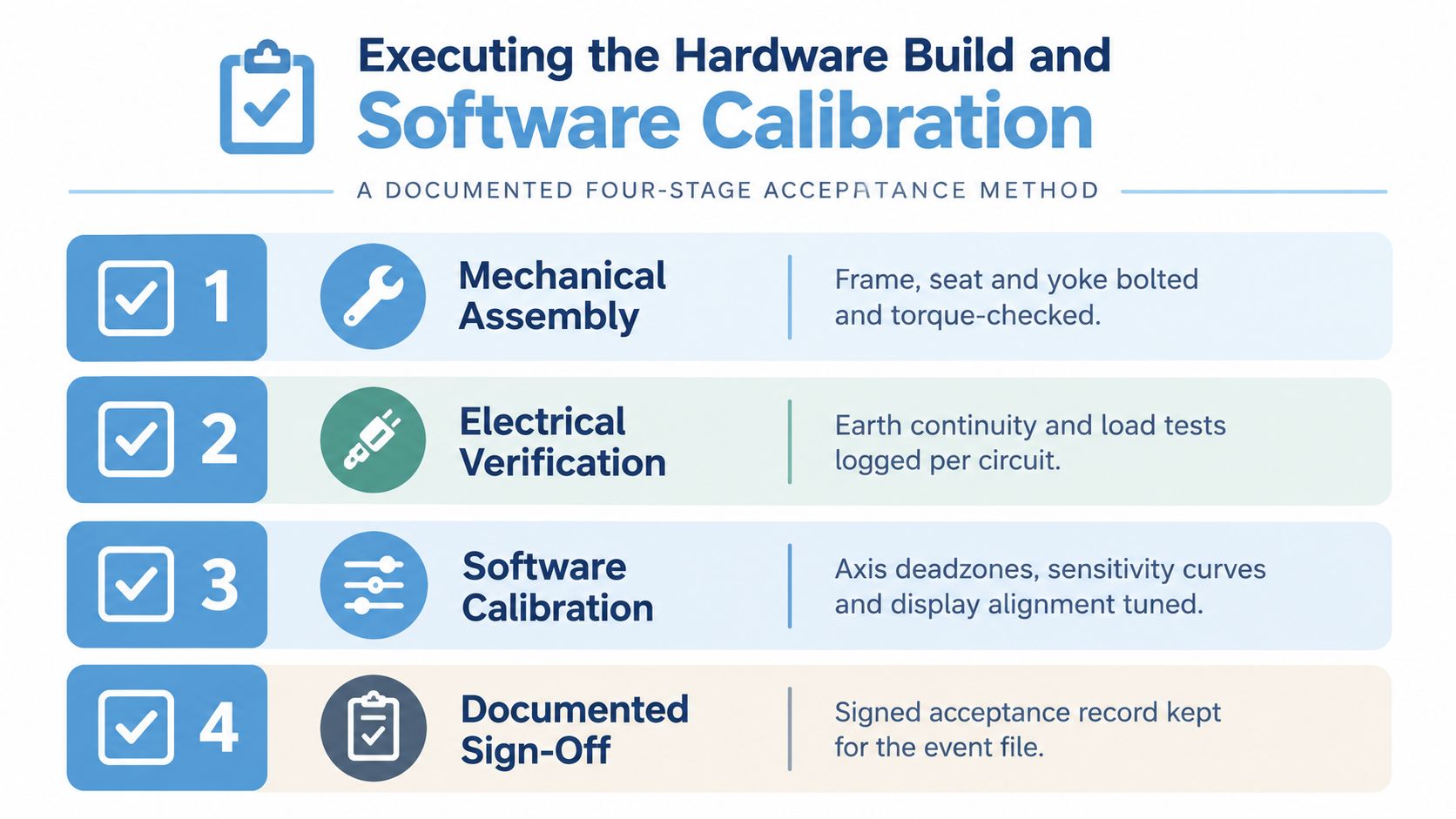
The working method is a documented four-stage process. Define the experience objective and required fidelity first, verify the technical configuration against the intended aircraft or scenario second, control the physical installation and commissioning third, then complete an operational check before guests arrive. This approach reflects the CAA guidance on device qualification and operational approval, while adapting the discipline for an event environment.
Build in a controlled sequence
Start with the frame, seat, control column, pedals and display supports. Tighten and torque-check mechanical fixings according to the supplier's instructions, then inspect the motion envelope with the system unpowered. The operator should be able to reach the emergency stop without leaning across a moving guest or entering an unsafe zone.
Route cables away from entry points and use appropriate cable protection where they cross a floor route. Don't hide joins beneath carpet or branding. Label both ends of each critical cable, photograph the completed routing and record any change from the venue plan.
Electrical verification follows mechanical completion. Check earth continuity, circuit allocation, power-up behaviour, network connections and load performance under operating conditions. A simulator that boots successfully on its own may still fail when the motion base, displays, cooling and operator equipment start together.
Calibrate for the actual show floor
Software calibration should happen after the physical system is stable. Confirm the installed software version, aircraft or helicopter profile, control mapping, axis direction, dead zones, sensitivity curves, display alignment, field of view and motion limits. If a projector has moved or a graphics driver has changed, repeat the relevant checks instead of trusting the previous venue configuration.
The sign-off pack should contain the equipment inventory, serial or asset references where relevant, software version, electrical checks, emergency-stop test, visual and motion calibration record, operator briefing and a timed end-to-end guest trial. Run the complete journey, including briefing, seating, restraint, launch, scenario, reset, exit and cleaning or headset change.
Practical rule: A timed guest trial is more revealing than a quiet technical demonstration. It exposes slow resets, unclear instructions, awkward transfers and operator actions that won't survive a busy exhibition stand.
Keep the signed acceptance record with the event file. Repeat the acceptance check after transport, reconnection, software updates or venue power changes. That record gives the production manager a clear basis for stopping the attraction if a safety-critical or performance-critical item fails.
Integrating Safety Compliance and Accessible Design
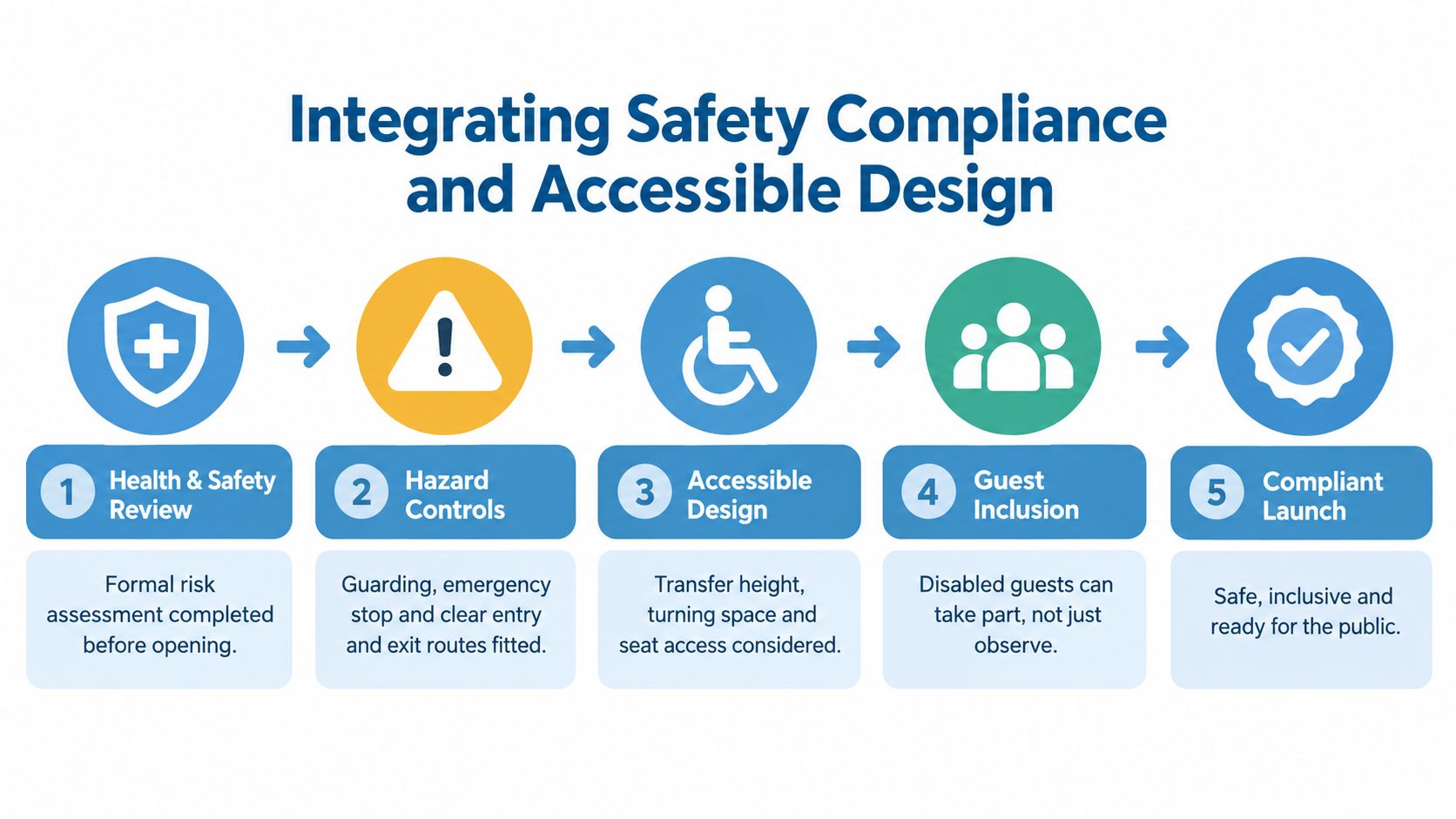
Safety and inclusion need to be designed into the floor plan, not added after the simulator has been built. A rig that passes a visual inspection but leaves no clear exit route is not ready. Nor is an attraction that offers disabled visitors only the role of watching other people fly.
The UK framework provides useful benchmarks for public deployments. Safety features such as emergency stops and emergency lighting are subject to checking and recording in regulated simulator environments, and the organisation operating the device must control installation and preserve its specified performance. An event attraction may sit outside that exact regulatory category, but copying the discipline is sensible.
Build the safety sequence into opening checks
Before public use, isolate supplies during setup, inspect cables and connectors, secure the cockpit and confirm the movement envelope. Test the emergency stop under controlled conditions, record the result and verify how the system resets. For a motion rig, run a no-passenger movement test, followed by a staffed low-risk test using the intended seat, restraint, display and control configuration.
The operator briefing should cover motion enable and disable, restraint checks, guest communication, emergency procedures, safe access and the conditions that require a session to stop. UK simulator guidance also highlights seat belts when motion is selected, safety briefings and a technical log. Those controls translate directly to high-turnover public use.
Accessibility starts with the approach route. Check step-free positioning, turning space, transfer height, seat access and the position of controls. Where a guest can't use pedals, a confined cockpit, a headset or motion, offer an equivalent scenario using accessible controls, a fixed-base mode, an external display or an operator-led experience.
Research indicates that 52% of disabled people struggle to attend live events because of accessibility barriers, as reported by Conference News. The figure is a warning against treating venue-level access as proof that an interactive attraction works for everyone.
Give guests meaningful choices
Provide captioned instructions, clear visual and audio alternatives, adjustable seating where possible and a low-stimulation mode. Reduce unnecessary sound and visual intensity, explain the motion before it starts and let the guest choose whether to continue. Staff should know how to describe the alternatives without making the visitor disclose personal information in front of a queue.
A fair experience doesn't require every guest to use every feature. It requires the team to provide a dignified route to the same sense of participation.
Evaluating Turnkey Hire Versus Outright Purchase
Buying a simulator can make sense for an organisation with regular bookings, secure storage and people who can maintain the system between events. For many agencies and corporate teams, however, ownership creates a second operation involving software licences, transport cases, technical servicing, motion-base maintenance, spares, insurance, storage and staff training.
Turnkey hire shifts those responsibilities to a specialist supplier. You still need to approve the creative experience, venue plan and risk controls, but the supplier can manage delivery, branding, installation, operation and removal as one coordinated service. PSW Events, for example, provides mobile flight and helicopter simulator hire with delivery, setup and event operation, alongside other interactive attractions.
The flight simulator cost guide can help frame the early conversation, but a useful comparison should go beyond the headline hire price.
Hire vs Purchase Decision Matrix
| Factor | Turnkey Hire | Outright Purchase |
|---|---|---|
| Capital commitment | Converts the activation into a planned event cost | Requires investment before revenue or bookings are certain |
| Technical responsibility | Supplier manages setup, calibration and show operation | Internal team owns commissioning, faults and updates |
| Storage | Equipment returns to the supplier after the event | Requires secure, suitable storage and inventory control |
| Software | Supplier manages the agreed event configuration | Owner manages licences, updates and compatibility |
| Motion maintenance | Maintenance sits within the supplier relationship | Owner funds servicing, repairs and replacement parts |
| Branding | Supplier can install and remove event graphics | Owner needs a repeatable method for changing branding |
| Transport | Specialist logistics can include delivery and collection | Owner coordinates cases, vehicles, handling and crew |
| Insurance | Confirm the supplier's cover and scope before booking | Owner arranges appropriate cover and venue evidence |
| Staffing | Operators can run sessions and manage guest flow | Owner must train and roster competent operators |
| Control | Less control over physical availability during busy periods | Greater control over configuration and booking priority |
The right decision depends on event volume, internal technical capability, storage, lead times and how quickly the attraction will become outdated. A purchase isn't automatically cheaper, and a hire isn't automatically less flexible. Price the whole operating model, including the people needed to make the hardware work.
Balancing High Fidelity with Sustainability Goals
A motion rig can impress guests and still be the wrong choice for a particular venue. Maximum motion and visual fidelity bring extra transport, floor-space, power and operating demands. A fixed cockpit or lower-power VR installation may deliver a stronger activation when access, throughput and crew capacity matter more than mechanical movement.
UK clients increasingly include sustainability requirements in requests for proposals. They may cover procurement, venue selection, transport, materials, waste and recycling. Events Industry Alliance reporting supports making measurement part of the event specification, rather than leaving it to post-show communications.
Measure the configuration you actually operate
Create an event-specific record covering:
- Transport: equipment origin, delivery route, vehicle type, return journey and packaging movements.
- Electricity: connected load, operating hours, standby consumption and venue supply arrangements.
- Materials: reusable cases, printed graphics, disposable items and end-of-event waste handling.
- Usage: operating sessions, idle periods, reset time and whether the system can sleep safely between peaks.
- Reporting: the person responsible for collecting readings and producing the post-event summary.
Compare the guest experience, not only the equipment specification. A fixed-base cockpit with a wide display can offer shared visibility and simpler access than a motion rig. VR may reduce display and floor-space demands, but headset cleaning, tracking reliability, sensory comfort and alternative participation still require planning. A lower-power installation that excludes guests or creates long queues weakens the activation.
The most sustainable configuration meets the experience brief without carrying unused capability around the country.
Accessibility and sustainability belong in the same specification. Treat CAA-inspired safety benchmarks, accessible controls and energy use as operational requirements, not separate paperwork. Keep a reliable physical-control alternative where it gives disabled guests a meaningful way to participate, even if the main attraction uses VR or motion. Teams developing wider immersive training programmes can also boost WHS with immersive learning, particularly when the installation supports ongoing learning or safety engagement rather than a single demonstration.
Record the decisions, readings and accessibility provisions in the post-event summary. That evidence gives the client a clearer basis for improving the next activation, while helping the production team avoid transporting capability that guests cannot use.
Troubleshooting Common Show Floor Failures
When a queue is building, the operator needs a short diagnostic path, not a cupboard full of undocumented fixes. Start with the last known change. Configuration drift often follows a projector swap, graphics driver update, Windows update, control remap or cable reconnection.
Keep a technical log beside the operator station. Record the time, symptom, guest impact, action taken, result and whether the issue needs escalation after the session block. UK simulator guidance highlights the value of an equipment log, human-factors controls and an operator-controlled motion enable function for realistic, safe operation during busy use, as set out in the CAA simulator standards material.
Use a fault-first response
- Motion base won't centre: keep guests clear, disable motion, check the emergency-stop state and confirm the system has completed its startup sequence. Don't repeatedly cycle power while someone is seated.
- Controls respond incorrectly: compare the live axis mapping with the approved configuration, check USB connections and reload the known-good profile. Avoid remapping controls in front of a queue unless the change is recorded and tested.
- Displays lose alignment: pause sessions, verify projector or monitor position, confirm the saved calibration profile and run the visual check before reopening.
- USB devices disconnect: inspect the hub's power arrangement, reduce non-essential peripherals and move critical controls to a stable connection. Test a complete session after reconnecting.
- VR tracking drops: check headset lenses, tracking cameras, reflective surfaces and bright exhibition lighting. Offer the fixed-display alternative rather than keeping a guest waiting while an unstable headset is forced back into service.
- Emergency stop won't reset: remove the guest, identify which stop has been activated, follow the supplier's reset sequence and log the event. If the cause isn't clear, keep motion disabled and escalate.
The operator should always be able to run a safe fallback mode. That might mean fixed-base flying, external viewing, a shorter scenario or a controlled pause while a technician works. Protecting the guest experience doesn't mean hiding a fault. It means making a clear decision before a minor issue becomes an unsafe improvisation.
For a broader approach to maintaining dependable event equipment, review the equipment reliability guidance. Then agree the escalation route before show opening, including who can authorise a configuration change, who contacts the supplier and who decides whether the attraction remains open.
PSW Events provides mobile flight and helicopter simulator hire across the UK, with planning, delivery, installation, on-site operation and event removal coordinated around the venue requirements. If you need a flight simulator setup that accounts for safety checks, accessible participation, branding and reliable show-floor delivery, visit PSW Events to discuss your activation.