
The simulator arrives, but the venue team assumes an operator is coming with it. Your staff are busy registering guests, nobody knows how to reset the race, and the stand goes quiet by eleven o'clock. That's the risk with horse racing simulator hire: booking the attraction without booking the operation around it.
Start with responsibility, usable capacity and the guest experience. A simulator earns its place when people can find the queue, understand the controls, finish a race and leave with a clear reason to remember your brand.
Choosing the Hire Level That Fits Your Event
Choose the staffing model before deciding how the race will run. PSW Events offers service levels from dry hire, with no operator supplied, to full event management. The choice determines who handles each task after installation, not just how much support arrives with the equipment.
Dry hire can suit a venue with trained staff and a named safety lead. The hirer must hold appropriate insurance and is solely responsible for the equipment from installation until collection or return, including signing the PSW Job Sheet. If the marketing team is also expected to manage guest conversations, it may not have enough attention for safe operation.
Hire levels and who carries the responsibility
| Hire level | Who runs the simulator | Hirer responsibility and cover | Best suited to |
|---|---|---|---|
| Dry hire | Your own trained team, no PSW operator | Hirer must hold appropriate insurance and is solely responsible from installation until collection or return, including signing the PSW Job Sheet | Venues with experienced staff and an in-house safety lead |
| Operated hire | PSW operator on site | Hirer provides site access; confirm cover in writing at booking | Exhibitions and fan zones where guests need briefing and resets |
| Full event management | PSW plans, brands, installs and staffs the activation | Backed by £10 million product, employee and public liability insurance | Product launches, multi-day activations and private events with a single supplier |
Operated hire puts guest briefings and race resets in the hands of an on-site operator. Full event management adds planning, branding, logistics, installation, staffing and health and safety compliance. This can reduce the number of suppliers your team must coordinate, while leaving your staff free to focus on guests and event objectives.
PSW Events also provides Exhibition Games Hire, corporate events, team building, party entertainment, Bar Mitzvah and Bat Mitzvah entertainment, and Family Fun Day activations. Choose the service level to match the work your own team can reliably cover, rather than the event label alone.
Booking test: If your team can't brief guests, reset stations and watch safety throughout every opening hour, move up a hire level.
Plan prize distribution and promotional stock as separate duties. If you are preparing take-home items, this guide to customize merchandise for memorable events can help coordinate merchandise with the activation. Keep the operator at the controls, and confirm the chosen hire level in writing.
How to Plan Site, Power and Queue Before Delivery
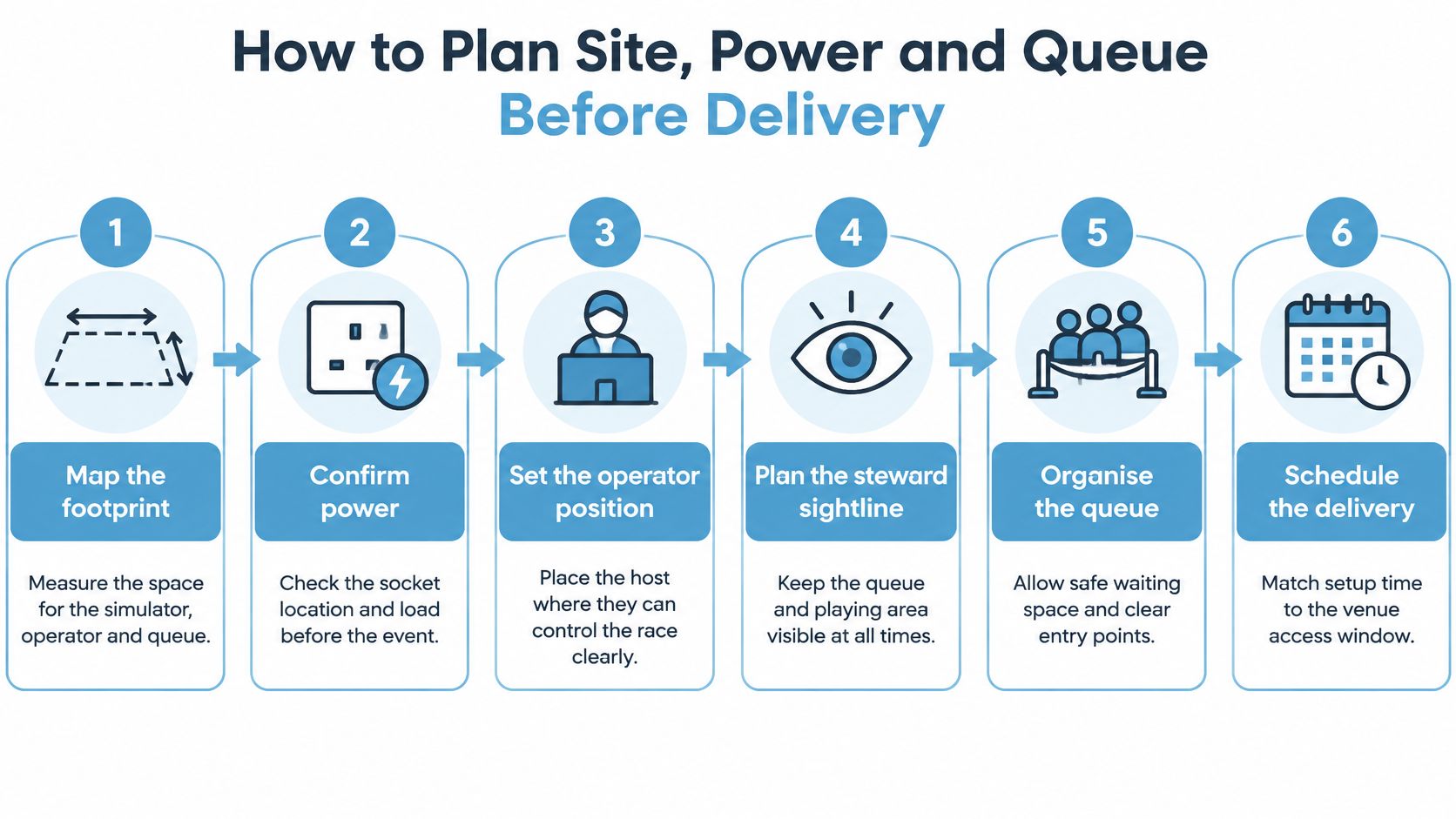
Start with a marked-up venue plan, not a photograph of an empty stand. The equipment footprint is only part of the space you'll need. Guests, spectators, the operator and delivery crew all need workable routes.
Use our installation requirements when preparing the venue information. Record door access, loading arrangements and the installation window alongside the operating layout, so the delivery team isn't solving access problems while exhibitors are building around them.
Build the operating layout
Map the footprint. Mark the simulator, operator position, steward sightline and emergency access on the venue plan. Check that the host can see both the participant and the waiting area without turning away from the controls.
Confirm power. Identify the supply, socket location and equipment load before delivery, with electrical intakes and generator enclosures away from public access. HSE electrical safety guidance requires temporary electrical equipment and installations to be properly selected, installed and maintained, with weather protection where necessary.
Route the cables. Keep runs out of walkways and fire routes wherever possible, and protect unavoidable crossings against trips and mechanical damage. Mark the agreed route on the drawing so another contractor doesn't later place furniture across it.
Position the queue. Keep waiting guests off emergency routes and away from controls, with a clear entrance and exit. Outdoors, arrange suitable cover or shade; the Premier Marquee Hire inflatable marquee guide can help frame shelter discussions, but confirm weather suitability and anchoring for the actual site.
Test before opening. Run the display, controls, scoring and reset procedure with someone unfamiliar with the experience. Include accessibility adjustments and check what the operator should do if the screen freezes or a participant wants to stop.
Calculate usable capacity. Time the whole guest cycle, including briefing, entry, play, exit and reset, then apply a 70 to 80 per cent planning factor for interruptions and adjustments. Treat the calculations below as planning examples, and replace them with your measured median cycle time after testing.
Capacity per station by cycle time
| Cycle time per guest | Theoretical per station per hour | Planning range per station per hour |
|---|---|---|
| 2 minutes | 30 | 21-24 |
| 3 minutes | 20 | 14-16 |
| 4 minutes | 15 | 11-12 |
| 5 minutes | 12 | 8-10 |
These are calculated examples using the stated planning factor, rounded to whole participants. They aren't guaranteed throughput figures, and spectators don't count as completed interactions.
Keep a visual layout with the production paperwork so the venue and crew share the same plan.
Race Formats and Settings That Feel Like Real Racing
A sprint creates a quick, clear challenge; a longer race gives participants more time to manage pace. Flat racing varies in distance and weight, so use these as inspiration rather than fixed simulator rules. Confirm which distances, controls and race formats the booked software supports. A virtual distance does not determine how long a guest occupies the station.
Proposed simulator race settings
| Race setting | Simulator use |
|---|---|
| Short sprint | Quick introduction for queue-driven events |
| Mile race | Main event for mixed audiences |
| Ten furlongs | A longer challenge that rewards pacing |
| Handicap-style setting | A visible weight mechanic explained by the host |
These are proposed simulator options, not claims about official race regulations. Don't promise pacing, weight selection or adjustable distances until the configuration is confirmed. A pre-rendered race and a participant-controlled simulator offer different experiences, even if their screens look similar.
For a busy opening period, use a sprint with a short explanation. It gives guests a straightforward first race and keeps the format easy to brief. A longer final can give leaderboard qualifiers a more deliberate challenge later, provided it fits the programme without interrupting promised public access. If weights affect performance, explain the mechanic on signage so guests can make sense of the result.
Realism helps only when guests understand what they can influence. Hidden complexity isn't a substitute for a clear challenge.
Choose the format to suit the event objective, the station's expected queue and the time available for each turn. Confirm the software setup before promoting specific race features. A more detailed race may add interest, but it can also require more explanation and occupy the station for longer. Keep the challenge clear enough that guests can understand the result and decide whether to play again.
PSW Events offers Driving Simulator Hire, Motion Seat Simulator Hire, Racing Seat Simulator Hire, Helicopter Simulator Hire and Motion Flight Simulator Hire. It also offers F1 Simulator Hire and Pit Stop Challenge Hire, alternatives when the event calls for a motorsport theme rather than an equestrian one.
Making Participation Work for Mixed Crowds
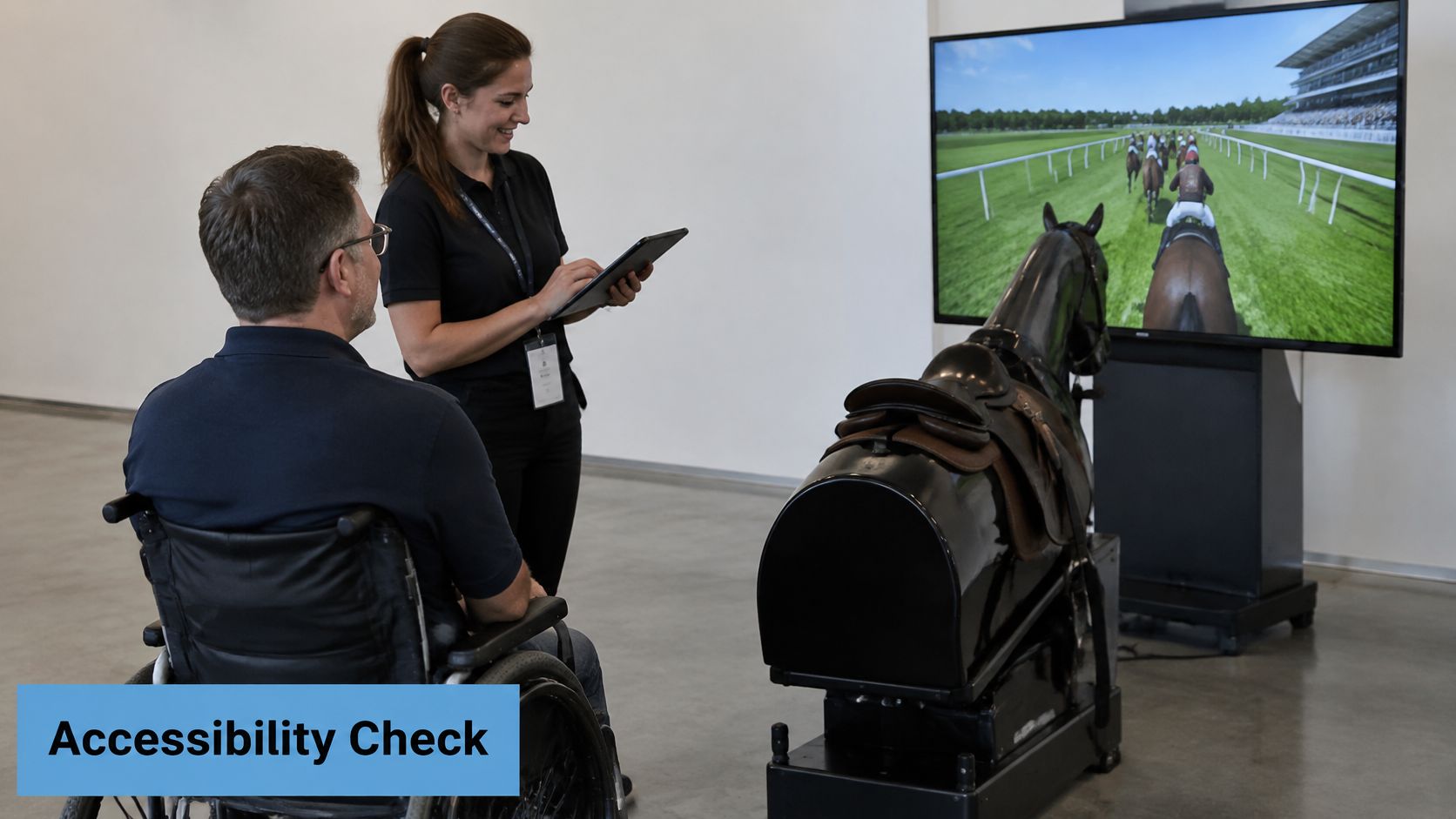
Can a wheelchair user participate independently? Can someone follow the race without hearing the commentary? Those are booking decisions, not questions to leave for the operator once guests arrive.
We operate sports simulators ranging from football to motor sports and flight simulators for conferences, exhibitions, brand awareness, party entertainment, sports fan zones and public events. These settings bring mixed audiences, so assess the actual equipment and layout, rather than assuming that enthusiasm for racing is the only entry requirement.
The scale matters commercially too: the House of Commons Culture, Media and Sport Committee's report identifies UK business events as generating £33.6 billion annually. Inclusive participation deserves a place in the production specification, not just the promotional copy.
Turn access questions into specifications
- Independent access: Establish whether guests can play from their own wheelchair, whether a transfer is necessary and what assistance would involve. Specify approach space and any transfer area before approving the layout.
- Control alternatives: Request a seated-height control option or another suitable input method where the equipment supports it. Confirm whether the alternative preserves the same meaningful race experience.
- Visual and hearing access: Specify readable instructions, visible results and on-screen captions where available. Commentary shouldn't be the only way to understand when to start or what happens next.
- Sensory needs: Agree adjustable volume and lighting, a clear explanation of motion effects, and a slower start option for guests who need more preparation.
- Waiting arrangements: Provide a way to request assistance without announcing personal needs to the whole queue. Decide how someone can leave and rejoin if prolonged standing isn't suitable.
Use the access review to establish what the hired configuration can deliver.
Keep the competition equivalent
Ask staff to adapt the same race wherever practical, rather than directing guests towards a separate, inferior activity. Where a control change affects scoring, explain how results will be compared without presenting the participant as an exception.
Inclusion check: A slower setup that lets more guests finish can be more useful than a high-performance rig that confident players dominate.
That isn't a guaranteed improvement in dwell time or lead quality. It's a reason to measure completion across the audience, not just celebrate the fastest score. Arrange a pre-event venue assessment and record the agreed reasonable adjustments in writing, including any limitations that marketing staff need to communicate.
Keeping the Race Focused on Skill, Not Betting
A betting-style screen can make a family day, school event or public-sector activation harder to approve. Competition does not depend on wagering. Use racing graphics that make the challenge clear without borrowing bookmaker imagery or implying guests should place bets.
Racecourse attendance reached 5,031,640 visitors in 2025, up 4.8% year on year, according to the Racehorse Owners Association's attendance report. That attendance figure supports presenting the simulator as sporting entertainment, rather than assuming betting interest will drive participation.
Choose an audience-appropriate mode
- Corporate competition: Set a team leaderboard and explain the skill challenge. Connect results to reaction time, control or strategy where the simulator supports those mechanics.
- Family play: Use simple instructions and short races. Keep wagering, odds and gambling imitation out of the experience.
- Brand storytelling: Use sponsor colours and messages in supported race graphics, while keeping the sporting challenge understandable without a sales briefing.
A hands-on simulator and a hosted racing programme are different formats. Use the race night hire information to clarify what a race-night event involves, then confirm that the planned presentation suits the venue's safeguarding and audience requirements. Don't assume every racing-themed activity is interchangeable.
Separate scoring from marketing consent
Allow guests to submit a display name without asking for unnecessary contact details. At the point of achievement, offer an optional QR route to a consent-based form. Make the opt-in clear and explain what happens to scores after the event.
Screen test: If a guest could read the display as betting advice, change it before opening.
Marketing permission should never be a condition of taking part. Put the logo on the leaderboard, not on anything resembling an odds board, and brief the host to use consistent, non-betting language.
Measuring Throughput, Leads and Repeat Play
A simulator can attract a queue without producing completed races or useful follow-up. Measure each step from first engagement to participation, then compare the results with the operating time and station count.
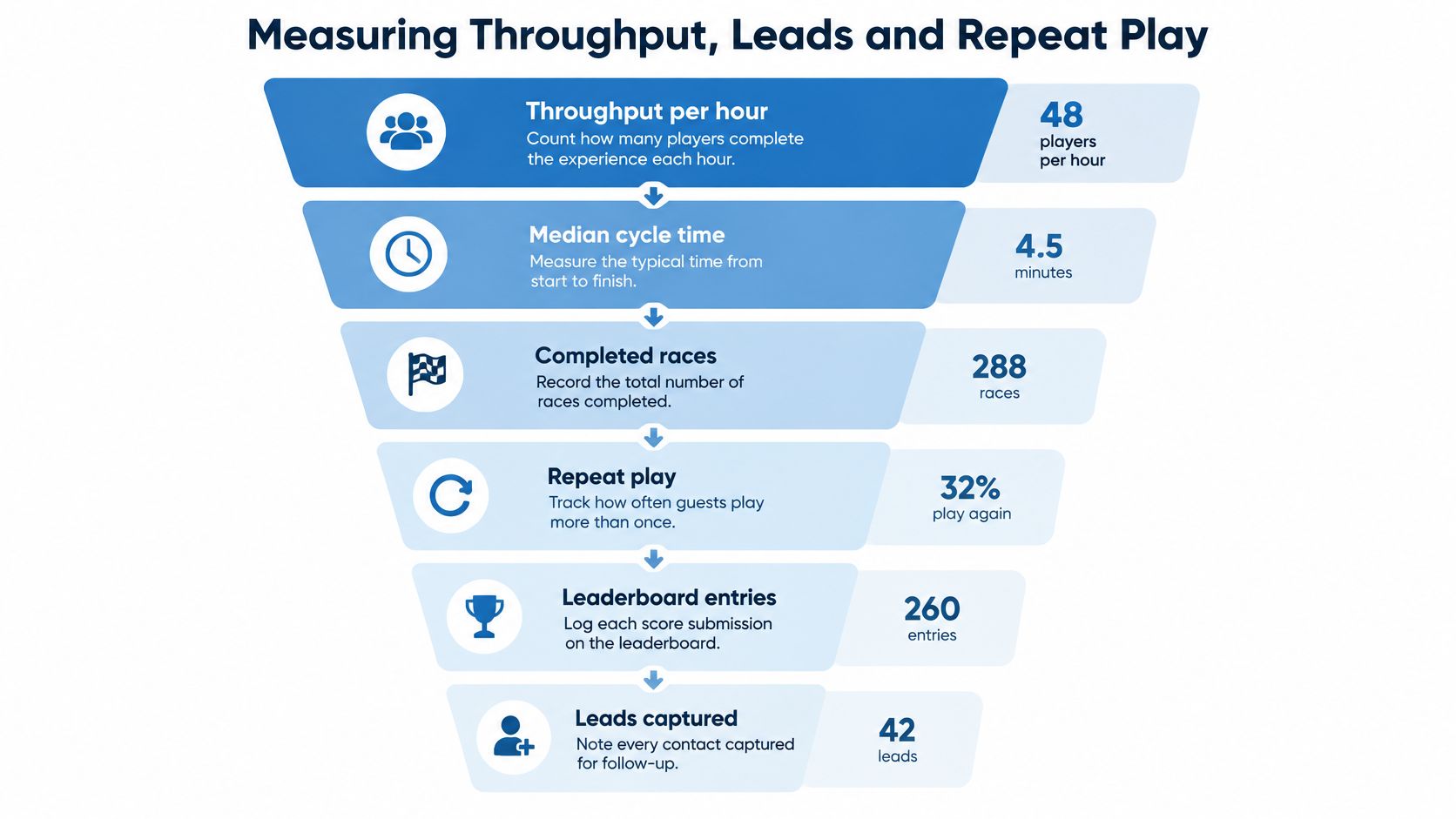
Set measures before opening: completed participants per operating hour, median guest cycle time, completed races, repeat play, leaderboard entries and opted-in leads. Keep participant counts separate from race counts when several people can take part in one race.
Example conversion funnel for one activation
This hypothetical funnel shows how to calculate the rate at each stage.
| Stage | Count (example) | Rate |
|---|---|---|
| Approaches | 100 | Baseline |
| Starts | 60 | 60% of approaches |
| Completed runs | 48 | 80% of starts and 48% of approaches |
| Opted-in leads | 20 | 20% of approaches |
Treat the first activation as a baseline, not a promised target. Define an approach consistently, such as someone who stops to engage with the host, so staff do not count every passer-by.
Record the same stages throughout the event. This makes it easier to see whether the main constraint is queue capacity, race duration or the step from participation to follow-up.
Diagnose the drop-off
- Approach to start: Check queue length, how clearly the host invites people to play and whether guests seem unsure about the controls.
- Start to finish: Review control difficulty, interruptions, resets and whether the briefing matches what appears on screen.
- Finish to lead: Check the consent prompt's relevance and timing. Completing a race does not give permission to contact a guest.
For fair competition, use fixed race lengths and equal settings. Avoid rewarding prior racing knowledge. Where supported, separate fastest time from highest score rather than combining different measures.
A handicap-style format can add variety to repeat play, but only if the simulator supports it and the rules are clear. The BHA guide to handicapping explains that roughly 60% of British races are handicaps, with higher-rated horses carrying more weight and eligibility sometimes restricted to bands such as 0–70. Keep those settings out of a leaderboard presented as an equal contest.
Agree the fields for the digital leaderboard before preparing the report. Close with a consistent record: date, venue, stations, operating time, completed races, repeat participants, leads, incidents and one change for next time.
Pricing, Insurance and Booking Checklist
Request a quote for the work involved, not just a day with a machine. Horse racing simulator hire costs should reflect the service level, hire duration, station count, staffing, delivery and installation distance, branding and race-setting preparation. A floor-area figure alone doesn't describe that workload.
Send the site plan with the enquiry. Include access restrictions, the operating schedule, delivery arrangements and the intended audience, so the proposal can distinguish equipment provision from the labour needed to run it.
Check the commercial scope
- Equipment and operation: Record the selected configuration, who operates it, and who covers breaks or unexpected absence.
- Delivery and collection: Confirm access windows, loading arrangements, installation responsibilities and collection arrangements.
- Creative preparation: Identify which graphics, race settings and leaderboard elements are included, and who approves them.
- Cover: For dry hire, your organisation must hold appropriate insurance and take responsibility during the agreed custody period. Full management is backed by our £10 million product, employee and public liability insurance.
- Documentation: Name the person authorised to sign the PSW Job Sheet and make sure the venue has the required safety paperwork.
Don't assume an operator's presence removes every responsibility from the organiser. Confirm the applicable cover and division of duties in writing, including responsibility for venue access, public routes and any equipment left on site outside operating hours.
Keep separate budgets separate
If your event also promotes riding lessons or equestrian participation, don't confuse simulator costs with the costs families face after the event. Bridle Up Hope Shop's riding budget tips for equestrian families can support that separate discussion without becoming a benchmark for an event-hire quote.
Before committing, assemble a booking pack containing the hire level, approved site plan, power arrangements, queue capacity, accessibility decisions, race settings and non-betting presentation. Give the operator and your team the same version.
Use our website's Booking page, call 01638 601720, or email sales@pswevents.co.uk with your date, venue, expected guest numbers, preferred hire level and accessibility needs. Confirm the date and service level in writing before committing the stand and marketing budget.
PSW Events offers simulator hire and event management covering planning, branding, logistics, installation and on-site staffing. Visit PSW Events with your venue plan and audience requirements to discuss a racing-themed activation with a workable queue, clear responsibilities and measurable outcomes.