
You've shortlisted a racing simulator, a screen and some lighting for an exhibition stand. The hire quote looks manageable, but the venue wants a power schedule, the stand builder needs the equipment weights, and nobody has confirmed who'll operate the attraction during staff breaks. Those unanswered questions are where an equipment budget starts to grow.
Choose event management equipment by what the site can support, not just what looks good in a brochure. Footprint, floor loading, electrical supply, staffing and recovery after a fault should all be settled before you book.
Event Management Equipment Categories at a Glance
Event management equipment categories and planning concerns
| Category | Typical equipment | Main planning concern | Typical use |
|---|---|---|---|
| Audio-visual and lighting | Projectors, LED screens, speaker towers, lighting rigs | Power load, rigging points, sightlines | Keynotes, product launches, stage shows |
| Simulators and interactive attractions | Sports, racing and flight simulators, VR, Batak Pro | Floor space, height clearance, operator staffing | Exhibition stands, fan zones, team building |
| Staging and structures | Stages, marquees, truss, screen supports, climbing structures | Ground strength, wind loading, lifting controls | Outdoor festivals, large brand activations |
| Power and safety | Generators, distribution boards, cable ramps, weather covers | Circuit loading, weather exposure, public access | Any outdoor or temporary installation |
| Scoring and leaderboards | Electronic leaderboards, game consoles, interactive walls | Data feed, screen placement, uptime | Competitions, sales contests, fan zones |
Audio-visual equipment makes presentations visible and intelligible, but speaker coverage and screen placement matter more than headline specifications. Interactive attractions give visitors something to do, provided the operating area includes room for participation and supervision.
Structures support equipment and people, so their suitability starts with engineering rather than appearance. Power and safety equipment makes the installation usable without exposing visitors to electrical or trip hazards. Scoring systems connect individual activities into a competition, but they need an agreed source of results and a recovery plan.
Most briefs combine categories
A racing simulator isn't a standalone booking. It also needs a level operating position, an electrical connection, a queue boundary and someone responsible for resetting sessions. Add a public leaderboard and you've introduced another display, signal connection and operating dependency.
The 2024 UK Events Report valued business events, including conferences, exhibitions and product launches, at approximately £33.6 billion. At that scale, equipment planning is a core delivery task, not an optional production extra.
The 2024 PLASA and #WeMakeEvents survey received 158 responses from entertainment and events technology professionals, with 92% based in the UK. It offers a trade-facing perspective, but your own specification still needs to reflect the venue and operating brief.
Use the table as a booking index. Match presentation requirements to audio-visual, visitor participation to simulators, supported loads to staging, electrical infrastructure to power, and competition results to scoring.
Audio-Visual, Lighting and Screen Equipment
A wall-filling screen is only the visible part of the specification. The key questions are whether the floor can take the load, the supply can carry peak draw, the audience can hear and see, and a named operator owns every cue. For a conference stage or product launch, start with the audience's job: hear speech, see content, follow the action.
An LED screen needs assembled weight, support method, maximum electrical demand and processor position confirmed before it is drawn on the site plan. Projection adds a clear throw path and controlled ambient light. Speaker towers and line arrays need a support arrangement and coverage plan. Moving-head and wash lighting need positions that light presenters without glaring into seats. Media servers need compatible outputs, tested content and accessible controls.
A brand activation worked through
Say your stand uses a large LED wall and a pair of speaker towers. Work through the installation by function:
- LED wall: Get the supplier's circuit schedule, including processors and ancillary equipment. Do not put the wall on a general stand socket because the connector happens to fit.
- Playback and control: A media server and control laptop may share a suitable control circuit if the electrician confirms the combined load. Keep the arrangement labelled so nobody disconnects playback to charge a phone.
- Speaker towers: Confirm whether they are ground-supported or suspended. Their support and any rigged loads need a structural check, not just an AV booking.
- Live operation: Name the technician controlling playback, microphones and presentation cues. If content changes during the day, unattended playback is not an adequate operating plan.
Outdoor screens need an explicitly suitable installation, including protection for processors, connectors and controls. A weather cover does not turn indoor equipment into outdoor equipment. If part of the event is outdoors, agree a fallback position so equipment can move inside where possible.
Dry hire or a technical crew
A plug-in installation uses agreed floor-standing equipment and straightforward connections. Dry hire can suit a static presentation where a competent venue technician accepts responsibility for operation. PSW Events offers service levels from dry hire, where no operator is required, up to a full event management service. Rigged screens, suspended speakers and live show cues call for specialist installation and technical control.
The client still has to arrange any help needed to access or leave the venue, and rooms or marquees must be large enough in footprint, height clearance and weatherproofing. Put those limits on the AV drawing early, before screen size becomes a late argument with the venue.
Speech deserves its own check. Texas Old Town's guidance on choosing microphones for wedding vows is useful context for microphone position and the person speaking. If a supplier sends a sound system rental checklist, read it as a prompt for power, inputs, playback and operator questions, then confirm which items are in your quote.
Before approval, ask the venue:
- Rigging: Which ceiling points are approved, and who authorises their use?
- Loading: What floor and point-load limits apply?
- Access: Who helps equipment in and out, and at what times?
- Control: Who operates the AV system, and who can change its settings?
Simulators and Interactive Attractions Compared
Simulator and interactive attraction fit by space and staffing
| Attraction | Typical space | Staffing | Best fit |
|---|---|---|---|
| Sports simulators, including football, motor sports, golf, rugby and boxing | Small to medium booth, plus activity and containment space | Operator usually needed | Exhibitions, fan zones, public events |
| Racing and F1 rigs | Medium, level floor with access around the seat | Operator recommended | Brand activations, team building |
| Motion and flight simulators | Large, with height and movement clearance | Operator and safety briefing | Experiential showcases, product launches |
| Batak Pro and virtual reality | Small to medium, with clear participant space | Light supervision, adjusted to the activity | Conferences, dwell-time zones |
| Climbing walls | Medium, anchored or supported to the engineered design | Trained climbing staff | Fan zones, family fun days |
These descriptions are shortlisting guides, not installation dimensions. The operating envelope includes the participant, attendant, barriers and queue, not just the machine.
The different participant positions are visible in these simulator formats.

Match the activity to the operating space
Sports simulators need space for the sporting movement and containment. A golf swing or kicked ball changes the safe footprint, even when the screen enclosure looks compact; confirm the level-floor requirement and powered components separately.
Racing and F1 rigs need safe entry and exit around the seat. Confirm the complete rig weight, its contact points and whether the venue floor can support them, especially on raised exhibition flooring.
Motion and flight simulators, including helicopter formats, generally demand the greatest height and movement clearances among these options. Specify a stable, level installation position and verify the particular model's power, restraint and emergency-stop arrangements.
The following video provides another view of interactive equipment.
Batak Pro and VR can fit smaller spaces, but lighter supervision doesn't mean unattended operation. VR needs a protected movement area and headset assistance; Batak needs clear reach space and someone controlling turn-taking.
Climbing walls require trained staff and an engineered support arrangement. Don't assume they share the electrical requirements of screen-based attractions; establish what the chosen wall needs.
Plan participation, not just spectacle
For a brand activation, dwell time only helps if visitors can participate and staff can hold useful conversations. Pair each attraction with a queue plan and a written operator-to-active-station arrangement, including breaks and participant assistance.
Choose by audience first: B2B delegates, consumers and families have different expectations and access needs. Then compare the venue's measured space with the supplier's installation drawing, including queues and maintenance access.
Staging, Structures and Rigging Requirements
- Confirm the site and anchorage. Review the equipment layout, ground strength, slope, underground services and permitted fixing points before selecting the structure.
- Agree the working procedures. Document how the team will build, operate and dismantle it, including access equipment and exclusion areas.
- Inspect before handover. Arrange post-erection inspection and competent-person sign-off, with any defects resolved before public access.
- Set public clearances. Position fencing and barriers so visitors can't reach ballast, moving components or vulnerable supports.
- Define weather reassessment. Record who monitors conditions, who can stop operation and what happens when the structure's operating limits are approached.
These controls turn a collection of hire items into a managed installation. The HSE guidance on temporary demountable structures identifies design, installation, use and takedown as planning responsibilities, including foreseeable wind loading, ground conditions and equipment suitability.
Treat supports as engineered equipment
Stages, marquees, truss, screen supports, PA towers and climbing structures aren't ordinary furniture. A support can look stable while still being unsuitable for the attached screen, the ground beneath it or the wind exposure.
Request a site-specific load and layout review. That should account for the equipment itself, attached branding, ballast, operational movement and any loads imposed on a venue floor.
The HSE's outdoor equipment guidance directs organisers towards the Lifting Operations and Lifting Equipment Regulations 1998, known as LOLER, for relevant lifting equipment and suspended-load arrangements. Agree the organiser's, venue's and contractor's responsibilities before hoists, trusses or suspended components arrive.
Practical rule: A decorative finish must never conceal the components that the crew needs to inspect, secure or isolate.
Allow room to build and remove it
A marquee or venue room must accommodate more than the finished equipment footprint. It needs sufficient height clearance, weatherproofing, installation access and space for the crew to work safely.
Under our access requirements, the client must arrange any help needed to access or leave the venue. Rooms and marquees must also be large enough for the equipment's footprint, height clearance and weatherproofing.
Check door openings, turning spaces, loading arrangements and the route from vehicle to operating position. A suitable event room is no use if the equipment can't reach it.
Choose ballasted free-standing equipment when fixing into the venue or ground isn't permitted and the engineered ballast arrangement is acceptable. Choose anchored rigging only where authorised fixing points and an appropriate design are available; neither option removes the need to verify loading and stability.
Power, Cables and Weather Protection on Site
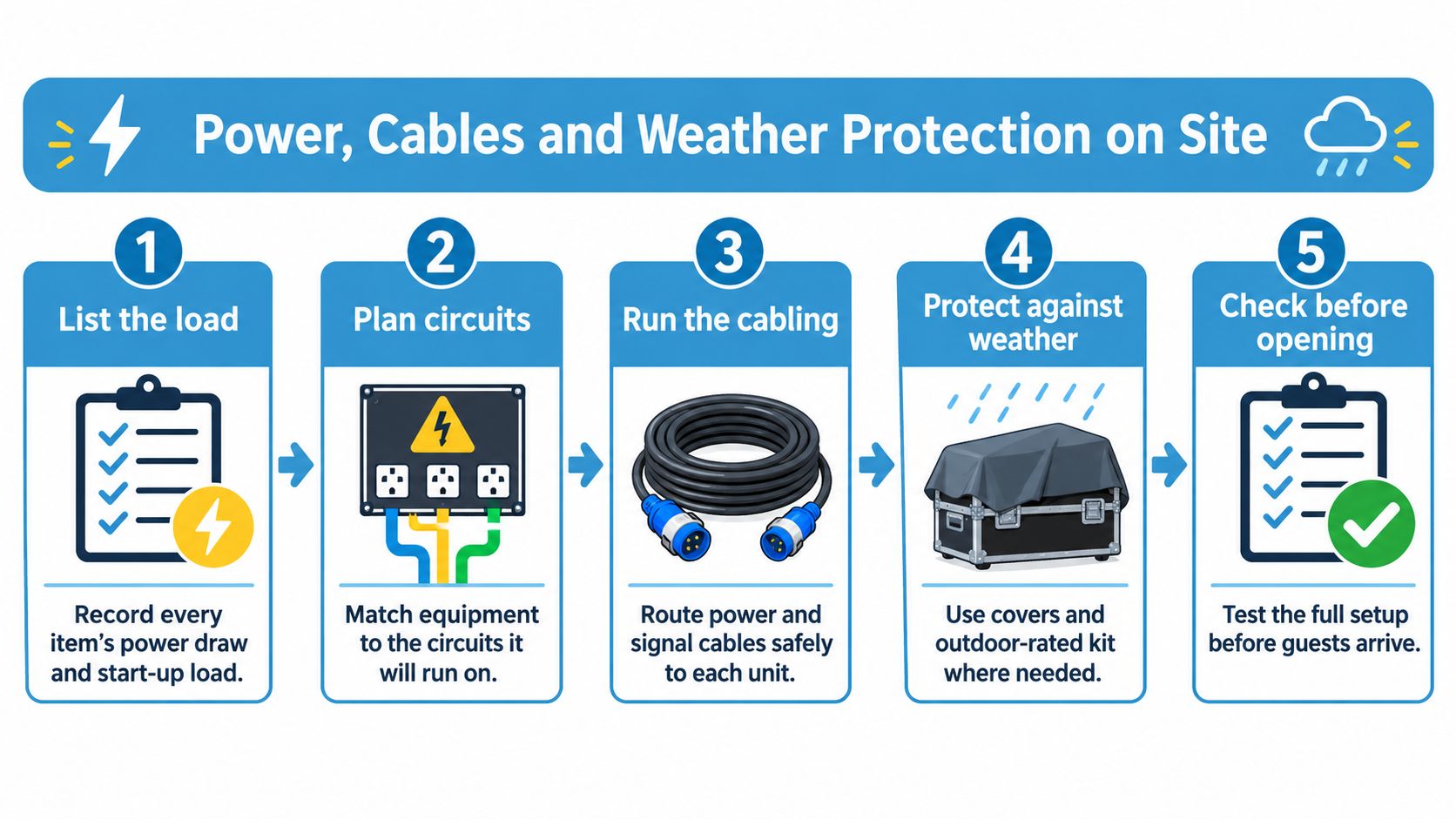
Start with a load schedule listing every simulator, display, light, controller and ancillary device. Record running demand, start-up load, supply type, connector and allocated circuit, then have the electrical contractor size the distribution and any generator from that schedule.
Don't total wattages and select a generator without considering start-up behaviour, load distribution and the supplier's electrical requirements. Outdoor venue power must be confirmed in writing at the site visit, whether that means a grid connection or generator hire.
Build the electrical plan
- Position the supply safely. Keep electrical intakes and generator enclosures away from public areas while retaining access for operation and emergencies.
- Select suitable cables. Choose cable specifications for the expected loading, route length, environmental exposure and installation conditions.
- Protect crossings. Avoid pedestrian routes where possible and use suitable cable ramps where crossings can't be eliminated.
- Separate vehicle movement. Keep traffic away from cable routes wherever practicable, including during build and removal.
- Protect exposed equipment. Provide suitable weather-resistant enclosures or shelters and prevent unauthorised contact with electrical components.
- Inspect and hand over. Test the installation, record the circuit arrangement and explain operating restrictions to the event team.
- Plan isolation. Identify how each circuit can be isolated and who is authorised to act during a fault.
The HSE's event electrical-safety guidance supports these controls and specifically advises using suitably sized ducts or pipes for underground cables, with no cable joints left underground. Electrical installation and protection decisions belong with a competent electrical contractor.
Use this process graphic to check the sequence before opening.
Plan for interruption
Say rain reaches a connection and stops an attraction while visitors are queuing. The response needs to cover safe isolation, visitor communication and controlled recovery, not just finding another socket.
Our team dries equipment affected by rain as soon as the clouds pass so the event can continue. Wet electrical equipment must remain isolated until it has been checked and retested as appropriate, rather than being restarted because its exterior looks dry.
We arrive with enough setup time for equipment to be ready and tested at least half an hour before the event starts. Use our installation requirements when coordinating the venue's readiness.
For cable organisation principles, Forward Electrical's cable management guide provides useful supporting reading. The event drawing still needs to show the actual power and signal routes.
Specify any backup battery or generator against the simulator and leaderboard circuits it must support, including required operating duration. Agree a restart order so equipment doesn't all demand power simultaneously.
The events industry climate-transition plan identifies access to sustainable energy and grid connections as an outdoor-events challenge. The lowest-energy device isn't necessarily the best overall choice if unreliable operation leads to replacement transport or emergency generation.
Scoring, Leaderboards and Game Control Systems
A sales contest uses a pair of simulators feeding a shared leaderboard. Mid-afternoon, the main display fails: the games still work, but participants can't see their rankings and staff start recording results differently.
The useful backup isn't just a spare screen. It's a compatible display, the correct connection and an agreed manual scoring sheet, with someone authorised to reconcile results after recovery.
Specify the full scoring chain
An electronic leaderboard may show live scores, rankings or sales totals. Identify where those values originate, how they reach the display and whether results remain available when the network disconnects.
A game console introduces user accounts, game settings and session resets. Lock down the competition mode before opening so participants compete under the same conditions rather than whichever settings the previous player selected.
An interactive wall may combine brand content, movement-based play and data capture. Confirm which functions work offline and whether a network outage stops participation or only prevents data synchronisation.
Simulator scoring feeding a shared screen needs a reliable mapping between participant and result. Our electronic leaderboard information can help frame the display requirement, but the production schedule must also identify the score source and system operator.
Decide who can correct a disputed score before the competition starts, not while a queue watches.
Keep the competition understandable
Short rounds, visible rankings and straightforward prizes make turn-taking easier to explain. Don't make visitors complete a long registration sequence before they understand the activity.
Position the results screen where the queue can read it without blocking the next participant. Select screen size through an actual viewing-distance check, using the intended score layout rather than a full-screen logo.
Where lead capture runs through a screen, agree in writing who owns the data, what is collected and how it is handled. Make the visitor information understandable at the point of collection.
Before go-live, confirm:
- Results: The score source, ranking rules and authorised corrections.
- Connectivity: Network access and the offline fallback.
- Visibility: Readable text from the queue and viewing area.
- Recovery: A named restart operator and compatible backup display.
- Records: Manual scoring, participant identification and data responsibilities.
Hiring Versus Buying Event Equipment
Hire versus buy by decision factor
| Factor | Hire | Buy |
|---|---|---|
| Upfront cost | Low, paid per booking | High capital outlay |
| Cost per event | Hire fee each booking | Falls with use; running costs still apply |
| Transport and storage | Supplier handles under the agreed service scope | Your responsibility and cost |
| Testing and maintenance | Supplier's annual testing, confirmed in the agreement | Your responsibility, budget for it |
| Flexibility | Change kit mix for each event | Locked to what you own |
| Risk of unused kit | No owned idle inventory | High if utilisation is low |
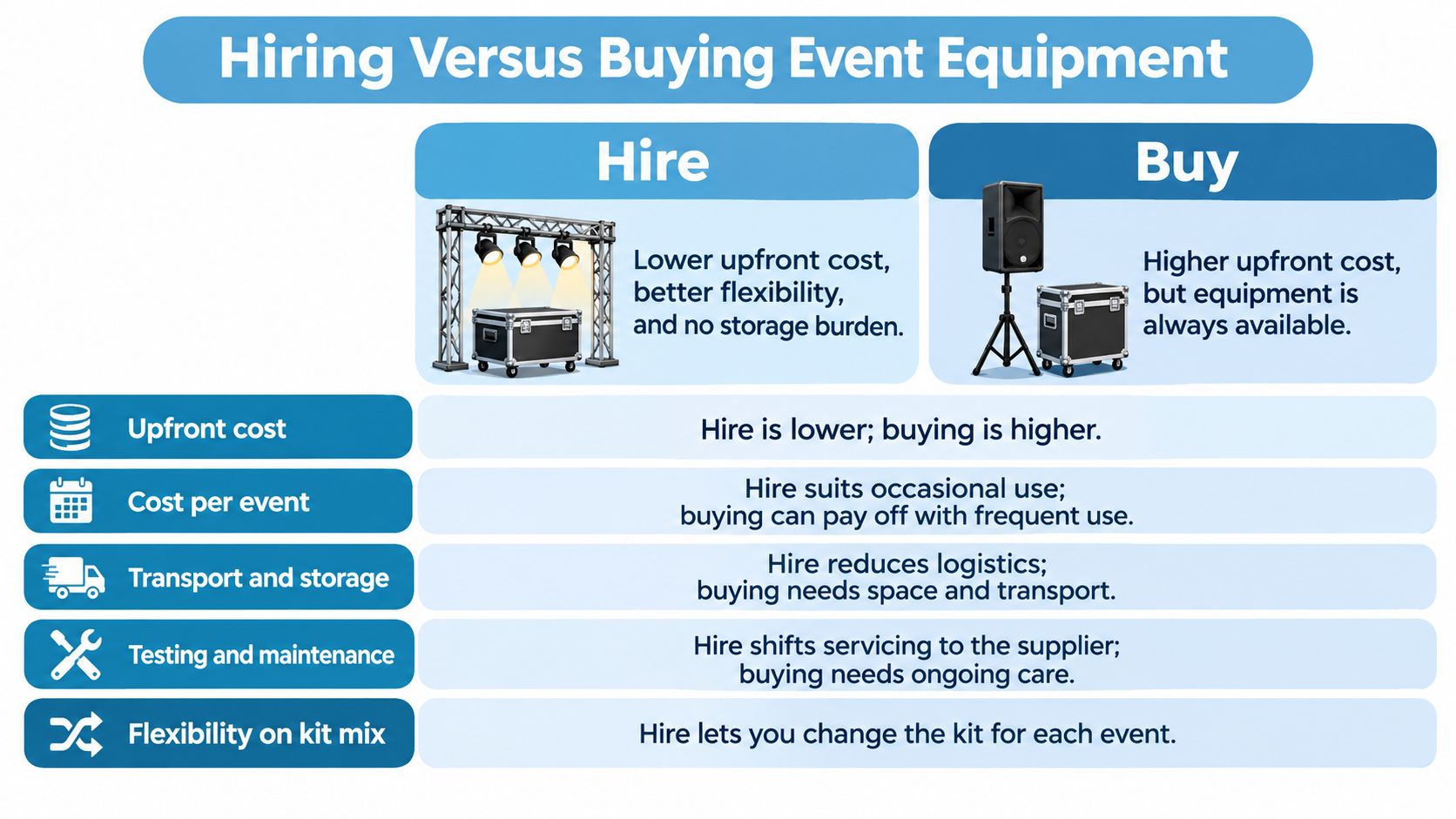
Hiring converts equipment purchase into a per-booking cost. Buying can make sense when you repeatedly need the same specification and have the people, transport and storage to support it.
The table assumes responsibilities are written into the hire agreement. Don't assume a dry-hire quotation includes transport, installation or servicing support during your event.
Calculate ownership before comparing quotes
For an initial annual comparison, add the purchase price, storage and transport for the year, then divide by the events you realistically expect to run. Compare that result with the complete hire cost per event, not just the advertised equipment fee.
For example, take a recurring roadshow using identical racing equipment. Put the supplier's purchase quotation into a worksheet, add your warehouse allocation and planned vehicle costs, then divide by confirmed roadshow bookings rather than hoped-for bookings.
Add separate lines for maintenance, testing, insurance, operator training and repair cover. If ownership only looks cheaper when those cells are empty, the comparison isn't ready for approval.
A longer-term model should account for useful life and realistic resale value. Don't assume equipment will remain commercially suitable because it still switches on.
Buying test: Ownership needs both a credible utilisation schedule and a credible person responsible for keeping the equipment operational.
The comparison graphic summarises the main commercial differences.
Measure the lifecycle, not the reusable label
Research reported by AMI Magazine covering 789 events found 1,229 tonnes of materials were used once and discarded, with estimated disposal costs of almost £500,000. That supports avoiding disposable builds, but it doesn't prove that every durable attraction has a low environmental impact.
Assess transport distance, power consumption, utilisation, maintenance, storage and eventual disposal. A reusable simulator sent on inefficient journeys may compare poorly with a more locally available option, while modular branding can avoid rebuilding an otherwise serviceable installation.
Keep environmental and financial calculations distinct. A financially attractive purchase isn't automatically the lower-impact choice, and a hire invoice alone doesn't reveal the equipment's lifecycle footprint.
Match the service to your resources
We own the equipment shown on our website, with only a small number of exceptions, and house it in our warehouse. All our equipment is tested annually.
Our service levels range from dry hire, where no operator is required, to full event management. That distinction matters because an internal team may be able to manage a straightforward installation but not a staffed attraction alongside registration, hospitality and presentations.
Before buying, answer these questions:
- Utilisation: How often will this exact equipment run?
- Operation: Who will operate, inspect and maintain it?
- Storage: Where will it live between events, and how will it travel?
If those answers depend on unallocated staff time or unavailable storage, hiring is the more defensible starting point.
Accessibility, Permissions and Weather Risk
Accessibility isn't a post-installation check. Once the equipment, barriers and queue are in place, changing the layout may mean moving electrical routes, reducing capacity or replacing the attraction.
Scope's event accessibility guidance explains that, under the Equality Act 2010, venues and events must take reasonable steps so disabled people aren't placed at a disadvantage. Equipment selection should therefore include access routes, controls, participation and viewing positions from the outset.
Check the whole visitor journey
A ramp to the stand doesn't resolve an inaccessible simulator seat or a queue that blocks wheelchair circulation. Review arrival, waiting, participation and departure, including what reasonable accommodation is available where the standard activity can't be used.
Provide accessible information formats and keep circulation clear around equipment. Staff also need defined emergency roles, including how they'll assist visitors without obstructing evacuation routes.
- Organiser: Record access needs and agreed accommodations before approving the layout.
- Venue: Confirm accessible routes, physical restrictions and emergency arrangements.
- Contractor: Incorporate ramps, barriers and circulation into the installation drawing.
- Supplier: Explain operating restrictions and brief attendants before public opening.
Allocate permissions and financial risk
Under our booking requirements, the client obtains any permissions or licences needed for the venue to cover all equipment and artistes hired. Establish this during contracting, not when the delivery team reaches the loading bay.
The client must also arrange any assistance needed to access or leave the venue. Identify who supplies access staff, keys, loading permissions and any required lifting assistance.
Our terms state that the full fee remains payable if uncontrollable circumstances prevent equipment use at the venue. These include weather, acts of terrorism, vandalism, theft or damage on site, and poor crowd control.
Arrange appropriate insurance and a practical contingency plan rather than assuming cancellation transfers the cost to the supplier. Check policy exclusions against the event's actual risks and the contract's payment obligations.
Document the remaining decisions before installation:
- Weather decisions: Name who monitors conditions and authorises suspension.
- Crowd management: Assign queue control and intervention responsibilities.
- Contingency location: Agree whether a suitable alternative operating area exists.
- Contract approval: Have the organiser confirm permissions, insurance and fee exposure.
A responsibility matrix only works when each organisation accepts its duties. Send it with the final site plan and retain the agreed version.
Confirm Your Equipment Schedule Before You Book
An equipment shortlist isn't a booking-ready specification. Turn it into a schedule that the venue, organiser and installation team can all approve.
- List the equipment. Record each item's footprint, weight, height, power draw and staffing requirement, including ancillary components.
- Check the venue. Compare the schedule with room or marquee dimensions, available supply, loading access and installation restrictions.
- Choose the operating service. Decide whether your team can accept operational responsibility or needs staffed event delivery.
- Agree planning and inspection. Set the planning meeting and site visit needed to develop the site plan and resolve utility requirements.
- Confirm the booking details. Finalise event location, event times and the site contact through our online booking information request or by phone.
Keep one agreed technical document
For events involving performers, the EPKS technical rider template is a useful starting point for documenting technical requirements. Incorporate relevant details into the event schedule so production teams aren't working from conflicting documents.
Our full event management process includes online planning meetings, site visits to help create site plans, power and utility requirements, staffing and management on the day. Our team delivers and sets up the equipment, and you meet the team on the event day.
Use the category table at the top as the checklist for your conversation. Start with the shortlisted equipment, but settle the supporting infrastructure and responsibilities before committing to the booking.
PSW Events offers event equipment hire with delivery and setup, through to staffed event management. Visit PSW Events with your equipment shortlist, venue details and event timings so we can establish the site, power and operating requirements before you book.