
You've booked the sports hall, agreed the fixture or fan-zone programme, and someone asks whether the scoreboard is suitable. The quotation looks impressive, but it's not obvious whether the screen can show team fouls, whether the shot clocks connect to it, or whether anyone at the far end will be able to read the time.
Choosing an electronic scoreboard for basketball starts with those practical questions, not the sponsor graphics. Separate the equipment needed to run the match from the features used to entertain visitors, then judge each quotation against your competition, venue and operating plan.
Minimum Display Specs by Competition Level
Minimum display and shot-clock requirements by competition
Find your competition first, then read across every column. The BUCS basketball regulations make working score-and-time displays enforceable requirements and specify mandatory shot clocks for Premier Tier and Tier 1, with a £100 fine per instance for a missing required shot clock and a separate £100 fine for a non-compliant scoreboard.
| Competition | Score and clock | Fouls and time-outs | Shot clock |
|---|---|---|---|
| NBL Division 1 men's and women's | Score and game time with digital countdown | Dedicated team-foul and time-out fields | Visible to players and officials, with 24-second and 14-second resets |
| NBL Division 2 men's | Score and game time with digital countdown | Dedicated team-foul and time-out fields | Visible to players and officials, with 24-second and 14-second resets |
| Other NBL and club levels | NBL baseline is running score and elapsed or remaining minutes; confirm club competition rules | Confirm the competition's required fields | Required in Senior NBL competitions; confirm other club rules |
| Under-16 and Under-18 Premier League | Confirm the competition's main-display specification | Confirm the competition's required fields | Required, with digital countdown and 24-second or 14-second resets as applicable |
| BUCS Premier Tier and Tier 1 | Fully working, easily visible score and time remaining in each period | Confirm the applicable competition rules | Mandatory 24-second shot clocks |
| FIBA-rules matches | Minutes and seconds, changing to seconds and tenths in the final minute of each quarter and overtime | Confirm the applicable equipment level; team names and points belong on the main display, with player points at Level 1 | Confirm the applicable FIBA equipment specification and competition requirements |
What a proper scoreboard means on Saturday
Say a club secretary is told on Saturday morning that the hall needs a proper scoreboard. The useful answer isn't a particular brand or screen size. It's the equipment that satisfies the club's competition row, including the information fields and separate timing devices.
In England's NBL, the electronic scoreboard is a formal venue requirement, not an optional presentation extra. A score-only display may be adequate for an informal shooting challenge but unsuitable for the club's scheduled match.
Team fouls and time-outs are counts or indicators, not clocks that count down in the same way as possession time. When checking a quotation, ask to see the actual basketball layout rather than accepting a description such as digital match display.
Check the whole installation
A main scoreboard and a shot clock perform different jobs. The former tells everyone how the match stands; the latter tells players and officials how much possession time remains.
Shot-clock placement therefore matters as much as reset functionality. Basketball England's requirements call for visibility to players and officials, preferably above the backboards or otherwise at the ends of the court.
For a shared venue, an electronic scoreboard for football comparison can help explain multi-sport layouts, but football functionality doesn't establish basketball suitability.
Before buying or hiring, confirm every column in writing. Where the table asks for confirmation, obtain the governing body's current requirement before signing rather than treating an unanswered item as permission to omit it.
Scoreboard Types and Where Each Fits
School halls, club venues and international arenas don't need identical hardware. Basketball England's facilities guidance describes the progression from tabletop electronic units in school and community facilities to wall-mounted systems at club and NBL level, and central scoreboard cubes in international arenas; it also requires NBL displays to remain readable by players, officials and spectators.
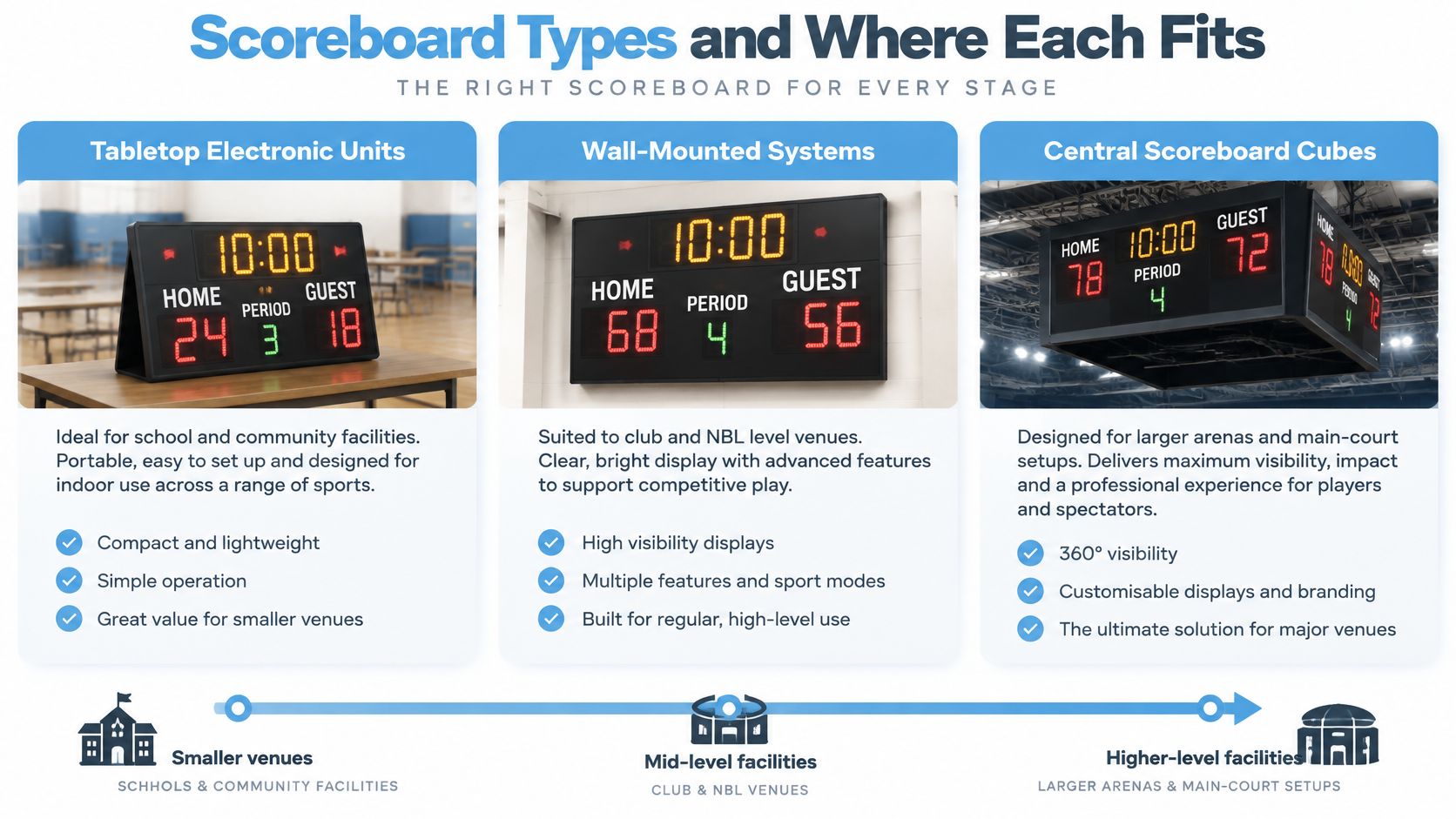
Scoreboard types compared by venue and trade-off
| Type | Typical venue | Strengths | Limits |
|---|---|---|---|
| Tabletop electronic scoreboard | School and community facilities | Lower-cost starting point, simple setup | Small digits and limited data fields |
| Wall-mounted LED scoreboard | Club and NBL venues | Readable from stands when correctly specified, dedicated match-data fields | Requires secure fixed mounting and a power run |
| Central hanging cube | International arenas | Multi-sided viewing for seating around the court | Greatest installation complexity and typically the largest cost commitment |
| Software-driven screen with laptop or tablet feed | Mixed-use halls and events | Flexible layouts, quick updates and sponsor branding | Relies on an operator and a stable control-to-display connection |
Judge the limitations, not just the appearance
A tabletop unit is convenient when equipment must be carried into a hall and packed away afterwards. Check its field layout carefully, though. Adding a separate handwritten foul count doesn't automatically make a basic unit suitable for regulated competition.
A wall-mounted LED scoreboard suits a venue that regularly hosts basketball. Its dedicated digits can keep match information uncluttered, but the installation needs an agreed cable route, suitable wall structure and protection from ball impact.
A central hanging cube provides viewing faces towards different seating areas. That doesn't guarantee visibility from every seat: the installer must still assess obstructions, viewing angles and the structure supporting the suspended load.
A software-driven screen is useful when the same display must alternate between match information and event content. Its flexibility comes with operational questions: who controls it, what connects the controller to the screen, and what happens if that connection fails?
Buying principle: Choose the format that meets the match requirement with the least operational complication, not the one with the longest graphics demonstration.
A league can use several hardware types across its venues because compliance concerns the complete working installation, not its shape alone. Settle the practical question first: will the scoreboard stay fixed, or must it move between sites and events?
Sizing, Brightness and Viewing Distance
Measure from the furthest seat or bench position to the proposed display, not from the centre circle. Use a laser distance meter or tape measure, then mark the viewing position and screen location on a floor plan.
Record the seating layout as well. A person looking straight at the screen from floor level has a different view from someone seated high up or looking across the display at an angle.
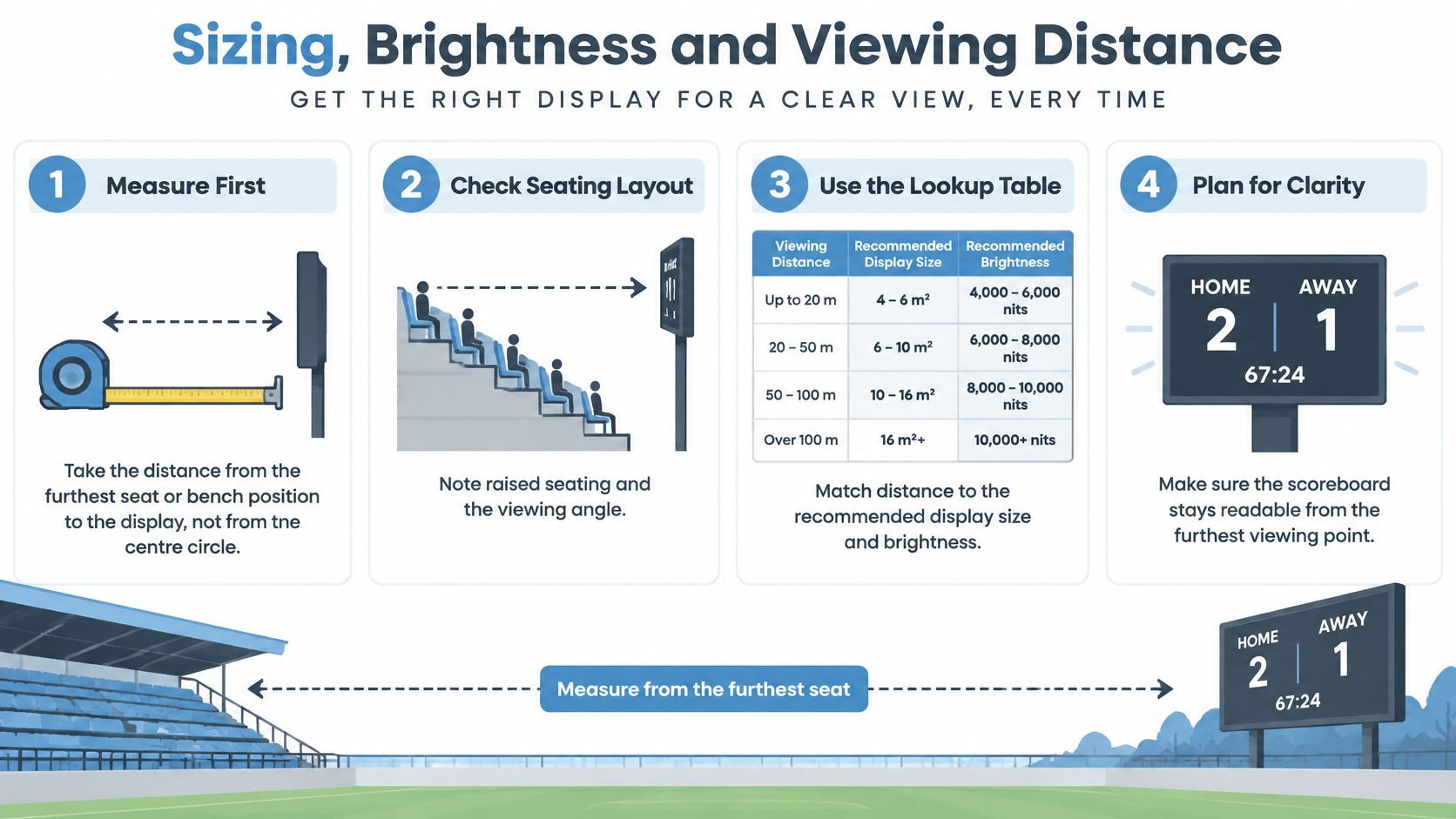
Use digit height as a starting question
The following is an illustrative sizing exercise, not a published basketball standard. Use it to discuss candidate displays with a supplier, then validate the actual model under the venue's lighting conditions.
Approximate digit height by viewing distance
| Viewing distance | Approximate digit height | Typical venue |
|---|---|---|
| Hypothetical 10–20 m viewing position | Trial a 100–200 mm digit-height range, subject to an on-site readability check | Club halls and small stands |
| Hypothetical viewing position over 50 m | Supplier-designed digit size, validated from the furthest seat | Major arenas, usually a central display |
Overall screen dimensions aren't the same as digit height. A large video screen can still show an unreadably small clock if logos, borders and animation occupy most of its surface.
Ask for a demonstration of the finished basketball layout, including the smaller foul and time-out fields. Don't approve a screen based only on a full-screen score graphic.
Match brightness to the room
Halls with windows need assessment when daylight falls across the display. Outdoor fan zones need a screen designed for daylight use, not an indoor display described as bright.
Ask suppliers for brightness in nits, together with dimming controls and the conditions in which the proposed screen should be tested. More output isn't always better indoors: excessive brightness can make fine details uncomfortable to read.
Placement also needs a site-specific decision. A far-wall position may work well for the main display, but check baskets, curtains and equipment for obstructions; assess the downward viewing angle for raised seating rather than automatically tilting the screen.
A screen passes the visibility check only when the smallest required information is readable from the least favourable occupied position.
For example, take a hypothetical 28 m sports hall with raised seating along one side. You might trial main digits in a 200–300 mm band, then test the complete layout from the rear seats; that range is a demonstration choice, not a guaranteed specification. Check shot-clock visibility from the free-throw line as part of the wider on-court assessment.
Write down the distance, seating arrangement and daylight conditions before requesting quotes. Those details are more useful than asking for a large scoreboard.
Match Mode and Activation Mode Features
Official match content always takes priority. Sponsor graphics can add value, but they shouldn't reduce the space, contrast or attention available to information that players and officials need.
There is a genuine audience for basketball experiences: Basketball England's account of Sport England's Active Lives findings reports more than 320,000 adults in England playing at least twice during the surveyed 28-day period in the November 2024–November 2025 survey, and nearly 1.1 million children aged 5–16 playing weekly in 2024–25. That supports planning for different participants and visitors, not assuming every event needs a bigger advertising screen.
Give each mode a defined job
Match mode should present the official score, time, team fouls and time-outs in a stable layout. Remove decorative movement that competes with those fields.
Activation mode can carry sponsor loops, social prompts, QR lead capture and branded challenges during breaks or on a separate screen. Keep the official match information in a protected area whenever the main display is also being used for promotional content.
Check the operating features rather than just the design mock-ups:
- Sponsor-loop control: Advertising pauses when live play resumes, without an operator having to close several windows.
- Scannable QR content: Test a large, uncluttered code at the intended audience position, for example around 3 m away in a rehearsal scenario.
- Accessible presentation: Use high colour contrast and large text; don't communicate a state through colour alone.
- Fast mode switching: A remote or app should return the display to the correct match layout without resetting official information.
- Sound handover: Challenge audio mustn't mask the match horn or interfere with the timing operator's controls.
Rehearse the return to play
Say a club hosts a Saturday fixture with a sponsor's three-point challenge at half-time. The official clock runs through the quarters, while the challenge uses a separate counter or clearly isolated activation layout during the interval.
When the interval ends, the operator returns to match mode with the correct score, period and timing state intact. The challenge result mustn't overwrite the official score.
Rehearsal test: Switch modes three times and confirm that the official score remains visible throughout.
That's how activation features earn their place: they support participation without making the match harder to follow.
Timing, Scoring and Data Connections
The FIBA Official Basketball Equipment rules valid from 1 October 2024 specify a countdown in minutes and seconds, changing to seconds and tenths during the final minute of each quarter and overtime, alongside team names and points, plus each player's cumulative points at Level 1 competitions.
That is a display behaviour to demonstrate, not merely a box to tick on a specification sheet. Ask the operator to advance the clock through the format change so you can see whether the digits remain clear and stable.
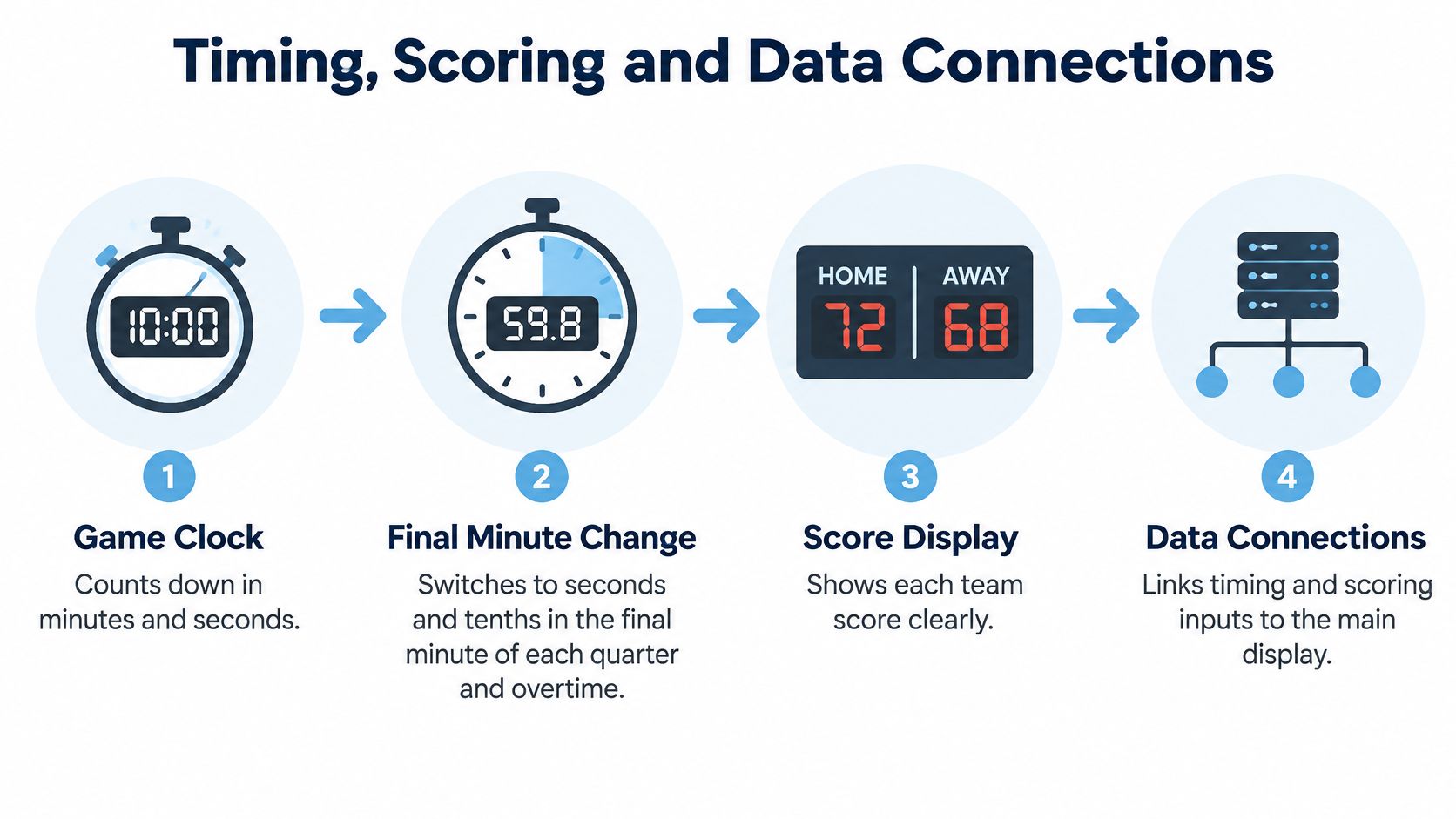
Keep the official record separate from the display
The FIBA official scoring procedures organise the running score into four main columns, with the latest team totals marked by a thick circle and horizontal line at the end of each quarter or overtime period. That manual record provides an essential check on what spectators see.
If the display and scoresheet disagree, alert the table officials and have them resolve the discrepancy through the proper procedure. Do not allow an event technician to change a disputed score just because a different figure appears on a laptop.
Understand what connects to what
A dedicated controller can communicate with the main display through a cable or wireless link. Ask which path carries the commands and whether a loss of connectivity leaves a misleading clock running on screen.
Shot clocks should integrate with the timing setup so game-clock and possession-clock operations work together. Integration doesn't remove the need for the table-official roles required by the competition, and it shouldn't be sold as a substitute for trained personnel.
An optional statistics or electronic leaderboard connection serves a different purpose. Establish whether it receives official match data, challenge results or manually entered scores, and prevent an activation feed from writing into the official match display.
Run an event-day acceptance check
Use a short, repeatable sequence before doors open:
- Power up and confirm the game clock. Check the period, countdown behaviour and visible response to start and stop commands.
- Test the horn. Confirm the correct sound output and check that venue audio settings haven't muted it.
- Test a possession reset. Exercise both the full-possession and shorter-reset functions, checking the displays at each end.
- Match a test score against the scoresheet. Verify the correct team changes, then clear the rehearsal entry before the match.
Also test the recovery procedure with the people who will operate the equipment. A spare device is of little use if nobody knows how to connect it or restore the correct state.
Don't rely on a single laptop containing the controls, graphics and only copy of the operating instructions. Arrange a trained backup operator and a documented manual-override or controller-replacement procedure, with the official record available for restoring the display.
Electrical Safety, Installation and Supplier Checks
Temporary equipment needs the same careful scrutiny as a fixed installation. The NBL rules and associated installation guidance identify the Sports Grounds Safety Authority's position that temporary electrical systems should comply with BS 7909, installations should comply with BS 7671, and an Electrical Installation Completion Certificate should be available.
Treat those as installation questions, not proof that a screen is safe because it switches on. The competent electrical contractor should identify the documentation applicable to the proposed work and explain its scope to the venue.
Compare evidence, not assurances
Consider two hypothetical quotations. One supplier provides PAT records for the controller, power supplies and display, together with bracket-fixing details and a power distribution drawing; the cheaper quotation contains no test records or mounting information.
The difference isn't paperwork for its own sake. The venue needs to know which items have been inspected, how the display is supported and whether the proposed electrical supply can carry the connected equipment.
A PAT certificate concerns equipment testing; it doesn't replace certification of the installation. Likewise, an electrical certificate doesn't establish that a bracket can withstand its intended load or foreseeable ball impact.
At PSW Events, every inflatable and electrical piece of our equipment has an RPII or PIPA test certificate and a PAT test certificate. Venue-specific electrical, mounting and access requirements still need to be agreed for the installation concerned.
Put the complete scope in writing
Review the installation requirements alongside the venue's own technical rules. Allocate responsibility for supply connections, cable protection, secure mounting and access to controls before equipment arrives.
The supplier's written scope should also document reset functionality, sightlines from seats and benches, and impact protection for both the display and its supports. Ask who approves the mounting arrangement and who signs off the finished installation.
Store the accepted drawings, certificates and equipment list in a shared event folder, with copies accessible to the venue's safety officer. Match document descriptions to equipment labels so the team can identify the correct record without guessing.
Before signing, request these documents:
- Electrical Installation Completion Certificate: Covering the installation, with its scope clearly identified.
- PAT certificates: Current records for every electrical item, including the controller, power supplies and display.
- Power distribution plan: Showing circuit loads, supply arrangements and cable routes.
- Mounting and protection specification: Bracket-fixing details and the impact-protection arrangement.
Confirm the Spec and Book Your Scoreboard
Turn the decision into a short equipment brief:
- Identify the competition and confirm its required display fields.
- Choose the hardware type that suits a fixed venue or travelling event.
- Specify visibility using measured viewing distances, seating positions and lighting conditions.
- Confirm operation through mode-switching tests, connection checks and certificate review.
We offer Electronic Leaderboard hire alongside sports simulators and activation equipment for corporate events, sports fan zones and exhibitions, plus Game Console, Giant Scalextric and Virtual Reality hire. Discuss whether the proposed setup is for official match use, audience challenges or both.
Before committing, ask which mode runs during play, what reset and connection backup exists if the operator is unavailable, and which certificates cover the equipment and installation. After equipment selection, we collect the event location, times and site contact details through an online booking information request or by phone.
PSW Events offers electronic leaderboard hire and basketball simulator experiences for events and fan activations. Visit PSW Events to discuss the intended use, and send your competition level, viewing distance and event date when requesting a quote.