
You're standing in a busy UK exhibition hall when a queue forms around a cockpit. One visitor is lining up a runway approach, another is asking whether the aircraft can simulate an emergency, and the marketing team is watching the stand attract attention from across the aisle. The supplier calls it a flight simulator experience, but that phrase can describe anything from a fixed-base gaming cockpit to a highly controlled training device.
For a first-time buyer, the difficult questions are practical. Which rig suits the audience? Will it fit the venue? How much time and staffing will it consume? Can every participant use it comfortably and safely? The answers depend less on the most impressive specification and more on the relationship between the simulator, the event objective and the people operating it.
What a Flight Simulator Experience Actually Involves
A simulator at a trade show usually has several jobs at once. It must look credible from a distance, give a participant something meaningful to do within a short turn, and keep the queue moving while an operator manages the controls, briefing and reset. A fixed cockpit with screens may be ideal for that environment. A motion platform or VR headset may add immersion, but it can also increase setup demands and reduce suitability for some visitors.
The term covers a broad range of equipment. Entertainment-grade rigs recreate flying through physical controls, software, displays, sound, visual scenery and sometimes motion. Approved Flight Simulation Training Devices, or FSTDs, are different. The UK Civil Aviation Authority requires an approved device to represent the relevant aircraft closely enough for its intended training objective, with differences identified and addressed through briefing or training. CAA guidance on FSTD qualification also distinguishes Full Flight Simulator levels A to D, with higher levels representing progressively greater fidelity.
That distinction matters when a supplier describes realism. A corporate attraction may offer a convincing aircraft experience without claiming to be a regulator-qualified training device. The CAA states that FSTDs can support practical training, skill tests and proficiency checks under UK Part-FCL only within the approved scope, with an evaluation report and approval certificate defining permitted activities. The CAA's approval guidance is useful reading if your event audience includes pilots or aviation professionals.
Four decisions to settle early
- Audience: Are visitors aviation enthusiasts, complete beginners, employees, clients or children?
- Space: Is the simulator going into a shell scheme, a conference room, a hospitality suite or an outdoor structure?
- Throughput: Will people take quick turns, or is the experience designed around a longer instructor-led challenge?
- Comfort: Can the supplier explain cockpit access, motion exposure, VR use, spectator arrangements and a clear exit route?
If the attraction also needs filming or polished event content, a specialist such as commercial video production can help capture the interaction without turning the simulator area into a second production problem. The strongest brief describes the outcome first, then selects the equipment that can deliver it.
The Four Main Types of Simulator Rig
Think of the categories as different ways to add information to a driving experience. A fixed-base simulator is like a driving game with a convincing wheel and dashboard. A full-motion system is closer to a roller coaster that responds to what the pilot does. VR changes the visual relationship with the cockpit, while a helicopter rig changes the aircraft task itself.
Fixed-base cockpits
These rigs stay physically still while software creates the flight environment. They can include a joystick or yoke, pedals, instrument panels, one or more screens, sound and an operator station. Their strengths are predictable access, fast reset and straightforward venue planning.
For an exhibition, a fixed-base setup often makes sense when the attraction needs a visible cockpit, a clear brand message and a steady stream of first-time users. It can still provide meaningful tasks, such as lining up a landing, following a route or responding to an instructor prompt. It doesn't need to move to feel interactive.
Full-motion platforms
A motion rig adds physical cues such as pitch, roll, acceleration or turbulence. That can make a landing or failure scenario feel more immediate, but motion doesn't automatically make the experience more accurate. The CAA treats realism as a combination of aircraft representation and operational behaviour, not visual spectacle alone.
A full-motion platform also introduces more questions about flooring, access, isolation, operating space and participant comfort. Full-motion flight simulator hire can suit a brand activation where the physical reaction is central to the creative idea, but a short session may not justify the additional complexity if a screen-based cockpit already meets the objective.
Virtual reality
VR offers a strong sense of presence because the participant can look around the cockpit and environment rather than viewing a fixed screen. It can create a compact footprint, but the headset adds its own requirements. Frame-rate consistency, head tracking, hygiene, supervision and easy removal all matter.
VR is particularly useful when the brief values immersion in a limited space. It may be less suitable where spectators need to follow every action, where participants have sensory concerns, or where the experience must be understood instantly from the aisle.
Specialist helicopter rigs
Helicopter simulators focus on rotary-wing control, often using a joystick, pedals, visual scenery and instructor-controlled conditions. Hovering, low-speed positioning and changing attitude create a different learning curve from a conventional fixed-wing take-off and landing.
| Rig Type | Best Event Fit | Footprint | Operator Needed |
|---|---|---|---|
| Fixed-base | Exhibitions and high-throughput activations | Usually compact | Yes, for briefing and reset |
| Full-motion | Premium activations and immersive challenges | Larger, with movement clearance | Yes, with closer supervision |
| VR | Compact immersive zones | Compact, but needs safe user space | Yes, for headset and comfort checks |
| Helicopter | Aviation, rescue and precision-themed events | Depends on cockpit and motion system | Yes, particularly for scenario control |
The right quote should identify the rig category, controls, display method, motion capability, operating space and staffing model. If those details aren't clear, ask the supplier to describe the participant journey from arrival to exit.
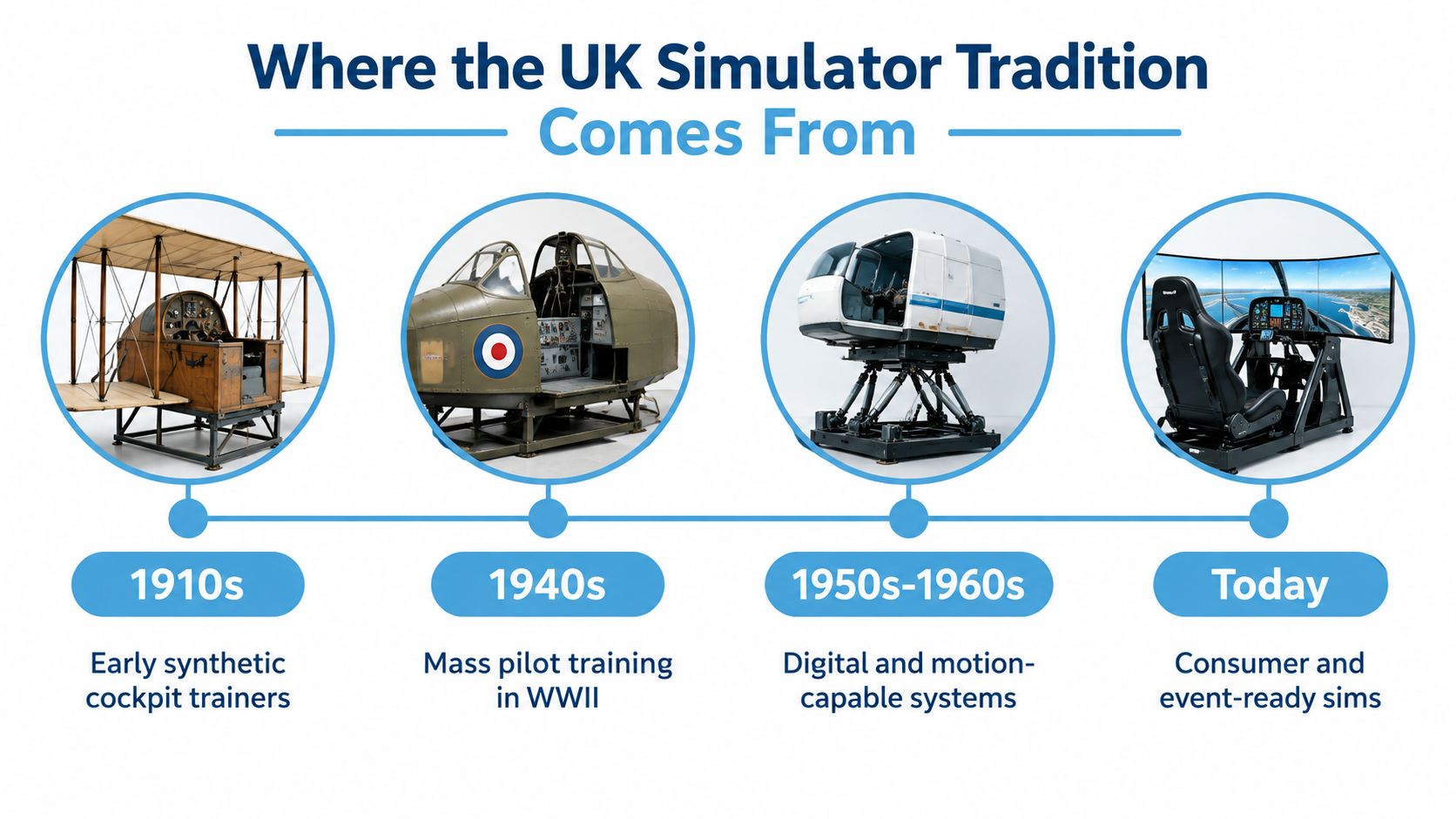
Where the UK Simulator Tradition Comes From
The UK's connection with synthetic flight training began long before modern event attractions. Around 1910, predecessor organisations of the Royal Air Force used crude, manually operated devices to introduce pilots to aircraft controls and the sensations of pitch and roll. By the Second World War, major air forces were using Link Trainers for basic instrument training, showing that simulated flight had become part of aviation education rather than merely an exhibition novelty. The Royal Air Force Museum's history of flight simulation traces this development.
The technology changed substantially during the 1950s and 1960s, when digital computers enabled real-time simulation and motion systems made training environments more physically convincing. Modern simulators can reproduce programmable weather, aircraft types and failures, allowing instructors to create situations that would be difficult or dangerous to reproduce in an aircraft. The RAF Museum describes them as a safe and cost-effective way to practise emergency procedures.
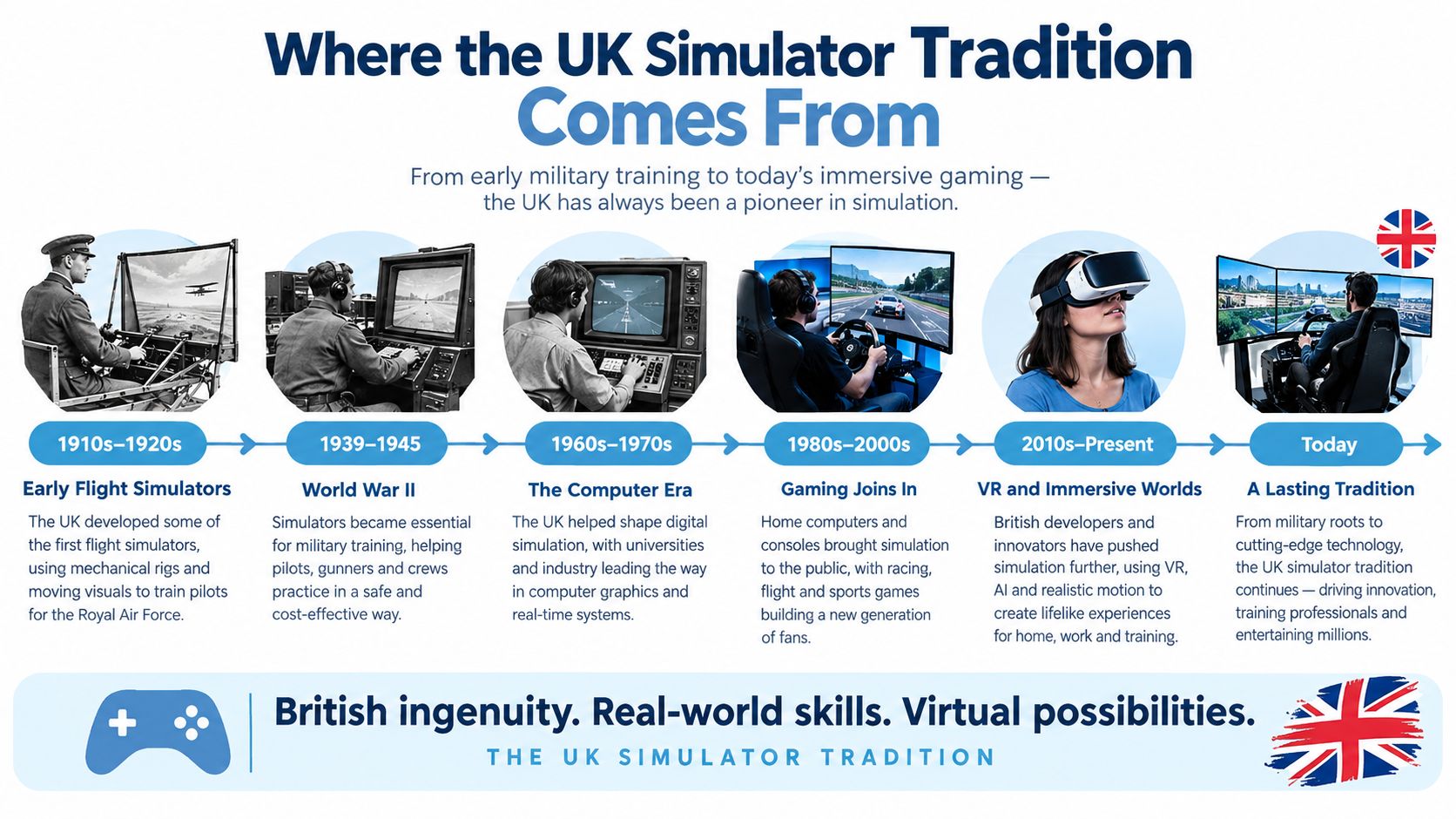
From supplementary tool to core capability
The scale of UK military training shows how far simulation has developed. Since 2008, the UK Military Flying Training System has been delivered through a 25-year programme valued at £3.5 billion, and by 2023 its provider reported that nearly 2,000 military aircrew trainees from the Royal Navy, British Army and Royal Air Force had graduated through an integrated live-and-synthetic model. The same account records more than 133,000 flying hours and 91,000 simulator hours, across six UK locations, with 110 aircraft, more than 100 simulators and 410 staff. These figures come from Ascent Flight Training's programme account.
Present-day UK military pilot trainees can expect to spend more than 60 hours on synthetic training systems, according to the RAF Museum. That heritage explains why a commercial rig can combine cockpit controls, visual systems, motion and scenario interaction in a coherent way.
It doesn't mean an event simulator is claiming military or airline qualification. The CAA requires a certified Full Flight Simulator used for commercial-pilot testing to have a valid Simulator Qualification Certificate, be serviceable and represent the applicant's aircraft class or type and configuration. The relevant CAA testing guidance makes clear that realism includes certification and operational condition, not appearance alone.
Where Flight Simulators Work Best at Events
A simulator works differently in an exhibition hall than it does at a private celebration. The same cockpit may support lead generation in one setting, team communication in another and simple entertainment somewhere else. Start with the event behaviour you want, then select the aircraft, display and staffing arrangement.
Exhibitions
At a trade show, visibility matters before the visitor sits down. A cockpit with large screens creates a natural stopping point, but the attraction should have a clear handover between observer, participant and sales conversation.
Place lead capture outside the operating seat rather than making the pilot complete a form mid-session. An operator can explain the challenge, a host can speak to waiting visitors, and a sales representative can follow up once the participant has finished. The main measures are usually relevant conversations, qualified contacts and the quality of dwell time, not just the number of people who touched the controls.
Brand activations
A brand activation needs a defined story. An aircraft manufacturer might use a route, aircraft system or landing challenge. A technology brand might focus on data, automation or visualisation. The simulator should make that story visible in the first few seconds, because visitors won't wait through a technical explanation before deciding whether to join.
A scenario with a clear start and finish is easier to repeat than an open-ended flight. The operator can reset it consistently, and the brand team can connect the result to a product message without pretending that the visitor has completed professional training.
Team-building days
For teams, the value often comes from communication rather than individual flying skill. One participant may operate the controls while others read instructions, monitor conditions or make decisions. A facilitator should define the task and debrief the behaviour, otherwise the session can become a queue of unrelated turns.
The CAA recommends that crew human-factors and crew-resource-management training should, where practicable, take place in a simulator capable of reproducing a realistic operational environment. Its framework includes briefing and debriefing, with objectives generally set at Level 3, where participants apply skills rather than merely recall information. CAA human-factors guidance supports using scenario-based communication and review in a structured event.
Hospitality and private celebrations
A private event can allow more relaxed participation, but the planner still needs a rotation method. Decide whether guests will fly individually, compete on a score or take part in a shared challenge. A visible leaderboard may energise a corporate group, while a quieter guided experience may suit a family celebration.
Keep spectators involved with an external display or commentary. The simulator shouldn't become a closed box that entertains one person while everyone else waits without context.
Choosing Between Fixed-Wing and Helicopter Setups
The aircraft choice changes the task more than many buyers expect. A fixed-wing experience usually gives a newcomer a familiar narrative, take-off, navigation and landing. A helicopter experience focuses on attitude, position and precision, often at lower speed and closer to the visual environment.
Fixed-wing for clear, repeatable challenges
Fixed-wing rigs suit general audiences when the objective is fast comprehension. A landing challenge can be explained quickly, watched easily and scored consistently. The cockpit geometry is often familiar to visitors who have flown as passengers, and a fixed-base screen setup can provide good spectator visibility.
Choose fixed-wing when your event needs broad accessibility, straightforward storytelling or a high number of short turns. Motion can add impact, but it isn't always necessary for the activity to feel complete.
Helicopter for precision and narrative
Helicopters earn their place when the event story involves rescue, surveillance, difficult access or precision work. Hovering and positioning require a different kind of concentration, and the surrounding scenery can become part of the task. A helicopter rig may also create a stronger visual hook when the brand wants to associate itself with response, exploration or specialist operations.
Helicopter flight simulator hire is worth considering when those scenarios matter more than maximum throughput. Ask how the supplier handles pedal reach, seating position, sightlines and instructor control, because the aircraft's physical arrangement affects who can participate comfortably.
Compare the experience, not only the hardware
VR can make either aircraft feel immersive, but a headset reduces the shared visual field for spectators. Screens support group viewing and easier photography. Motion can reinforce force cues, while a fixed base simplifies access and comfort management.
A useful buyer's test is simple. If a participant has only a short turn, will the aircraft type and scenario make sense within that time? If the answer is no, the more specialised rig may create a longer queue without creating better engagement.
Site Planning, Logistics and Safety
A simulator hire is a small live production, not just a piece of equipment delivered to a stand. The venue team needs to confirm access, floor loading, power, build times, public flow, storage and emergency routes before the supplier arrives.
Start with the physical route. Measure the entrance, lift, corridor and final position, then check whether the assembled cockpit can reach the operating area. Allow space for the operator, participant transfer, waiting visitors and a clear exit. Motion platforms and VR users need additional attention because movement, cables and visual disorientation can affect nearby people.
The pre-show checks that prevent avoidable failures
- Access: Confirm delivery doors, loading restrictions, lift dimensions and venue-approved delivery windows.
- Power: Ask the supplier for the electrical requirement and identify the dedicated supply with the venue.
- Flooring: Check whether the surface is level, stable and suitable for the rig or platform.
- Build: Agree installation, testing, branding, operator briefing and breakdown timings.
- Safety: Request RAMS, PAT testing evidence, pre-show inspection arrangements and emergency procedures.
- Insurance: Treat £10 million products, employee and public liability insurance as the baseline stated by PSW Events, not as a substitute for venue-specific safety planning.
- Staffing: Confirm who briefs users, controls scenarios, manages the queue, cleans shared equipment and handles an early stop.
- Egress: Keep the operating position and waiting area away from fire exits, service routes and emergency access.
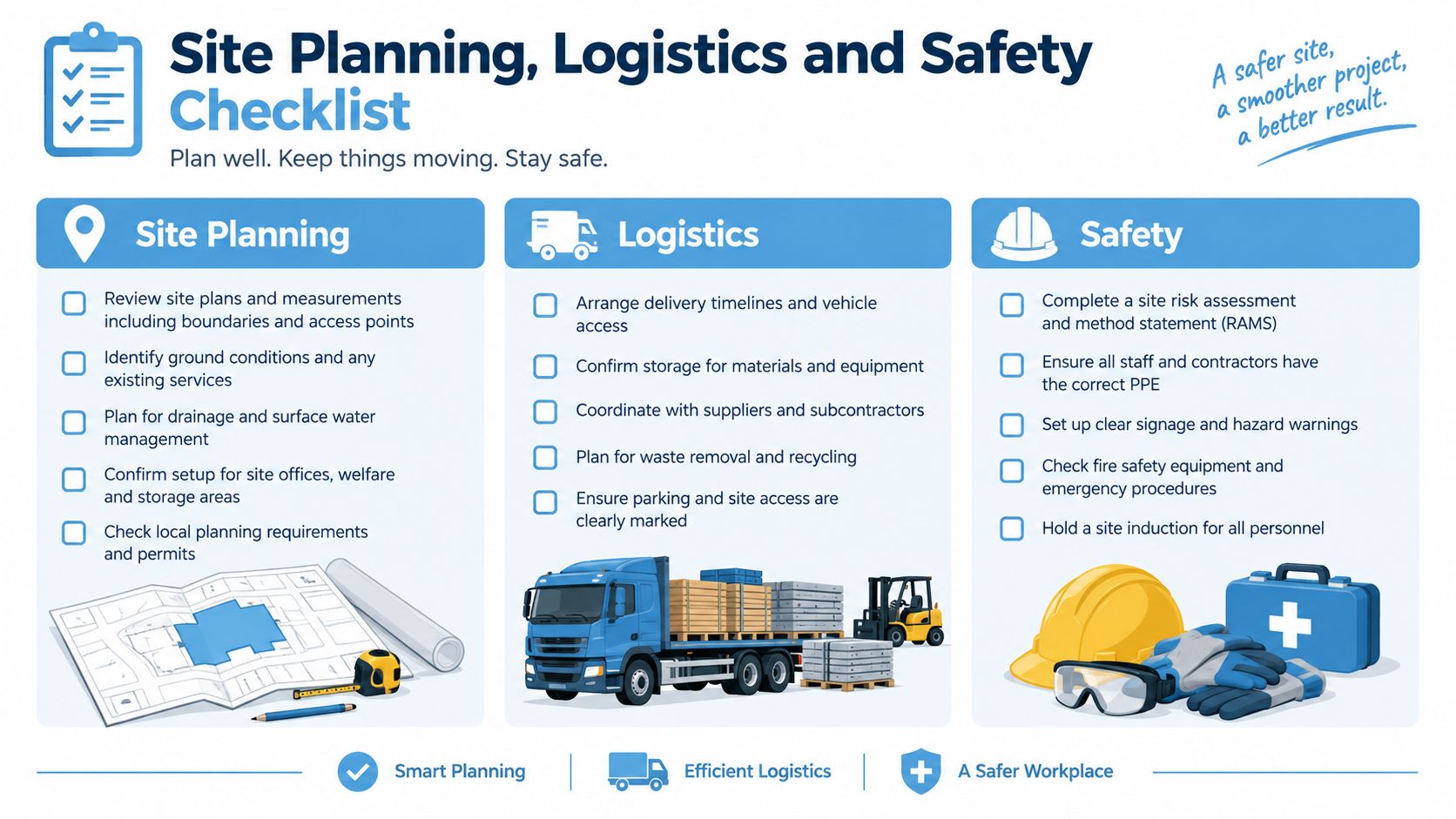
Use the table during the venue recce rather than leaving these questions to the week of the event.
| Item | Confirm With | Done? |
|---|---|---|
| Delivery route and access times | Venue operations and supplier | ☐ |
| Final footprint and spectator flow | Production manager and venue | ☐ |
| Power supply and cable management | Venue electrician and supplier | ☐ |
| RAMS and PAT testing | Supplier and venue H&S contact | ☐ |
| Operator position and emergency stop | Supplier | ☐ |
| Participant access and transfer method | Supplier and event access lead | ☐ |
| Branding, screens and lead capture | Client, agency and supplier | ☐ |
| Build, test and breakdown schedule | Venue, crew and supplier | ☐ |
For technical dimensions and operating conditions, ask the supplier for a written flight simulator requirements guide before approving the floor plan. A reliable operator should answer in venue language, with drawings, power information and named responsibilities.
Accessibility and Inclusive Design
A wheelchair-accessible venue doesn't automatically make a flight simulator accessible. The participant may still need to transfer into a restricted cockpit, reach pedals, see over an instrument panel or tolerate a visually demanding environment. Treat access as an engineering brief with a participant journey, not as a single badge on a booking form.
The University of West London's FlightPad information identifies restricted simulator access, possible difficulty seeing out of the window for people below 4 ft 8 in, potential motion-sickness reactions even when the simulator itself doesn't move, photo-sensitive epilepsy restrictions and a maximum of four guests per flight. Its flight simulator experience information gives planners a useful example of the detail that a generic label leaves out.
UK listings can also conflict. One may advertise wheelchair accessibility, while another states that its simulator isn't wheelchair accessible but its VR experience is. That difference is exactly why the buyer needs written answers before signing.
Questions to put to the supplier
- Is the route to the simulator step-free, and does the cockpit require a transfer?
- Can a companion enter or view the experience, and how many spectators can stand safely nearby?
- Are there seat, harness, height, reach or pedal restrictions?
- Can the supplier offer a fixed-base, screen-based or non-flying alternative?
- What sensory warnings apply to motion, flashing imagery, sound and VR?
- Can the operator provide a quiet briefing and stop the session immediately?
- How will the team rotate participants without exposing someone to unnecessary waiting or crowd pressure?
If a guest uses a mobility scooter, the venue and transport plan may need separate checking. A guide to mobility scooters cleared for air travel illustrates why equipment dimensions and travel arrangements should be discussed early, even though event access requirements are a separate issue.
Comfort, Motion Sickness and Briefing Best Practice
Comfort is an operational issue because an uncomfortable participant may leave early, discourage others or require the operator to stop and reset the session. The supplier should design the experience so that visual motion, physical movement and task difficulty rise progressively rather than arriving all at once.
UK research on a virtual-reality flight-training device recorded a moderate cybersickness severity score of 16.2, while cautioning that the result shouldn't be treated as a universal benchmark. The study reported symptoms including visual disturbance, reduced hand-eye coordination and gastrointestinal effects, and found no evidence that VR exposure reduced situational awareness overall. It did find that degraded stimuli, such as an aircraft upset in instrument meteorological conditions, increased attentional demand. The exploratory VR flight-training study supports a cautious, staged approach.
A practical operator sequence
Begin with stable visual references and a seated control position. Explain how to stop, remove the headset or leave the cockpit before the scenario starts. Introduce turbulence, motion or abnormal conditions only after the participant has acclimatised, and keep frame rate and head tracking consistent throughout the turn.
The operator should check in between sessions rather than waiting for visible distress. Clear access to the exit, clean shared headsets and a simple alternative activity help the event continue without pressuring anyone to fly.
Supplier questions: How do you stage motion and turbulence? What happens if a participant feels unwell? Can the experience run without VR or movement? Who monitors the user while the operator controls the scenario?
Ask for those answers alongside the footprint and power requirements. A technically impressive rig that causes abandoned sessions may perform worse than a simpler simulator that people understand, enjoy and can safely leave.
PSW Events provides mobile flight, helicopter and full-motion simulator experiences for exhibitions, conferences, brand activations, team-building days and private events, with planning, logistics, installation, staffing and H&S support. Visit PSW Events with your venue, audience and event objective to discuss a flight simulator experience that fits the space and the people using it.