If you're planning a racing simulator activation, your attention probably starts with the visible pieces. The car seat. The screen size. The branding wrap. The leaderboard. The queue around the stand.
That makes sense. Those are the parts everyone sees first.
But guests don't judge the quality of the experience with their eyes alone. They judge it with their feet. If the brake feels vague, too soft, too stiff, or inconsistent from one driver to the next, the whole activation starts to feel less polished than it looks. That's why racing simulator pedals matter far more than most event briefs assume.
For corporate planners, this isn't a hobbyist conversation about shaving tiny margins off lap times at home. It's an operations decision. Pedal choice affects accessibility for first-time users, fairness in timed competitions, reset speed between guests, and how much intervention your staff need to provide during a busy event day.
Why Pedals Are the Unsung Hero of Sim Racing Events
A common planning mistake is spending heavily on the parts that photograph well, then treating the pedals as a bundled extra. On paper, the rig still looks premium. On the floor, the weak point shows up quickly.
One guest brakes too early because the pedal has no meaningful resistance. Another stamps on it and gets a completely different response. A third asks whether the simulator is broken because the pedal travel feels cheap compared with the steering feedback. None of those moments ruin an activation on their own. Together, they chip away at confidence, throughput, and competitive trust.
That matters more now because sim-racing hardware has moved well beyond niche enthusiast use. Industry reporting projects continued growth in the wider category, with steering wheels forecast to grow at 8.9% CAGR and motion platforms at 8.4% CAGR, showing sustained demand for more accurate setups across training and entertainment use cases, according to Fact.MR's sim-racing gear market outlook.
What planners notice too late
Pedals affect three things immediately:
- Immersion: Guests forgive a lot if the controls feel believable. They notice bad braking faster than they notice a subtle graphics upgrade.
- Fairness: If you're running fastest-lap competitions, inconsistent pedal feel creates arguments about whether the leaderboard is skill-based.
- Reliability: Pedals take repeated force from every participant. That makes them one of the hardest-working parts of the rig.
Practical rule: If the pedals feel like an afterthought, the whole simulator feels like an afterthought.
The broader history of sim racing also helps explain why expectations have changed. Coverage of the category traces the roots back to arcade titles such as Night Driver and Pole Position, but the rise of direct-drive and load-cell hardware in the 2000s and 2010s pushed realism much further. For event guests, that means the gap between a toy-like setup and a premium setup is now obvious.
Understanding the Four Main Types of Racing Pedals
When suppliers talk about pedals, the language can get technical quickly. For event planning purposes, the simplest way to understand the differences is to focus on what the pedal measures and how that affects guest behaviour.
Potentiometer pedals
A potentiometer pedal measures position. It operates similarly to a volume knob. The system reads how far the pedal has moved.
That's why these pedals are common on entry-level setups. They're simple and familiar. For event use, though, they usually feel less convincing on the brake because braking in a real car is more about pressure than distance.
In a low-pressure fun zone, they can still do the job. In a competitive environment, they often expose their limits.
Hall-effect pedals
Hall-effect pedals also measure position, but they do it magnetically rather than through direct contact. The practical event takeaway is that they're generally cleaner and less prone to wear than basic potentiometer systems.
They're often a sensible choice for throttle input, where smooth position tracking matters. On the brake, they still share the same limitation as other travel-based systems. The guest learns a pedal distance rather than a braking force.
Load-cell pedals
A load-cell pedal measures force. The easiest analogy is a bathroom scale. Instead of asking how far the pedal moved, it asks how hard the driver pushed.
That is why load-cell brake pedals are so widely recommended. UK-facing guidance describes them as the strongest value-to-performance upgrade because they improve lap-time consistency by tying braking to muscle memory and pressure control rather than travel distance, as explained in this sim-racing pedals buyer's guide. For events, that matters because repeatable braking gives guests a fairer run, especially when they only get a short session.
Hydraulic pedals
Hydraulic pedals use fluid pressure to mimic a more authentic brake feel. When they're good, they feel excellent. They can deliver a very convincing progressive resistance.
For shared-use event hire, the trade-off is complexity. More realism doesn't always mean better operations. If a feature needs extra maintenance, more careful tuning, or more time to explain, its value depends on the event format.
Racing Pedal Technology Comparison for Event Hire
| Technology | How It Works | Feel & Realism | Durability Rating | Best For |
|---|---|---|---|---|
| Potentiometer | Measures pedal travel | Basic, easy to understand, less realistic on brake | Moderate for light use | Casual fun use and simple arcade-style activations |
| Hall-effect | Measures pedal travel with magnetic sensing | Smoother than basic entry systems, still travel-based | Good | Throttle and clutch duties in shared rigs |
| Load cell | Measures applied force | Strong brake realism and better consistency | High | Competitive events, branded leaderboards, repeatable guest runs |
| Hydraulic | Measures pressure through a fluid system | Most car-like feel when tuned well | Depends heavily on maintenance | Specialist installs where realism outweighs simplicity |
What usually works best at events
For most corporate activations, load-cell braking is the practical middle ground. It gives a clear step up in feel and consistency without pushing straight into the complexity of more specialist systems.
What doesn't work as well is buying on spec-sheet prestige alone. A pedal can be technically impressive and still be the wrong choice if guests only have a brief run, are wearing mixed footwear, and need to understand the controls immediately.
Better hardware isn't the same as better event hardware. The right pedal is the one that stays consistent across constant turnover.
Decoding Key Pedal Specifications for Event Use
The technology type tells you how a pedal behaves. The specifications tell you whether people can use it comfortably all day in a live environment.

Pedal travel and why it changes guest confidence
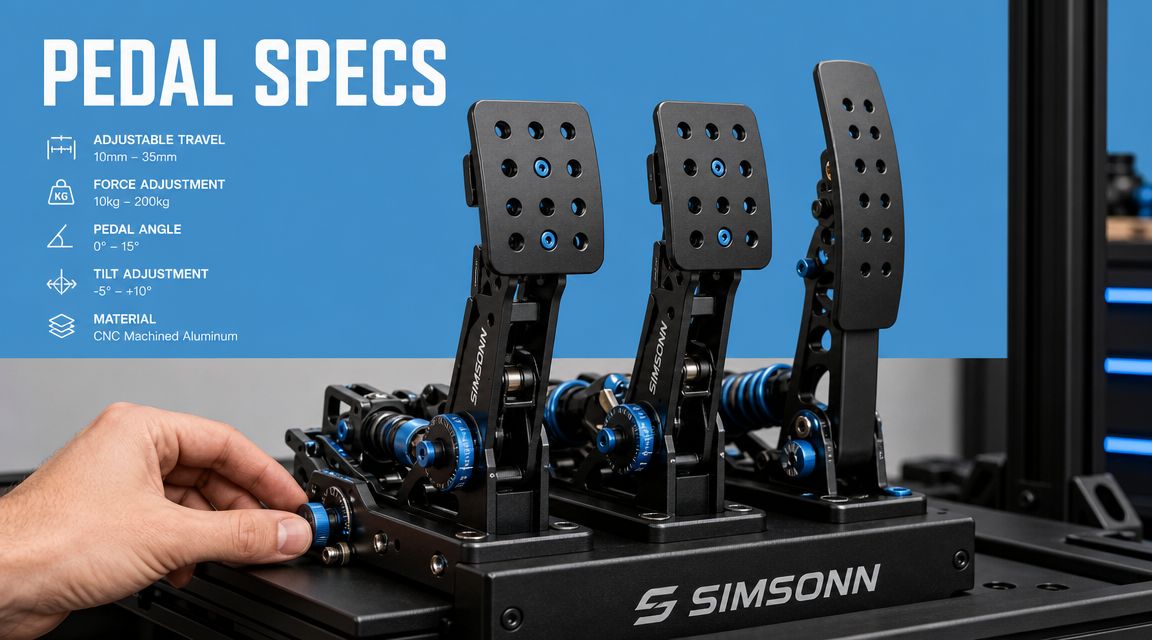
Pedal travel is the amount of movement before the input reaches full range. Too much travel can make the brake feel vague for first-time users. Too little can make the controls feel abrupt and unforgiving.
For events, the aim isn't to create a perfect replica for one skilled driver. It's to create a pedal response that feels intuitive to a wide range of guests within seconds. That usually means avoiding extremes.
A brake with a more progressive feel helps here. Premium pedal systems increasingly use dual-stage behaviour, with a softer initial phase and a firmer phase later in the stroke. UK-oriented technical guidance also describes adjustable resistance and brake forces in the 100 kg to 140 kg range, with some load cells rated up to 200 kg capacity, in this Demon Tweeks overview of sim-racing pedals. The operational benefit is simple. A firmer, clearer brake reduces accidental over-braking and gives guests better feedback.
Angle and adjustability
Angle matters more at exhibitions than many planners realise. Guests arrive in trainers, dress shoes, and sometimes less simulator-friendly footwear. They vary in height, leg length, and confidence.
A highly aggressive pedal angle may suit an enthusiast who settles in for a long session. In a shared activation, it can slow everything down. Neutral geometry is often the smarter choice because it works well enough for more people with fewer adjustments.
Key features worth asking about include:
- Pedal face position: Wider or adjustable faces can make foot placement easier for inexperienced users.
- Angle range: Useful, but only if it can be set once and left stable during the event.
- Resistance tuning: A brake that can be made firmer without becoming intimidating is valuable.
- Heel support: Helps guests place their feet consistently, especially in short timed runs.
A quick visual explanation can help non-technical teams understand what they're looking at:

Resistance is not just for experts
A common misconception is that firm or tunable pedals only matter to advanced drivers. In practice, sensible resistance can make the simulator easier for novices because the controls communicate more clearly.
That doesn't mean maxing everything out. It means setting the brake so guests can feel the threshold instead of guessing it.
A brake pedal should guide the user, not surprise them.
Ensuring Compatibility with Your Rig and Software
Pedals can be excellent on their own and still become a headache if they're awkward to integrate. For event use, compatibility is less about theoretical possibilities and more about clean setup, quick troubleshooting, and stable operation.
USB direct versus wheel-base connection
Most racing simulator pedals connect in one of two ways. They either connect directly by USB to the host system, or they connect through the steering wheel base.
A direct USB connection can be useful because it separates the pedal system from the wheel hardware. If you need to diagnose an issue, the fault path is usually clearer. The downside is that each extra connection point is another thing to secure, label, and check during setup.
A wheel-base connection can create a tidier install with fewer visible cables. For temporary event environments, that simplicity is attractive. But if one component in that chain has a problem, diagnosis can become slower.
The right answer depends on the rig and the support model behind it. If you'd rather not piece together that decision yourself, a specialist supplier with complete car simulator hire options can specify a matched package rather than leaving integration to chance.
Two pedals or three
For most public-facing activations, two pedals wins.
Historical summaries of sim racing note that the common setup is a brake-and-accelerator pair, while a clutch pedal is optional and mainly useful for manual-gear or historic driving, as described in The Hoosier 500's overview of sim-racing history. That lines up with what works on event floors. Most guests don't need a clutch to have fun or post a competitive time.
A third pedal can add authenticity for enthusiast audiences. It can also add hesitation, mis-starts, and briefing time.
A practical compatibility shortlist
Before sign-off, confirm these points:
- Mounting standard: The pedal plate and rig need to match securely.
- Cable route: No loose or exposed runs where guests or staff move around the attraction.
- Game support: The target title should recognise the pedal input without awkward workarounds.
- Reset behaviour: After each session, the system should return to a known baseline quickly.
If a setup fails any of those checks, the issue isn't just technical. It's operational.
Critical Considerations for Event and Exhibition Hire
Home-rig advice often assumes one driver, one seat position, one pair of shoes, and lots of time to fine-tune. Exhibition halls are the opposite. You need a system that survives constant use, accepts mixed-ability guests, and resets fast.

Durability first
A pedal set in an event environment gets treated far more aggressively than one in a spare room. Guests brake hard. Some stamp instead of modulate. Others rest both feet awkwardly across the plate while they get settled.
That's why build quality matters in practical terms. Rigid construction, secure mounting, and stable adjustment points matter more than a long list of enthusiast features that no one will use on the day.
If you are choosing between "ultimate realism" and "something that keeps working smoothly across the entire show", choose the second option. Every time.
Hygiene and surface design
Pedals are touched by shoes all day, often in poor weather, and not always with clean soles. That affects presentation as well as maintenance.
Good event-grade pedal choices should be easy to wipe down, easy to inspect, and free from awkward recesses that trap dirt. Metal faces can look premium, but finish and shape still matter. A surface that looks great in product photography can become messy very quickly under exhibition traffic.
Accessibility beats perfection
One of the biggest gaps in mainstream pedal guidance is that it rarely answers the question corporate planners face. How do you configure pedals for hundreds of guests with different leg lengths and footwear moving through in quick succession? That operational gap is highlighted in this Asetek guide on sim-racing seating position, which shows how much existing advice is still focused on single-user setups.
For event use, three things matter more than hobbyist optimisation:
- Neutral pedal angle: More forgiving for mixed audiences.
- Quick seat adjustment: Easier than constantly changing pedal position.
- Fast calibration reset: Keeps each run fair without technical delay.
A lot of premium home-rig setups are too personalised for public use. They feel excellent for their owner and awkward for everyone else.
Do high-end features always pay back
Not always.
There is a valid commercial question around whether advanced pedal tuning delivers meaningful value in short-format sessions, especially when guests may only drive briefly. Some features clearly help. Others mainly increase setup complexity.
That doesn't mean premium pedals are wasted. It means the return comes from consistency, fault tolerance, and ease of use, not from owning the most exotic hardware available.
If you're evaluating options for a public activation, compare them through the lens of racing simulator hire rather than enthusiast ownership. You're buying repeatable guest experience, not a private dream build.
The best event pedal is rarely the most extreme one. It's the one that lets the hundredth guest have a run as cleanly as the first.
Setup and Integration Tips for Flawless Operation
Day-of-event problems are usually mundane. A pedal base shifts. A cable gets nudged loose. The brake calibration drifts after repeated use. None of that is glamorous, but it decides whether the simulator feels professional.
Secure the pedal base properly
If the pedals move under braking, guests lose confidence immediately. The rig feels unstable even when everything else is working.
Use a rigid pedal deck and lock the mounting points firmly. Friction alone isn't enough in a busy activation. If the setup includes branded race seats hire, check that seat adjustment doesn't compromise pedal reach after repeated user changes.
Keep cable management boring
Good cable management should be invisible. Route pedal cables away from guest entry points, staff walkways, and cleaning areas.
A simple day-of checklist helps:
- Anchor cables early: Don't wait until final dressing when the stand is already busy.
- Label connections: Fast fault finding matters when queues are building.
- Protect floor runs: Any exposed section needs proper cover and tidy routing.
Recalibrate on your terms, not when forced to
Pedals should be calibrated before the event opens, then checked at planned intervals rather than only after complaints. That is especially important if the format includes timed laps or head-to-head competition.
A good operating routine is to:
- Test throttle and brake response before doors open.
- Confirm the brake reaches full intended input without requiring awkward force.
- Recheck after any rig movement or seat-position change that feels unusual.
- Keep one staff member responsible for control feel, not just general queue management.
The smoother this process is, the less often guests notice that any technical process happened at all.
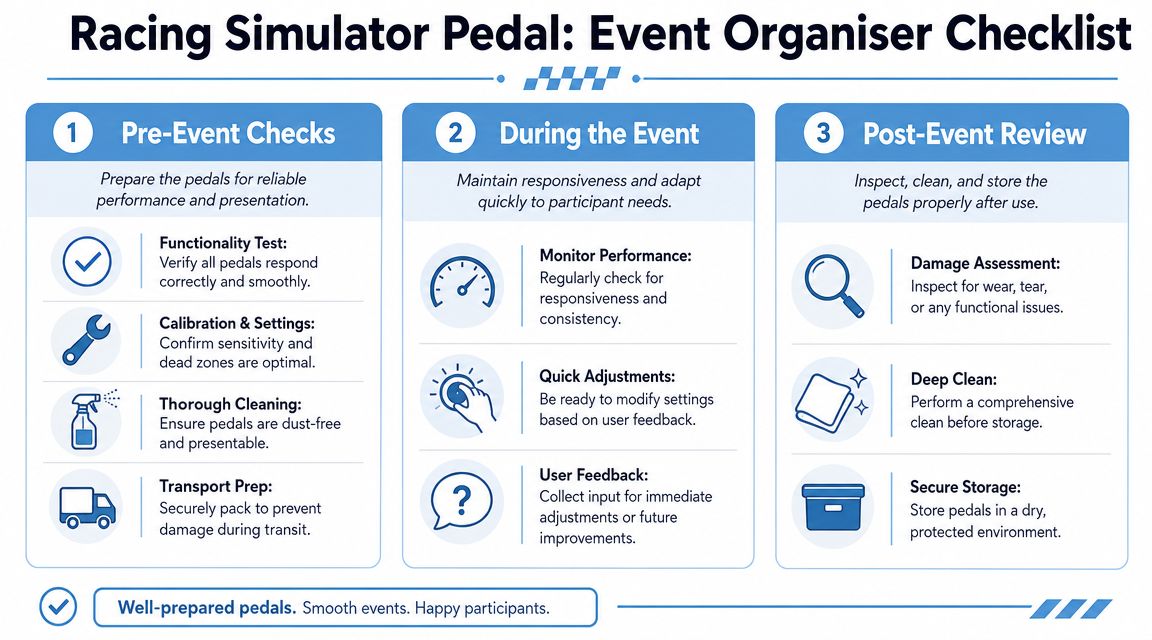
A Maintenance and Rental Checklist for Organisers
The easiest way to avoid pedal problems is to treat them like a working event asset, not a static accessory. A simple checklist keeps everyone aligned, especially when operations, production, and venue staff are all involved.

Pre-event checks
Before guests arrive, confirm the basics:
- Functionality test: Verify that throttle, brake, and any clutch input respond smoothly.
- Mounting check: Make sure the pedal base is firmly fixed and doesn't shift under pressure.
- Calibration review: Confirm sensitivity and dead-zone settings suit the event format.
- Cleaning pass: Start with pedals clean, dust-free, and presentation-ready.
- Transport check: If the rig has just arrived, inspect for knocks, loose fittings, or shifted hardware.
During the event
Once the activation is live, focus on consistency:
- Monitor response: Watch for delayed or erratic input, especially on the brake.
- Reset smartly: If multiple guests are cycling through quickly, keep the setup on a known baseline.
- Wipe down regularly: Shoes bring dirt fast. Clean little and often.
- Listen to feedback: If several guests mention the same issue, assume it's real and inspect it.
- Check movement: Reconfirm that the pedal set hasn't loosened under repeated heavy braking.
Small issues don't stay small on a live event floor. They spread through the queue as soon as guests start talking.
Post-event review
After close, do more than just pack down:
- Inspect wear: Look for loose bolts, damaged faces, cable strain, or unusual pedal feel.
- Deep clean: Remove surface dirt before storage or transport.
- Log issues: Note anything that needs repair, replacement, or retuning before the next deployment.
- Store properly: Keep pedals dry, protected, and secure in transit cases or storage boxes.
This is the difference between a rig that performs consistently across hires and one that slowly becomes unreliable.
Frequently Asked Questions
How much space do racing simulator pedals need at an event?
The pedal set itself doesn't usually drive the footprint. The primary space issue is the relationship between the pedals, seat travel, guest entry, and staff access. A setup can look compact on a floorplan and still become awkward if guests can't get in and out cleanly. Ask your supplier to account for approach space, not just rig dimensions.
Can pedals be branded for an activation?
Usually, branding is better applied around the simulator environment than directly onto the pedal faces. The pedals need grip, durability, and easy cleaning. Branded side panels, seat surrounds, monitor frames, and leaderboard areas tend to carry the visual identity more effectively without compromising usability.
Should we use a clutch pedal for family days or mixed audiences?
In most cases, no. A two-pedal setup is easier to explain and easier to use. A clutch only makes sense if the audience specifically expects manual-gear authenticity or the content has been built around that driving style. For broad public use, simpler controls almost always improve throughput and confidence.
Are premium pedals wasted on short sessions?
Not if the premium value is in consistency and feel rather than complexity. Guests may not consciously identify a load-cell brake or a tunable resistance curve, but they do notice when the controls feel believable and repeatable. The return comes from smoother guest experience, fewer staff interventions, and cleaner competition.
What causes the most avoidable pedal problems at exhibitions?
Loose mounting, poor cable routing, and over-tuned settings. Most event issues aren't caused by obscure hardware faults. They're caused by a setup that wasn't configured for constant user turnover.
Choosing racing simulator pedals for an event isn't about impressing an enthusiast on a spec sheet. It's about giving every guest a clear, reliable, enjoyable drive while keeping the attraction easy to run.
That's the standard worth buying for.