
You're standing at a UK trade show, watching a queue form around a racing simulator with a VR headset. Visitors are laughing, leaning into corners and asking when they can have a turn. The attraction is obvious, but so are the practical questions: will it fit on the stand, can unfamiliar users operate it safely, and will the experience still work after hours of repeated sessions?
A racing simulator VR activation can create a stronger reason to stop than a passive display. It can also introduce latency, motion sickness, accessibility and data-protection issues that a normal exhibition game might not. The right decision isn't based on the headset alone. It depends on how the full system performs when a queue of mixed-experience guests, venue restrictions and brand objectives are added.
Why VR Racing Simulators Are on Every Event Planner's Radar
At a busy trade show, a simulator can attract attention before a host says a word. The planning decision comes afterwards: use it as a quick visual draw, or connect each lap to a wider brand conversation. A host can explain the experience, a branded leaderboard can encourage return visits, and a spectator screen can keep the surrounding queue engaged while another guest drives.
That matters because event audiences increasingly expect participation, not only signage and brochures. Racing supplies an immediate, understandable task. Guests do not need to study a complex product first. They recognise the steering wheel, understand the challenge of a lap time and can watch someone else compete before joining.
The appeal extends beyond gamers because the task is easy to understand on a busy stand. With a short host briefing, a first-time guest can complete a lap in under 60 seconds, helping the team plan queue turnover. The wider UK market provides useful context, as outlined in this guide to virtual reality in events. Grand View Research estimates that UK virtual-reality gaming generated US$1,376.2 million in 2024, with a projection of US$4,081.1 million by 2030 and a forecast compound annual growth rate of 19.1% from 2025 to 2030. These figures cover VR gaming overall, not racing simulators specifically, so they indicate market conditions rather than guaranteed event demand.
Practical rule: Treat the simulator as a conversation starter, not the entire activation.
The visual impact fades when the experience has no story, host or useful next step. Plan what happens before the headset goes on, during the drive and after the guest finishes. The brief should also cover staffing, footprint, insurance, recovery procedures, headset latency, accessibility and the health-and-safety paperwork required by the venue.
A hire-ready plan links those details to the brand objective. It treats the simulator as an event operation involving equipment, people and follow-up, rather than as a standalone game. This guide examines the setup, comfort-related technical choices, hiring versus buying, and supplier briefing for exhibitions, conferences and private corporate events.
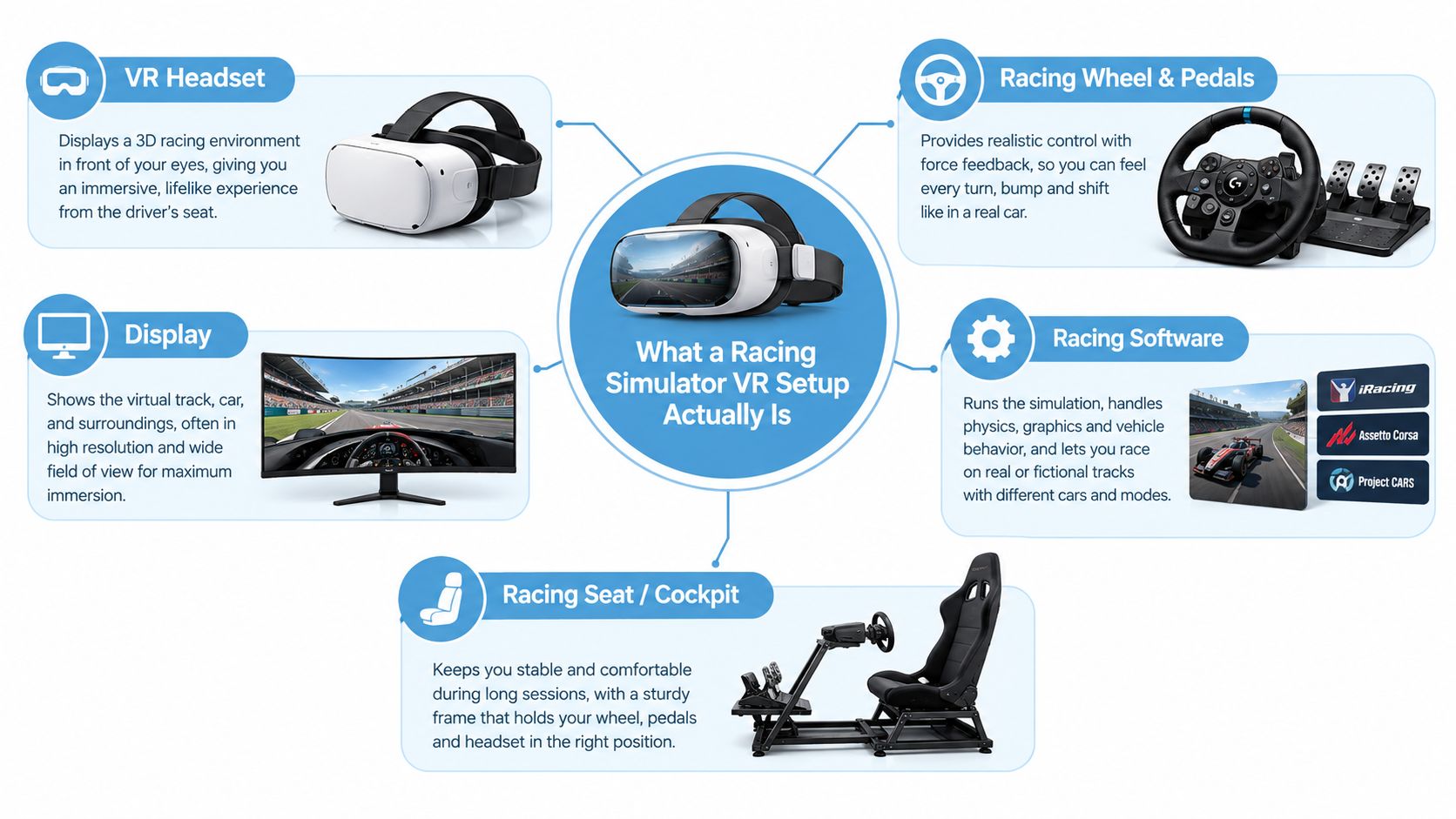
What a Racing Simulator VR Setup Actually Is
A useful analogy is a cockpit placed on your desk. The physical steering wheel, pedals and seat occupy the physical space, while the headset replaces the view through a windscreen. The software supplies the road, car and physics. Motion cues then add controlled physical feedback, helping the body interpret braking, acceleration and cornering.
That experience is built from four separate layers:
The headset
The headset displays the virtual track and tracks the user's head position. A PC-tethered model can draw demanding simulation graphics from a dedicated computer, while a standalone unit contains more of its own processing hardware. The choice affects image quality, cable management, setup complexity and the consistency of the experience across repeated sessions.
The rig
The rig provides the seat, steering wheel and pedals. A force-feedback wheel resists the driver's inputs and communicates kerbs, grip changes and steering load through the wheel. Pedals can range from simple consumer controls to equipment designed for more precise braking. A fixed seat usually reduces mechanical complexity. A moving seat adds physical cues but requires more space, power, testing and supervision.
The software
The simulation controls the virtual car, circuit, scoring and session length. Event use favours software that starts quickly, resets reliably and presents a clear finish state. A technically impressive title can still be a poor hire choice if staff need too many steps to launch a race or recover from an error.
The motion layer
Motion platforms may reproduce small pitch, roll and heave cues, or combine movement with vibration through the seat and controls. The aim isn't to throw the participant around. Research indicates that cue consistency is more important than maximum movement amplitude, especially for novice users, and that larger accelerations and rotational movement can be more likely to provoke symptoms in some people. The University of Southampton research also found that sickness increased over time in its experiment involving low-frequency roll motion.
Each layer can be changed independently, which explains why two systems with apparently similar specifications can feel completely different. For planners comparing audience-engagement tools, resources such as Compare vs Stampede can help structure broader supplier and platform comparisons, although the simulator itself still needs a practical on-site test.
The key point is interaction. A sharp headset can't compensate for a poorly calibrated wheel. A powerful rig can't fix a dropped frame. A moving platform won't improve a session if its cues arrive late or the operator can't reset it quickly.
The Technical Specs That Matter at the Stand
A supplier's specification sheet can look impressive while saying little about the guest experience. Event planners should translate each figure into a question about comfort, reliability and throughput.
Latency comes first
End-to-end transport latency is the delay between a participant moving the wheel or head and seeing the corresponding result. It can include input capture, head tracking, rendering, display scan-out and wireless transmission. A peer-reviewed driving-simulation study identifies approximately 50 milliseconds as an upper limit for conventional driving simulation and recommends about 20 milliseconds for head-mounted or head-slaved systems because rapid eye and head movements make users sensitive to delay. The study is available through CORE.
Ask the supplier to validate the complete chain, not just quote the headset's panel response. The wheel, telemetry, motion commands, PC, headset and network all contribute. A stable frame rate at or above the headset's refresh rate, with no dropped frames, is more useful than a headline specification tested in ideal conditions.
Refresh and tracking affect confidence
The headset should maintain a stable image while the participant looks into a corner, checks a mirror or turns their head. Tracking must also remain reliable under venue lighting, near screens and around other structures. Inside-out tracking is simpler to deploy because it uses cameras on the headset. External sensors can offer another approach, but they add mounting, alignment and cable considerations.
| Spec | What it controls | Event impact |
|---|---|---|
| End-to-end latency | How quickly movement appears in the virtual scene | Delays can create visual and vestibular conflict, increasing discomfort |
| Frame-rate stability | How consistently the scene is rendered | Dropped frames can make short sessions feel rough and unpredictable |
| Head tracking | How accurately the view follows the user | Poor tracking breaks immersion and complicates first-time use |
| Wheel and pedal feedback | How the car communicates grip, braking and steering | Good feedback gives guests a clear task without requiring a long tutorial |
| Cable and power arrangement | How the system connects and operates in the venue | Untidy routes create trip hazards and slow resets |
| Motion synchronisation | How physical cues match virtual acceleration | Mismatched cues can feel worse than a fixed-base system |
Before booking, check the available floor area, cable reach, PC graphics requirements and network conditions. A home setup can be tuned for one user. A stand setup must cope with different heights, glasses, driving styles and rushed handovers. This racing simulator setup guide is useful when converting a technical concept into a venue-ready plan.
Hiring Versus Buying a VR Racing Simulator
Hiring and buying solve different problems. Hire gives a company access to equipment, technicians and transport for a defined event. Buying offers control and repeat availability, but it turns the organisation into the equipment owner, operator or maintenance manager.
| Factor | Hiring | Buying |
|---|---|---|
| Initial commitment | A project-based quote | Hardware and software investment |
| Transport | Often arranged by the supplier | Managed in-house or outsourced |
| Operation | May include an experienced operator | Requires trained internal staff or an operator hire |
| Maintenance | Usually handled within the supplier relationship | Owned by the purchaser |
| Branding and configuration | Agreed for each booking | Available whenever the system is set up |
| Storage | No long-term storage burden | Requires secure, suitable space |
| Event flexibility | Easy to scale or change format | The owned specification may limit future briefs |
| Risk | Supplier availability and hire terms matter | The owner carries downtime and depreciation risk |
A hire quotation should state what's included. Check delivery, installation, removal, operator staffing, insurance documents, software licences, branding, cleaning and contingency support. Some suppliers set a minimum booking period, so ask how the quote changes if the event involves an exhibition build, a live show and a breakdown window rather than a simple operating day.
Buying requires a broader calculation. The purchase price is only one part of the cost. Add the computer, headset, wheel, pedals, motion platform, software, replacement parts, maintenance, storage, transport and staff time. A system that sits unused between events may be less economical than a supplier relationship, even if the hardware looks cheaper over the long term.
The hybrid option
A hybrid arrangement can work well. A company might own a branded rig but hire an operator for public-facing events. Another might keep staffing and logistics in-house while hiring specialist hardware for occasional campaigns. This separates the asset decision from the expertise decision.
Before committing, answer three questions:
- Event frequency: Will the equipment appear regularly enough to justify ownership?
- In-house AV capability: Can your team troubleshoot the PC, headset, wheel, software and network on-site?
- Storage location: Is there a secure, dry and accessible place for the complete unit between events?
If the answers are uncertain, compare a fully managed hire with the complete ownership cost, not just the hardware invoice.
Integrating VR Racing into Brand Activations and Events
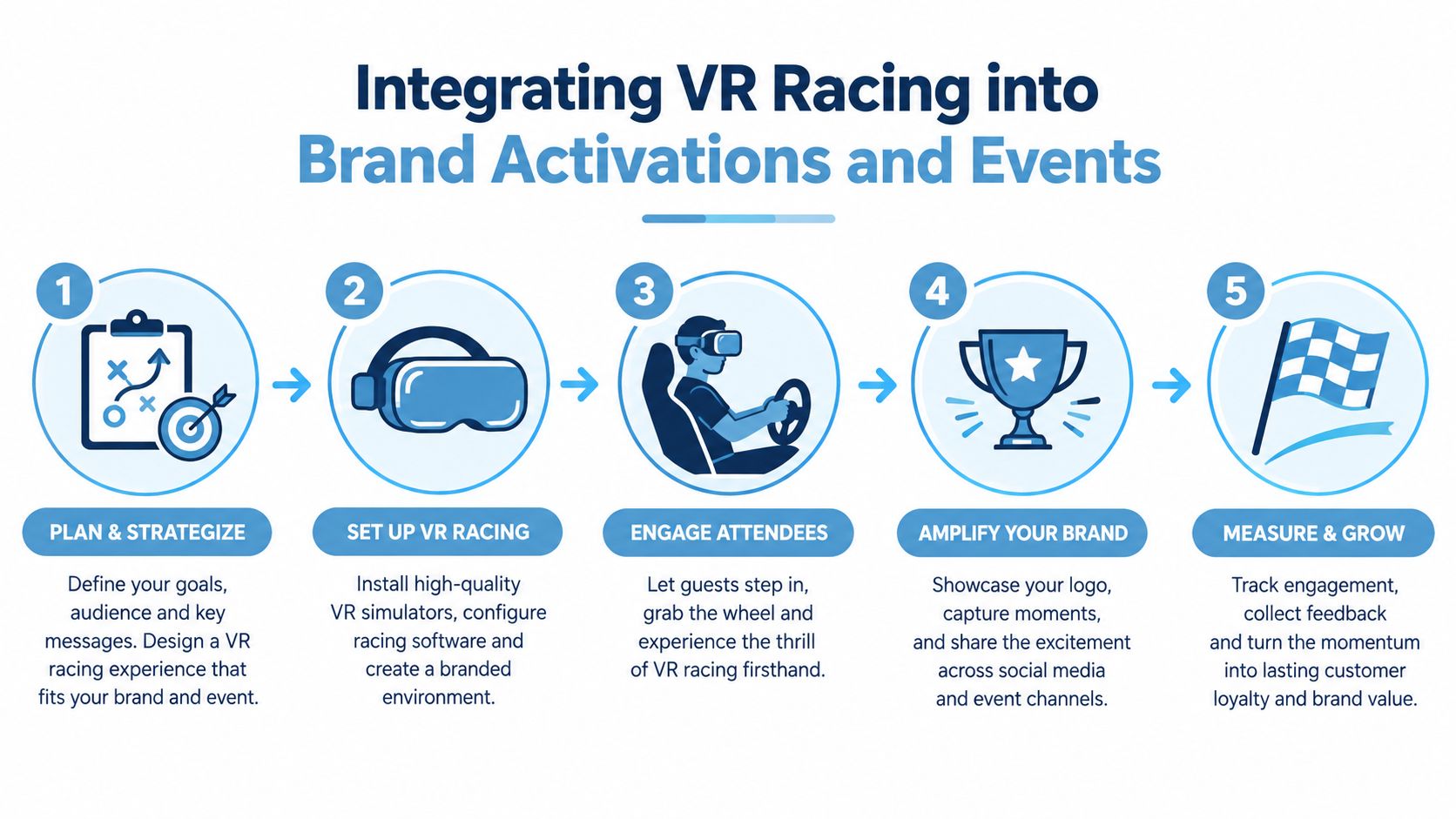
A strong activation begins before the participant reaches the cockpit. At an exhibition stand, a host can explain the challenge while a queue marshal directs visitors to a waiver or consent screen. The participant then receives a short briefing about the headset, controls and possible motion discomfort before staff fit the head strap and check that the view is clear.
The host shapes the meaning of the experience. For a vehicle brand, the story might focus on handling and performance. For a technology company, it could highlight responsiveness, data or engineering. For an employer brand, the race might become a team challenge. The drive should support the campaign rather than sit beside it as an unrelated attraction.
A practical flow looks like this:
- Approach: Use a visible lap-time display or a staff invitation to explain the challenge.
- Consent: Collect only the information needed for the stated purpose, with a clear privacy notice and an opt-in choice for marketing.
- Briefing: Explain the controls, session format, motion-sickness symptoms and how to stop.
- Drive: Keep the participant seated, supervised and focused on a simple objective.
- Follow-up: Display the result, offer a shareable branded asset where appropriate and invite the guest to the next brand interaction.
Build the data layer carefully
A leaderboard can capture attention, but it shouldn't become an excuse for unclear data collection. If the campaign collects email addresses, session results, dwell time or audience movement data, the organiser needs a lawful basis, understandable consent language and a clear retention approach. Heat-mapping and analytics should be explained in the privacy information rather than hidden in general event wording.
Two formats work particularly well:
- Fastest-lap prize draw: Guests opt in, record a result and enter a clearly explained draw.
- Race the pro: Selected clients or senior guests receive a scheduled challenge with a host-led introduction and a visible result.
The system should also support spectators. A lap-time screen, replay view or live leaderboard lets people participate without wearing a headset. That matters because the most memorable activation is rarely the one that only serves the person in the seat.
Safety, Accessibility and Duty of Care for Mixed Audiences
A supplier brief should treat safety and inclusion as part of the experience design, not paperwork added at the end. Start with the operating zone. Keep cables managed, separate spectators from moving equipment, use sanitised face interfaces between users and display clear instructions about motion sickness. PSW Events' health and safety compliance information can help planners identify the documentation and controls to discuss with a supplier.
The spatial arrangement needs particular attention. University of Wales Trinity Saint David guidance specifies 2.5 metres of unobstructed space around each VR user and recommends starting with five-minute sessions followed by a break. The guidance also discusses breaks after 15 to 20 minutes, but an event operator may choose shorter sessions for first-time users and faster queue turnover.
The BBC's VR safety guidance recommends a break of at least 15 minutes after every 30 minutes and says users should stop immediately if they experience nausea, eye strain, disorientation or other discomfort. It also identifies pregnancy, binocular-vision abnormalities, psychiatric disorders, seizures and heart conditions as circumstances in which users should consult a medical professional before using VR.
Design for people who won't use the headset
Motion sickness is a major accessibility issue. A review analysis reported negative motion-sickness feedback in 298 reviews, or 35.9%, and described an enjoyable experience still associated with motion sickness in 148 reviews, or 17.8%. The review analysis identifies smooth locomotion, rapid turning, visual blur and low frame rates as contributors, while noting that seated use can reduce symptoms for some people.
Offer a fixed-base or non-VR alternative, adjustable comfort settings, short turns and a clear stop procedure. Wheelchair users may need a suitable transfer approach or a different control position. Guests with hearing impairments need visual instructions and visible results. Guests wearing glasses need a headset and face interface that can accommodate them. People with epilepsy, pregnant guests and those with other health concerns should never be pressured to participate.
Children require age controls and supervision. UK online-safety guidance states that Meta Quest isn't recommended for under-13s and recommends parental controls and supervised use in shared spaces. A responsible organiser should confirm age suitability with the supplier and venue, establish an approach for under-16s, and provide a spectator role for anyone who can't or doesn't want to use the equipment.
Duty-of-care wording for a supplier brief: “Provide a supervised, seated VR racing experience with a documented risk assessment, safe cable management, accessible instructions, sanitisation between users, an immediate stop process, suitable alternatives and trained staff able to manage discomfort or equipment faults.”
Reference GM GROUP Services' event safety guidance when discussing broader duty-of-care responsibilities with production and venue teams. Also ask how the supplier's paperwork aligns with PUWER, RIDDOR and the Purple Guide where those frameworks apply.
Examples of VR Racing in UK Corporate Settings
At a London ExCeL trade show, the simulator sits on an island stand surrounded by queue barriers. A sponsor-branded leaderboard faces the aisle, while a staff member controls sign-up and keeps spectators away from the operating zone. The commercial test is throughput and useful conversations, not how dramatic the rig looks from a distance.
The host needs a script that works for both the motorsport fan and the person who has never used VR. The fan may want to discuss car setup. The newcomer needs reassurance that the controls are simple and that they can stop immediately. A visible screen gives both audiences a reason to watch.
At a conference at the NEC or Manchester Central, two compact rigs might share a hospitality area. Delegates arrive between sessions, so the operator should prioritise quick resets, low noise and clear instructions over an elaborate motion sequence. A fixed-base system may be more suitable than a moving seat if the venue is busy and the attraction needs to operate beside conversations.
A private corporate celebration at a hotel or warehouse creates a different brief. The delivery team needs to check vehicle access, loading routes, floor protection, power and the location of the operating contact before arrival. Guests may be less interested in technical specifications than in a simple competition that works for colleagues with different confidence levels.
The same racing simulator VR concept therefore serves three different objectives: footfall at an exhibition, dwell time at a conference and shared entertainment at a celebration. The equipment matters, but the venue plan determines whether it earns its space.
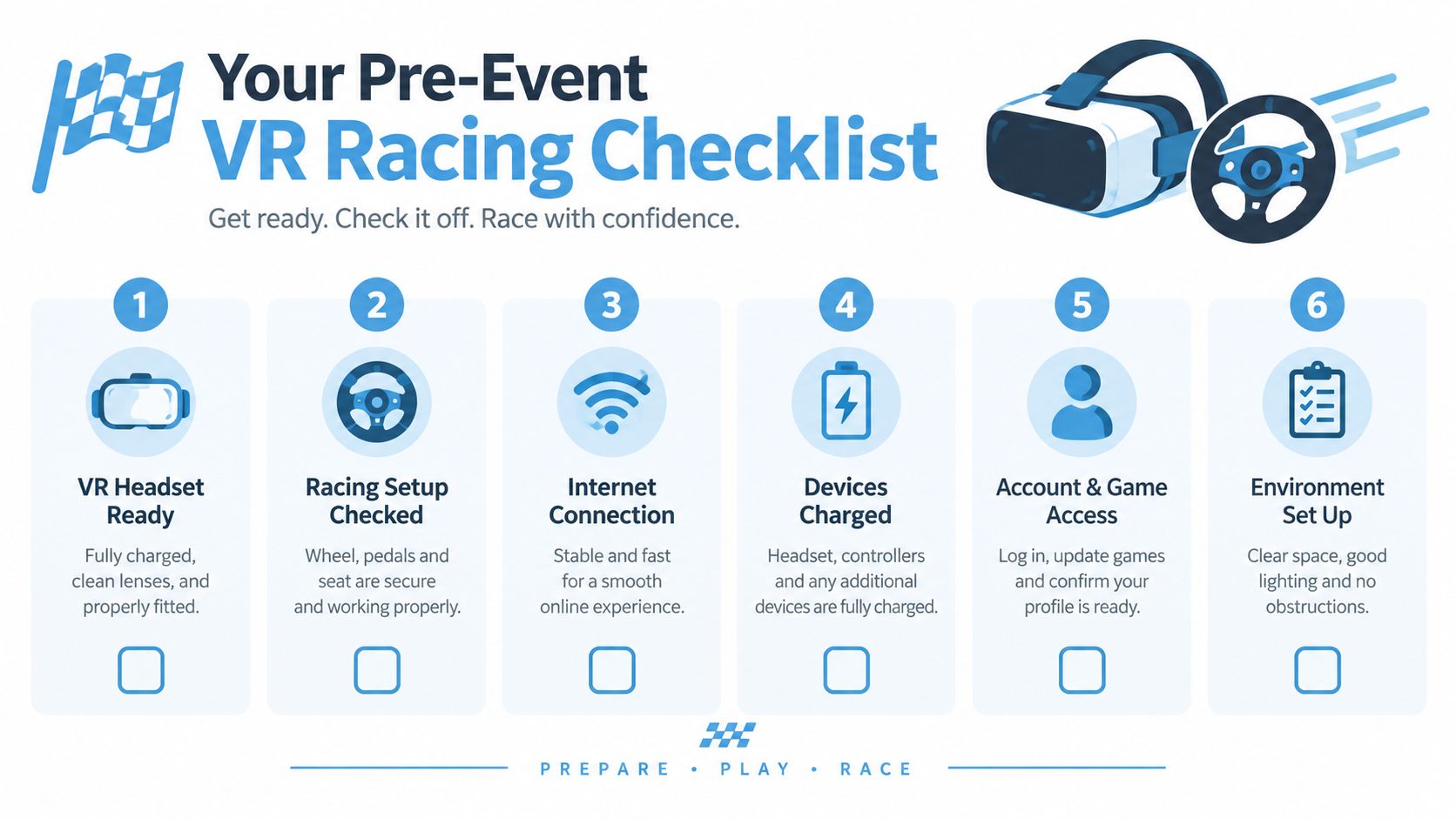
Your Pre-Event VR Racing Checklist
Take the following checklist into the supplier call and venue meeting.
- Confirm the footprint: Record the available floor area, access route, floor loading, ceiling height and separation between participants and spectators. Motion equipment may need more clearance than a fixed rig.
- Confirm services: Check power sockets, circuit capacity, network requirements, lighting conditions and any venue restrictions on cabling or suspended equipment.
- Confirm documentation: Request public liability insurance, equipment details, risk assessment, method statement, PAT certificates and the supplier's emergency process.
- Confirm the content: Ask whether car liveries, circuits, music and on-screen branding are licensed for the intended use. Confirm how the software resets and whether tracks or cars are time-limited.
- Confirm audience controls: Agree minimum age, parental or chaperone arrangements, epilepsy and motion-sickness guidance, accessibility options and the process for guests who don't want to wear a headset.
- Confirm the operating plan: Set out staffing, queue management, briefing, headset cleaning, sanitisation between users, signage, consent forms, data capture, leaderboard rules and the named on-day contact.
Finally, ask the supplier to describe the recovery process. Who stops a session if a guest feels unwell? Who replaces a failed headset? Who speaks to the venue if the queue expands? A hire-ready brief answers those questions before the first visitor sits down.
PSW Events provides managed racing, F1 and VR simulator hire for exhibitions, conferences, brand activations, team building and private celebrations, including planning, branding, logistics, installation, staffing and health and safety support. If you're planning a UK event and want to test the footprint, audience flow and operating model before sign-off, visit PSW Events to discuss your brief.