
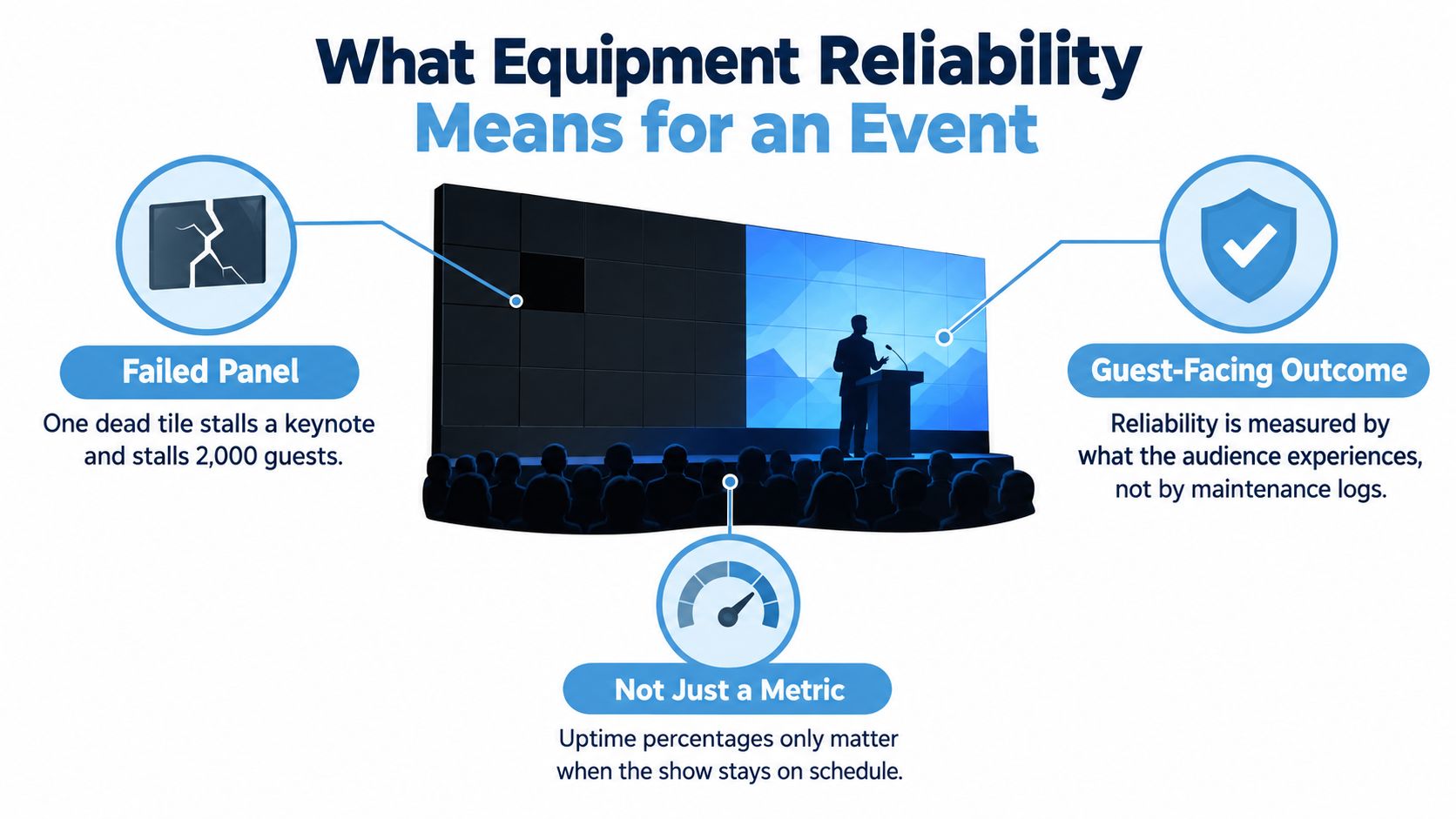
A keynote is due to start, the audience is seated, and the main LED wall suddenly goes black. The presenter can continue, but the room's attention has already shifted from the message to the fault. Guests start checking their phones, sponsors lose a branded moment, and the show caller has to decide whether to hold the programme, switch to confidence monitors, or carry on with a visibly compromised set.
That's equipment reliability at an event. It isn't only a maintenance record or a technician's comfort that a system passed its last test. It's whether the equipment performs when a visitor, presenter, sponsor, camera, or broadcast window depends on it.
For UK event teams, reliability also supports discoverability and commercial reach. Google accounted for 91.75% of UK search engine market share in August 2026, while Bing held 5.67%, according to the UK SEO Industry Report 2026. A reliable activation creates the photographs, conversations, reviews, and branded moments that help a business earn attention in that concentrated search market. Search visibility won't rescue an event that loses its main brand experience halfway through the day.
What Equipment Reliability Means for an Event
At ExCeL or Silverstone, the venue clock is unforgiving. A late reset, failed screen, or unavailable rig doesn't just create work for the production team. It can reduce visitor dwell time, delay a sponsor presentation, interrupt a broadcast cue, or force a brand ambassador to explain why an attraction isn't operating.
For live events, define equipment reliability as the probability that each asset performs to specification for the full period in which a visitor, presenter, or broadcast depends on it. That definition changes the question from “Did we maintain the kit?” to “Did the guest receive the experience we promised?”
Four measures that belong in the project plan
Start recording these measures from project kickoff:
- Mean Time Between Failures, or MTBF: Track it by asset class, such as LED tiles, playback servers, simulators, lighting fixtures, or motion systems. A low MTBF in one class tells you where redesign, replacement, or additional spares may protect the guest journey.
- Mean Time To Recovery, or MTTR: Measure the interval from a fault being confirmed to the experience being restored. A short MTTR can protect dwell time even when perfect uptime isn't realistic.
- First-time fix rate: Record whether the named technician solved the fault without a second intervention. This exposes weak diagnostics, missing spares, and unclear escalation routes.
- Show-hours delivered with zero critical incidents: Treat a critical incident as one that affects the programme, guest access, sponsor visibility, safety, or broadcast output. This is closer to the client's experience than a general uptime percentage.
Each measure should connect to a consequence. A screen failure may cost a keynote moment. A simulator fault may create a queue and reduce lead capture. A tripped circuit may expose the organiser to refunds or negative press. A useful resource on connecting maintenance activity to disruption is MA Hydraulics on cutting downtime.
UK infrastructure has long treated reliability as measurable engineering work. Ofgem's reporting framework defined equipment reliability through fault incidents per 1,000 units, and its 1997/98 England and Wales data distinguished plant and equipment faults from circuit faults while reporting different fault rates across 132 kV, EHV, HV, and LV networks in the referenced UK reliability report. Event teams should apply the same discipline at a smaller operational scale.
Cut-off times make this practical, not theoretical. If a venue requires the hall, rig, or visitor route to be signed off by a fixed time, your recovery assumptions have to work before that deadline. Record them, test them, and assign an owner.
Building a Preventive Maintenance Rhythm
Road cases hide problems well. A connector can loosen during transport, a cooling path can collect dust in storage, and a firmware change can behave differently once several devices share a network. A preventive maintenance rhythm needs to follow the kit through transport, storage, setup, operation, and return.
Service by travel and use
Use the service interval recommended by the manufacturer, then add event-specific checks around each deployment:
- Before each tour leg: Inspect cases, connectors, fans, cables, wheels, latches, power supplies, and visible damage. Check that labels still match the asset register.
- Before a new venue: Confirm firmware, software versions, configuration backups, power requirements, network dependencies, and any venue-specific restrictions.
- During storage: Keep equipment protected, dry, charged where appropriate, and separated from kit awaiting repair. Don't let a shared warehouse slot become an unofficial quarantine area.
- After high-use periods: Calibrate playback, lighting, tracking, interactive triggers, and safety-critical components according to manufacturer guidance and observed wear.
A Friday load-out at ExCeL should feed the same workflow as a Monday pre-flight at a Manchester hotel. The team can close the show with a fault log, mark equipment as available or restricted, and reopen the next job with a verified status. That is more dependable than asking a technician to remember what happened during a rushed strike.
A small register can prevent a large scramble
A shared spreadsheet or lightweight CMMS is enough for a small production team if everyone uses the same fields. Record the asset ID, category, serial number, firmware version, last inspection, open fault, assigned owner, spare status, and next action.
Suppose a playback server has twice required a replacement network card after transport. The register should flag the pattern before the next activation. The response may be a transport change, a pre-event bench test, a spare card in the flight case, or a supplier escalation. The point isn't to create paperwork. It's to turn repeated memory into a visible decision.
Practical rule: An asset isn't ready because it worked at the last event. It's ready when its current status, configuration, owner, and recovery plan are visible.
Preventive maintenance works best when it doesn't compete with venue access. Reserve service windows during warehouse preparation, transport checks, and planned reset periods. Teams looking to formalise inspection tasks can use reduce downtime with this guide as a planning reference, then adapt the list to their equipment and manufacturer requirements.
The trade-off is staffing. In-house technicians know the history of the kit and can spot small changes, but peak season may stretch them across simultaneous activations. Contracted partners add capacity and specialist knowledge, though they need clear access to configuration files, fault history, and sign-off authority. The workable answer is often a defined split, with internal ownership of the register and operational decisions, supported by specialist partners for calibration, firmware, rigging, or complex repairs.
Pre-Event Testing Checklist You Can Actually Run
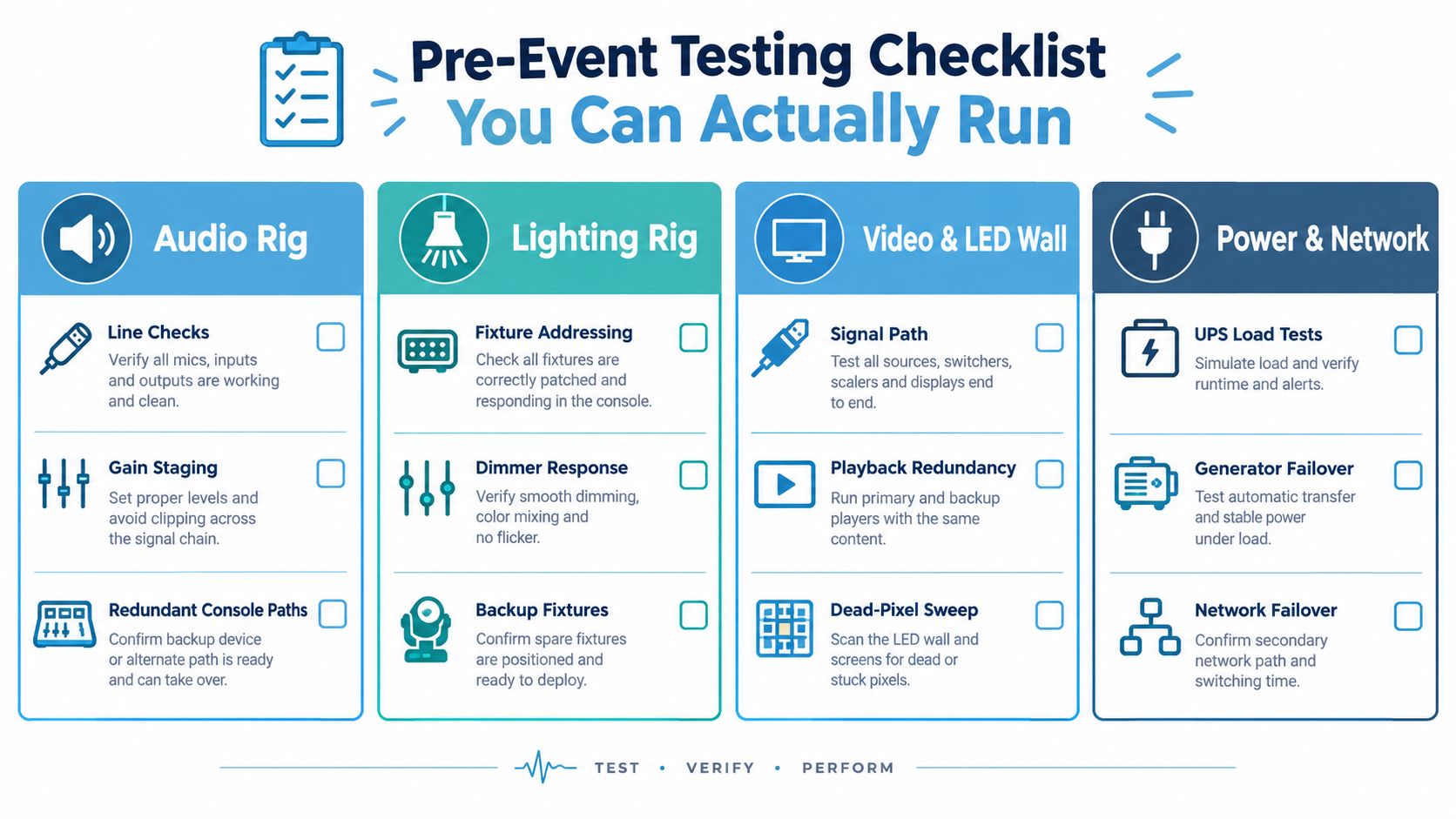
Technicians under pressure don't naturally scan a flat list. They walk the rig, the rack, the stage, or the guest journey. Group the test by system so the owner can see the complete failure path rather than ticking isolated components.
Power and distribution
Test the distribution board, protective devices, generator changeover where used, UPS behaviour, cable routes, load balance, and restart sequence. The pass threshold is simple: the system must carry the planned load, change over without creating an unsafe or guest-visible interruption, and restart in the documented order.
The power lead owns the test. Allow enough time for a controlled interruption and recovery, rather than treating a visual check as proof. Record the result and any circuit that must remain dedicated.
Audio and communications
Run line checks from every source to the expected output. Confirm gain structure, monitor feeds, playback paths, intercoms, and red-light radio tests. The audio lead signs off when the show caller can reach each required position and the fallback communication route works.
Don't accept “we can hear it” as a pass. Confirm the right signal reaches the right destination, at the right level, with the expected cue.
Video and playback
Check the complete signal path, screen calibration, content playback, switcher presets, confidence monitors, and failover media. Sweep LED surfaces for dead or misbehaving pixels, then run the fallback source under realistic operating conditions.
The video lead owns the test. A backup file sitting on a laptop isn't a failover plan unless the team has proved that someone can select it quickly and restore the intended output.
Lighting and rigging
Inspect safety chains, clamps, motors, cable paths, fixture addressing, dimmer response, presets, and backup fixtures. The lighting and rigging leads sign off separately because an attractive look doesn't prove mechanical or electrical readiness.
Any issue affecting safe suspension, access, or movement stops the test until a competent person resolves it. Don't trade a quick aesthetic adjustment against a safety control.
Interactive and experiential equipment
Test RFID readers, haptic triggers, sensors, software prompts, scoring, reset behaviour, and the staff interface. Walk through the experience as a visitor would. The attraction lead owns the test and should verify what happens when a participant presents an invalid tag, moves out of range, or repeats an action unexpectedly.
Use the installation requirements for the relevant equipment and venue in the PSW Events installation requirements as a practical reference point when planning space, power, access, and setup dependencies.
An hour before public entry, the show caller should run a 30-minute final walkthrough. Start at the guest entrance and follow the actual route. Check signage, queue systems, screen content, audio cues, lighting states, attraction resets, radios, and emergency access. Each owner signs the final sheet. If a fault appears later, the record shows whether the gap was in testing, operation, transport, or a change made after sign-off.
On-Site Procedures and Staffing on Show Day
At a 2,000-delegate conference running from 09:00 to 21:00, reliability depends on how people move information as much as on how the equipment is configured. A lead technician who keeps every decision personally may appear in control early in the day, then become the bottleneck when two faults arrive together.
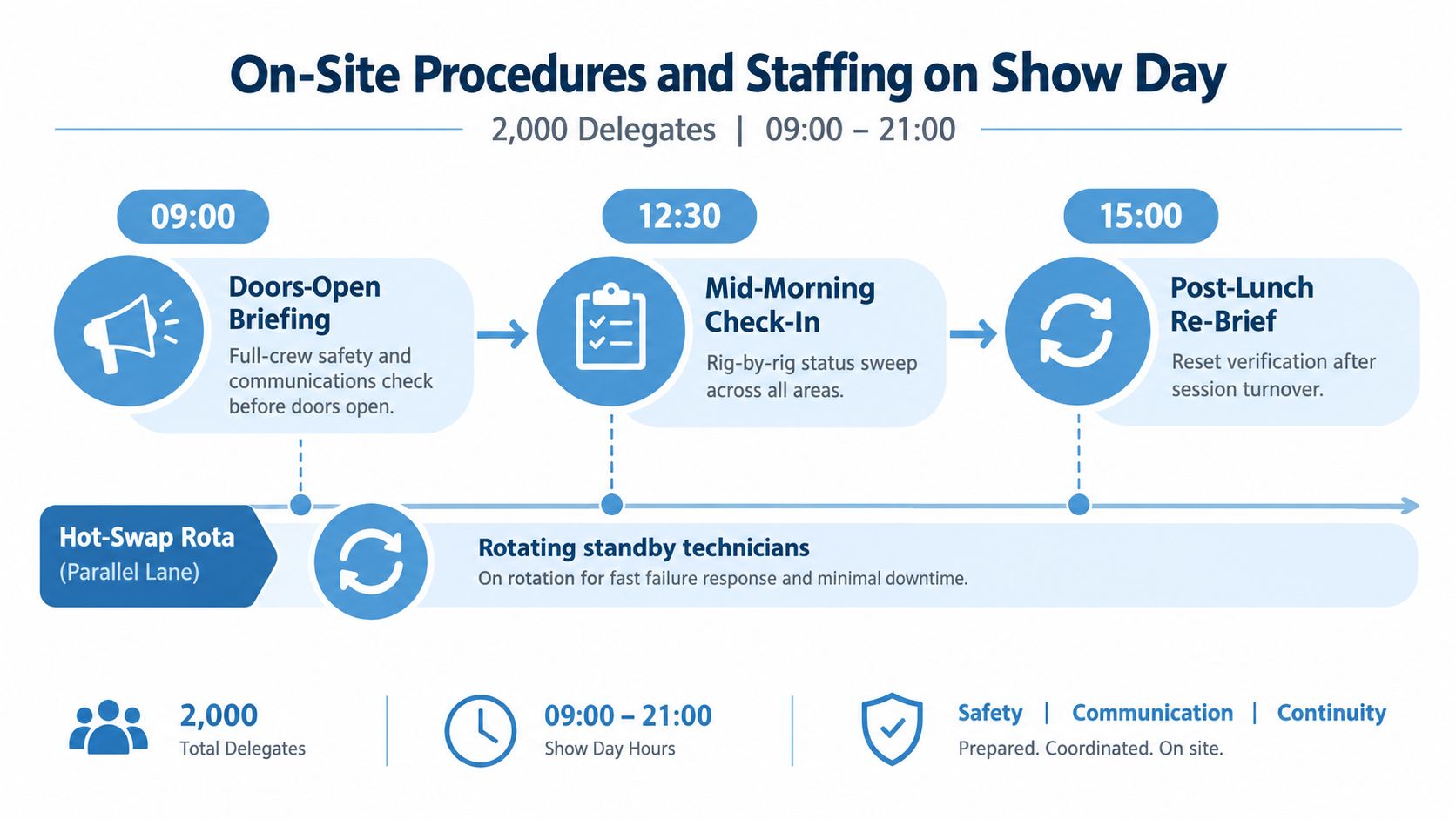
At 09:00, the doors-open briefing confirms safety, radio channels, escalation rules, guest messaging, and the location of staged spares. The show caller owns programme decisions. The lead technician owns technical prioritisation. FOH, stage, AV rack, and power distribution each have a named responder, with a standby technician able to hot-swap into the highest-risk position.
The mid-morning check-in is a rig-by-rig status sweep. At post-lunch re-brief, the team confirms session-turnover settings, resets interactive equipment, checks consumables, and replaces any technician who has been carrying a fault alone for too long.
Three live failures and their owners
Signal loss: The video lead confirms whether the fault is source, transport, processor, or display. The show caller decides whether to hold, switch to the fallback, or continue with an alternate visual. A runner brings the labelled spare only after the fault path is identified.
RF interference: The communications lead checks channel allocation, antenna position, battery status, and nearby transmitters. The show caller keeps the programme moving with a pre-agreed announcement or cue change. Don't let several people alter frequencies at once.
PSU tripping: The power lead isolates the circuit and confirms whether the trip is local, load-related, or upstream. The technical lead decides whether to swap the supply, move to a designated circuit, or reduce the load. Nobody resets repeatedly without identifying the cause.
Brand ambassadors need a short script for a visible failure. They should acknowledge that the experience is being reset, direct guests to an alternative, and avoid promising a recovery time they don't control. That protects trust better than pretending nothing has happened while a queue grows.
At handover, the outgoing technician records open faults, temporary fixes, parts used, and decisions still pending. Fatigue rules matter in the last trading hours. Rotate people away from repetitive monitoring, protect meal breaks, and require a fresh owner for any fault that remains unresolved across a shift.
Contingency Planning and a Spare Parts Strategy
The UK obsolescence problem makes contingency a procurement decision, not a load-in improvisation. An engineering-industry report found that more than half of organisations had no plan for obsolete equipment, 62% had never completed an obsolescence audit, and 68% didn't know critical spare delivery times, according to the Institution of Mechanical Engineers' report on UK obsolescence planning. The same source reported that 38% of engineers experienced serious downtime incidents lasting more than two days several times a year, while almost seven in ten said more than half of their equipment was over ten years old.
For events, the lesson is direct. Sign off the contingency budget before the hire contract, while you can still change the equipment specification and supplier obligations. Once the kit is in the hall, a missing processor or discontinued power supply becomes an operational problem with little negotiating power.
Separate fast-burn and slow-burn spares
Keep fast-burn items in a labelled flight case at the dresser or technical position:
- Cables and connectors: Carry tested, labelled replacements for every interface that can stop the guest experience.
- Power supplies and adapters: Match voltage, current, connector type, and physical fit. A visually similar substitute may create a new fault.
- Control accessories: Include known-good remotes, batteries, interface converters, and configuration media.
- Critical signal paths: Hold a complete hot spare where a failure would stop the show and no acceptable manual workaround exists.
Slow-burn items can be sourced through an agreed courier or supplier response arrangement. The contract should identify the part, delivery route, available hours, and who pays when the failure results from supplied equipment.
Pay for a second unit when the failure would stop the headline experience, affect safety, or take longer to diagnose than the available recovery window. Accept the risk when a manual mode preserves the visitor journey and the replacement cost would exceed the realistic consequence. Write that decision into the risk assessment.
Spares Pack Sizing for a Mid-Size UK Activation
| Equipment Category | On-Site Spares Rule | Typical Recovery Cost |
|---|---|---|
| Cables and connectors | Carry tested replacements for every critical interface, plus labelled alternatives for common formats | Low parts cost, but high guest impact if unavailable |
| LED and video processing | Hold a compatible tile or processor path where one failure can interrupt the main visual | Moderate to high, depending on hire and courier terms |
| Playback and control | Keep a verified fallback source and current configuration backup | Moderate, with programme and content consequences |
| Power supplies | Carry matched supplies for critical devices and label the approved substitute | Moderate, with safety review required |
| Interactive equipment | Carry sensors, readers, trigger components, and a manual operating mode | Variable, depending on the attraction |
| Rigging and safety components | Use only approved, inspected replacements managed by competent personnel | Potentially high, never reduced to a price-only decision |
Design for graceful degradation. A simulator that can continue in a reduced mode, a screen system with an alternate output, or an attraction that can switch to a staffed queue activity gives the audience something useful while the technical team recovers the primary system.
Choosing Suppliers and Structuring Reliability Contracts
The cheapest hire model can become expensive when the organiser supplies the crew, diagnoses the fault, finds the spare, and carries the client conversation. Compare procurement models against the consequence of failure, not only the day rate.
| Model | Who Owns Setup and Crew | Key Reliability Clause |
|---|---|---|
| Full-service hire | Supplier owns setup, operation, technical crew, and de-rig | Named response lead, documented MTBF history by asset class, engineer-on-site inclusion, and a clear recovery process |
| Dry hire | Organiser supplies crew and operation, supplier ships equipment | Acceptance test, configuration handover, spare availability, technical escalation, and responsibility for equipment defects |
| In-house ownership | Organisation owns equipment, maintenance, setup, and staffing | Asset lifecycle plan, maintenance records, training standard, obsolescence review, and internal response cover |
Terms worth negotiating
Ask for reliability evidence that relates to the actual equipment class, not a generic statement that the supplier tests its kit. Require response-time guarantees, engineer-on-site inclusions, escalation contacts, and a written process for failures that affect the programme.
A downtime ladder can be useful where a fault continues beyond the agreed recovery window. The remedy might begin with additional technical support, then move to a service credit or other contractual consequence. Tie the trigger to the guest-facing effect, not only whether a technician is standing beside the rack.
Clarify responsibility for consumables, sub-loans, replacement parts, firmware-induced failures, and configuration changes. Secure the right to receive a post-show failure report within five working days, including the fault, response, parts used, temporary fix, root cause if known, and prevention action.
Security also affects reliability. Unauthorised access, unattended cases, or interference with a technical position can create faults that no maintenance schedule prevents. Security for event hire is useful context when the production plan includes exposed equipment, overnight storage, or public access.
Use PSW Events vendor selection criteria alongside your own tender scorecard. Score technical evidence, recovery capability, documentation, crew competence, venue experience, insurance, communication, and the supplier's willingness to explain what happens when the first plan fails.
A practical tender question is: “Show us the recovery path for the most damaging plausible failure.” The supplier should explain who responds, what spare is available, what the audience sees, who speaks to the client, and how the incident is recorded.
Documentation, Training, and Post-Event Reporting
The most reliable event teams turn every show into usable information for the next one. Documentation should travel with the kit, not remain in one technician's inbox.
The core set includes an asset register with serial numbers and firmware versions, configuration backups, laminated single-line diagrams, venue drawings, approved operating procedures, contact details, and a fault log reviewed within 48 hours of strike. Keep the documents accessible offline. A network failure shouldn't prevent the team from finding the power path or the fallback procedure.
Train for recovery, not just setup
Quarterly rig rehearsals give technicians a chance to practise the faults that are difficult to simulate during a live show. Vendor-led refreshers can cover decoders, matrix switchers, control software, and firmware changes. New technicians should work buddy shifts before they own a critical position.
Training should include the guest-facing response. A technician may restore a signal correctly but still fail operationally if the show caller doesn't know the status, the brand team gives the wrong message, or the queue has no alternative route.
Crossrail provides a useful UK example of disciplined reliability growth. Its methodology established an operating baseline from integrated system testing, collected failure-mode data during commissioning and trial-running hours, and used a Chi-square confidence approach with 50% and 80% confidence levels to project reliability growth from observed failures and operating hours, as described in Managing Reliability Growth in Practice. Event teams can apply the same logic at a simpler scale: baseline, observe, analyse, correct, and verify.
Post-Event Reliability Report Template
| Report Field | What to Record | Why It Matters |
|---|---|---|
| Asset and fault | Asset ID, symptom, time, location, and operating state | Identifies repeat problems and weak configurations |
| MTBF | Failures by asset class and operating period | Supports replacement, redesign, and supplier discussions |
| Response time | Detection, acknowledgement, arrival, repair, and restoration | Shows whether the recovery plan worked |
| Spare parts consumed | Part number, quantity, source, and remaining stock | Rebuilds the next activation's spares pack |
| Near-misses | Problems caught before guests experienced them | Captures preventive value, not only visible incidents |
| Attendee-visible consequence | Queue length, screen downtime, missed cue, reduced access, or alternative offered | Connects technical work to brand and commercial risk |
| Corrective action | Named owner, deadline, verification method, and status | Prevents temporary fixes becoming permanent |
| Supplier performance | Communication, response, documentation, and follow-through | Feeds the tender and scorecard process |
UK businesses already have a strong reason to make these reports practical. One UK industry source reported that over 80% of industrial businesses experienced unplanned downtime in the last three years, with incidents lasting around four hours and plants losing roughly 49 hours of productivity per year on average, as reported by IDS Industrial Data Systems. Event teams should translate that operational problem into visitor terms, such as missed footfall, shorter dwell time, queue build-up, or an aborted brand activation.
The next risk assessment should use the report. Increase a spare holding where a repeated failure consumed the only backup. Change the supplier score where response was slow. Rewrite the briefing where a near-miss exposed unclear ownership. Equipment reliability compounds when each event leaves the next one better prepared.
PSW Events provides planning, branding, logistics, installation, on-site staffing, and H&S documentation for interactive attractions and simulator-based activations across the UK and worldwide. If you're planning an event where reliable operation, guest flow, and recovery from faults matter, visit PSW Events to discuss the equipment and support model your activation needs.