
You've booked the venue, approved the branding and promised visitors an experience they won't find on an ordinary exhibition stand. Then the supplier asks a simple question: what sort of helicopter simulator do you need? A compact rig may be perfect for fast-moving footfall, while a full cockpit with motion can become the centrepiece of a launch. Choose the wrong format, and you'll either create queues nobody manages or pay for realism your audience barely notices.
For UK events, a flight simulator helicopter hire should be judged by the result it creates on the day. Does it stop people in the aisle, keep them engaged, support a product story, generate leads or give guests something memorable to share? The answers determine the right level of visuals, motion, staffing and scenario design.
What Event Planners Mean by a Helicopter Simulator
At a trade show, the useful definition of helicopter simulator hire isn't the one found in a flight-training manual. It's an interactive attraction that puts a guest into a convincing helicopter experience, gives them a clear challenge or route, and moves the next participant through without turning the stand into a bottleneck.
The market sits on a spectrum. At one end is a detailed video game in a flight-shaped seat. At the other is a type-specific training device that recreates an actual aircraft's layout and procedures. An event rig usually belongs closer to the entertainment end, because it needs short sessions, simple instruction and reliable operation for people who may never have touched a helicopter control.
The parts your supplier is providing
A typical installation combines:
- Cockpit shell: A shaped seat or replica cabin gives the participant an immediate visual cue and creates space for branding.
- Visual system: This may be a single monitor, several screens, a projector or LED panels showing terrain, buildings, coastline and weather.
- Flight controls: The cyclic controls pitch and roll, the collective changes lift, pedals control yaw and the throttle manages engine power, depending on the aircraft model.
- Motion platform: An optional base tilts or moves the cockpit to suggest hover corrections, turbulence and touchdown.
- Operator computer: A PC runs the flight software, aircraft model and scenario. Systems may use platforms such as X-Plane or Prepar3D, but the software alone doesn't make a professional event attraction.
The difference between a convincing rig and a disappointing one often comes down to integration. A large screen paired with loose consumer controls can feel less credible than a smaller display with a well-built cockpit, responsive controls and a confident operator.
For aviation training, fidelity and regulatory acceptance are central. UK training providers use devices such as Level D full-flight simulators and FNPT II synthetic training devices, with type-specific systems designed to replicate aircraft handling, controls and visuals, as described by Bristow's training service. Event planners don't normally need that certification level. They need an experience that looks right, feels responsive and fits the audience.
Practical rule: Book for the audience's reaction, not for the longest specification sheet.
That's the purpose of this guide. Before you ask for a quote, decide what realism means for your activation, how many people need to use the rig and what you want each participant to remember.
How a Helicopter Simulator Actually Works
The experience starts before the aircraft moves. A participant sits in the cockpit, the operator checks the seat position and explains the controls, then the visual system creates the outside world. That combination of sight, sound and hand movement gives the brain enough information to accept the scenario as a flight rather than a standard screen game.
Visuals create the first impression
A single screen can work for a small party or a compact stand, especially when the scenario is short and the operator keeps the aircraft near the centre of the view. Three screens widen the field of view and make hovering, turning and landing easier to understand. Wraparound projection or LED panels go further by filling the participant's peripheral vision.
Field of view matters because helicopter flying is about constant attitude correction and awareness of what's around the aircraft. A narrow image can still look attractive, but it limits the “I'm really up there” reaction. A wider system generally earns its space when the simulator is the hero feature of a launch or hospitality area.
Controls need to communicate cause and effect
The cyclic is the main flight control. Move it forwards and the helicopter pitches forwards, move it sideways and the aircraft rolls. The collective changes the lift produced by the rotor, allowing the participant to climb or descend. Pedals control yaw, helping the helicopter turn around its vertical axis.
Novices don't need a lecture on rotorcraft aerodynamics. They need to feel that their input does something immediate and predictable. Force-feedback controls add resistance, so the stick and pedals don't feel like loose computer accessories. Poorly calibrated controls create frustration because the aircraft drifts before the participant understands why.
The cockpit shell supplies context. Replica instruments, working switches and a believable seat position make the controls easier to interpret. The trim matters more than some buyers expect. If cables are exposed, screens are badly positioned or the seat looks improvised, guests notice before the flight begins.
Motion and software complete the illusion
Motion is an enhancement, not a substitute for good visuals and responsive controls. A small two-axis platform can add a noticeable sense of hover, turbulence and landing. Larger systems can reproduce more movement, but they need more floor space, power, access planning and supervision.
The software provides the world and the challenge. An operator might load a city skyline, an airfield, a coastline or a search-and-rescue mission. Weather, traffic and simulated failures can make a scenario feel less repetitive, but the event team should test every sequence before guests arrive. Complexity that causes delays isn't useful realism.
Realism Levels and What Each Tier Delivers
The right tier depends on the outcome you're buying. A busy exhibition stand needs clarity and throughput. A product launch may need a striking cockpit that photographs well. A private celebration can prioritise shared amusement over aircraft accuracy.
The four tiers below are practical buying categories rather than formal aviation classifications. Hire prices vary with duration, transport, staffing, branding, venue access and the equipment available, so a credible supplier should quote against a complete brief rather than a bare rig.
| Tier | Visuals & Controls | Motion | Best Event Outcome | Indicative UK Hire |
|---|---|---|---|---|
| Entry-level | Single screen, consumer controls and a flight-style seat | None | Fast entertainment, casual parties and compact stands | Quote required |
| Mid-tier | Multi-screen visuals, replica cockpit shell and force-feedback controls | Optional light movement | Exhibition dwell time and lead-generation activity | Quote required |
| High-tier | Type-specific cockpit, detailed switch layout and responsive controls | Two- or three-axis motion | Brand launches, premium hospitality and hero experiences | Quote required |
| Premium | Certified or near-certified training device with instrument-accurate panels | Hydraulic or advanced motion | Specialist aviation engagement and high-end demonstration | Quote required |
Entry-level and mid-tier options
An entry-level unit is useful when the attraction needs to fit into a restricted footprint or run continuously for a broad audience. It can deliver a scenic flight, simple landing challenge or short aerobatic sequence. It won't create the same physical presence as a cockpit replica, but it can still give a party guest an enjoyable first flight.
The mid-tier option is often the sensible event choice. Wider visuals, a shaped shell and force-feedback controls give visitors more involvement without requiring the operational complexity of a training device. For a trade show, this tier usually balances recognisable impact, manageable space and straightforward staffing.
High-tier and premium options
A high-tier simulator makes sense when the cockpit itself carries the story. An aerospace company may want visitors to feel surrounded by aircraft hardware. A defence-technology launch may need a mission-based experience. A premium device brings impressive realism, but it also demands more careful planning and may reduce the number of people who can use it in a session.
Training facilities demonstrate why this distinction matters. Bristow's Dyce, Aberdeen centre is described as the only facility of its kind in the UK and contains three full-size helicopter simulators, representing the Leonardo AW189, Sikorsky S-92 and S-76, as outlined by Vne Aviation's helicopter training overview. That is a national training reference point, not automatically the right model for an exhibition stand.
For event applications, full-motion flight simulator hire is worth comparing by objective. Don't pay for hydraulic movement if your audience will spend most of its attention on a branded screen or if the queue requires rapid sessions.
The best simulator is the one that makes the desired behaviour easy. If you want people to stop, use strong visuals and a clear challenge. If you want them to talk about the brand, build the mission around the brand story.
Event Formats That Use Helicopter Simulators
A helicopter simulator earns its place when the format supports the audience journey. The same equipment can produce very different results depending on whether people are walking past a stand, entering a branded environment or attending a celebration.
| Event Format | Realism Tier | Branding Focus | Staffing | Throughput |
|---|---|---|---|---|
| Exhibition stand | Mid-tier | Cockpit panels, screen graphics, QR code or prize draw | One operator and one queue host per rig | Roughly 8 to 15 flights per hour, depending on scenario length |
| Brand activation launch | High-tier | Full livery, mission narrative and visual environment | One operator, one host and brand representative | Roughly 8 to 15 flights per hour, depending on scenario length |
| Private celebration | Entry-level or mid-tier | Seat, backdrop, scenic route and event signage | One operator, with a host where queues form | Roughly 8 to 15 flights per hour, depending on scenario length |
The exhibition stand
A mid-fidelity rig can pull a visitor from the aisle without overwhelming the rest of the stand. Use the cockpit shell as a branded asset, put the call to action on the end screen and give the queue host a simple question to ask while people wait. A QR code can support a follow-up journey, while a prize draw gives hesitant visitors a reason to participate.
The mistake is treating the simulator as a self-running attraction. Without an operator and a queue host, the experience becomes slow, unclear and difficult to connect with lead capture.
The brand activation
A higher-fidelity cockpit works inside a pop-up or experiential zone where the participant has time to absorb a narrative. An aerospace brand might frame the flight as a route inspection. A motorsport sponsor could use a fast, visually dramatic mission. An insurer or defence-tech company may prefer a controlled emergency scenario that reinforces preparedness.
Branding should appear in the environment, not only on a sticker beside the seat. Use the aircraft livery, opening screen, briefing language and mission objective to connect the flight with the product story.
The private celebration
At a wedding, milestone birthday or Christmas party, the simulator is a shared spectacle. Guests usually want a scenic tour, landing challenge or light aerobatic scenario rather than a sales funnel. A consumer-grade or mid-tier rig can be enough, provided the operator keeps the queue moving and adjusts the experience for different ages and confidence levels.
The biggest planning error across all three formats is underbriefing the supplier about the audience. Tell them the likely age range, whether guests may have mobility needs, whether children will participate and whether the event includes people unfamiliar with technology. That information changes the seat, briefing style, scenario and staffing plan.
Logistics and Health and Safety Essentials
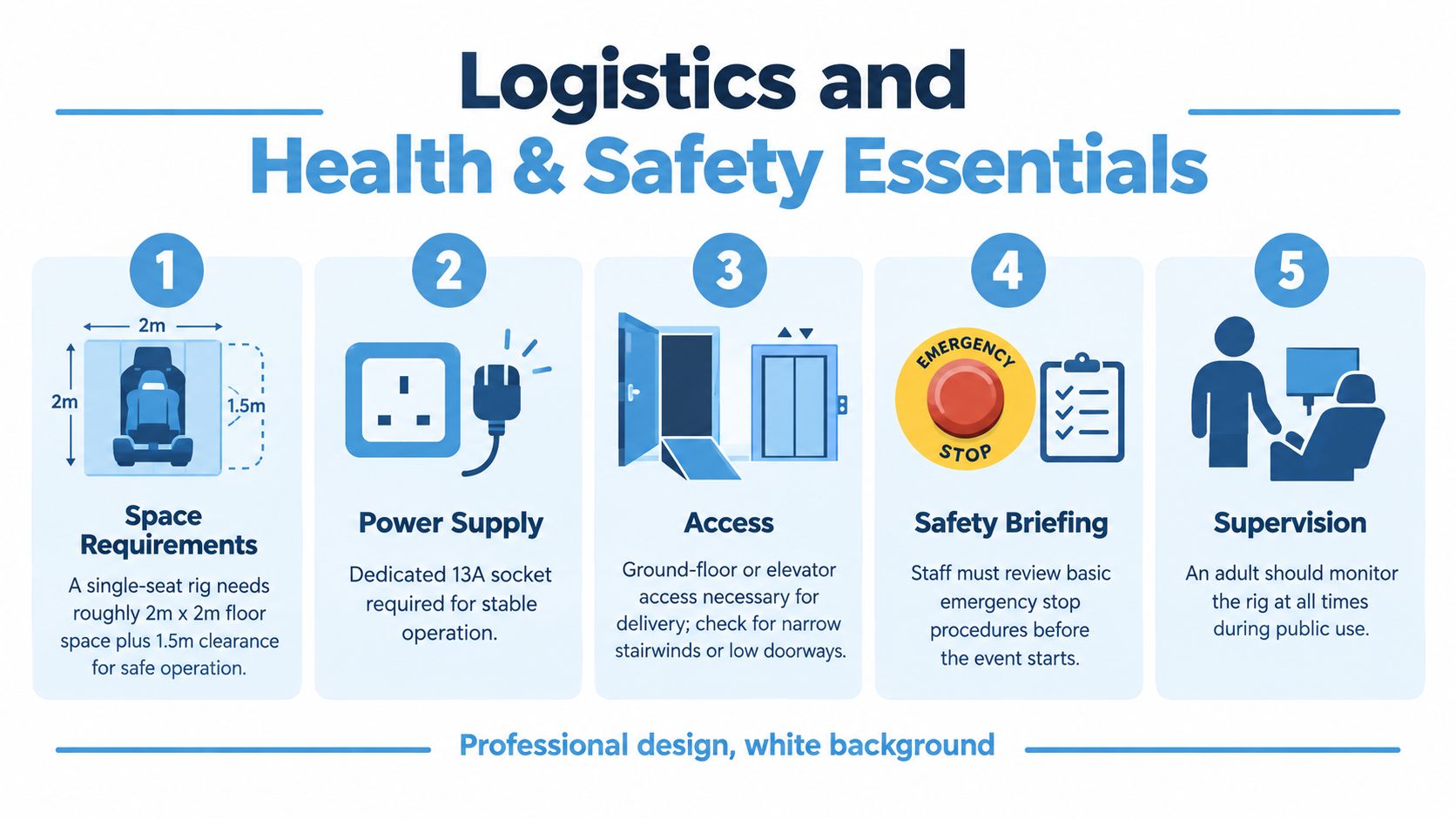
Venue teams and local authorities tend to ask practical questions first. How much floor space does the unit need? Can it reach the hall? What power does it draw? Who supervises the public? Get those answers in writing before the booking becomes difficult to change.
Space, power and access
A single-seat consumer rig needs roughly 2m by 2m plus 1.5m clearance, while a full-motion cockpit with operator station and screen rig may need a 4m by 4m minimum footprint and 3m ceiling clearance. These planning figures are equipment-dependent, so the supplier must confirm the final dimensions for the actual unit.
Basic equipment may use a standard 13A socket. Motion platforms and projectors may require a dedicated 16A or 32A feed, with the supplier confirming the draw before the event. Don't assume the nearest socket is suitable, particularly in exhibition halls where power is ordered through the organiser.
Check door widths, lift dimensions, loading bay rules and step-only routes. A flight case may arrive in a van or transit, but the packaged equipment can be wider or taller than the assembled rig.
Documents and public operation
A venue will normally expect Public Liability insurance, a written Risk Assessment and Method Statement, PAT-tested cabling, protected cable routes and supervised operation. Public Liability cover is commonly requested at £5 million to £10 million, although the venue's contract determines the exact requirement.
The operator should control entry, seating, harness or seatbelt use and the emergency stop. Queue management also matters. Keep waiting guests outside the equipment's movement envelope and prevent bags, drinks or loose clothing from entering the operating area.
Participant restrictions
Ask about minimum age, height and weight limits before promoting the attraction. Suppliers commonly set a minimum age between 8 and 12, with a maximum weight around 120kg, depending on the seat and restraint system. Motion sickness warnings should appear in the briefing, and the operator needs a clear process for stopping a session safely.
Wheelchair access requires more than a ramp to the venue. Check the transfer route, seat height, turning space and whether the participant can use the controls from the installed position. Include this question in the original enquiry rather than trying to solve it during build.
For broader planning, compare the equipment and venue considerations in this flight simulator hire guide. The useful test is simple: can the supplier explain how the rig will be delivered, secured, operated and removed without leaving the venue team to fill in gaps?
Pilots, Briefings and Scenarios on the Day
Guests don't normally operate an event simulator without supervision. The trained operator supplied by the hire company manages the controls, safety checks, software and emergency stop, while the participant provides the inputs that make the flight interactive.
A good briefing takes 60 to 90 seconds. It should explain the collective, cyclic and pedals in plain language, show the start-up sequence and give the participant one objective. “Take off, hold the hover and land on the marked pad” is easier to understand than a long explanation of every instrument.
Choose the scenario before the build
The scenario should match the audience and the available time:
- Scenic tour: A recognisable city or coastline gives broad appeal and makes the experience accessible to first-time users.
- Hover and slalom: A short challenge builds confidence quickly and works well on busy stands.
- Search and rescue: A coastguard or emergency mission gives a brand activation a beginning, middle and end.
- Aerobatics or autorotation demonstration: A thrill-focused audience may prefer a dramatic operator-led sequence.
A two-minute scenic loop suits high-traffic stands because the queue moves quickly. A five-minute mission is better for a private event where dwell time matters more than volume. The operator should be able to reset the software promptly and explain the next step while the previous participant exits.
Don't let the scenario become harder than the message. If a guest spends the whole session trying to keep the aircraft level, they may miss the branded environment, product story or social-sharing moment.
Booking Checklist and Brief for Your Supplier
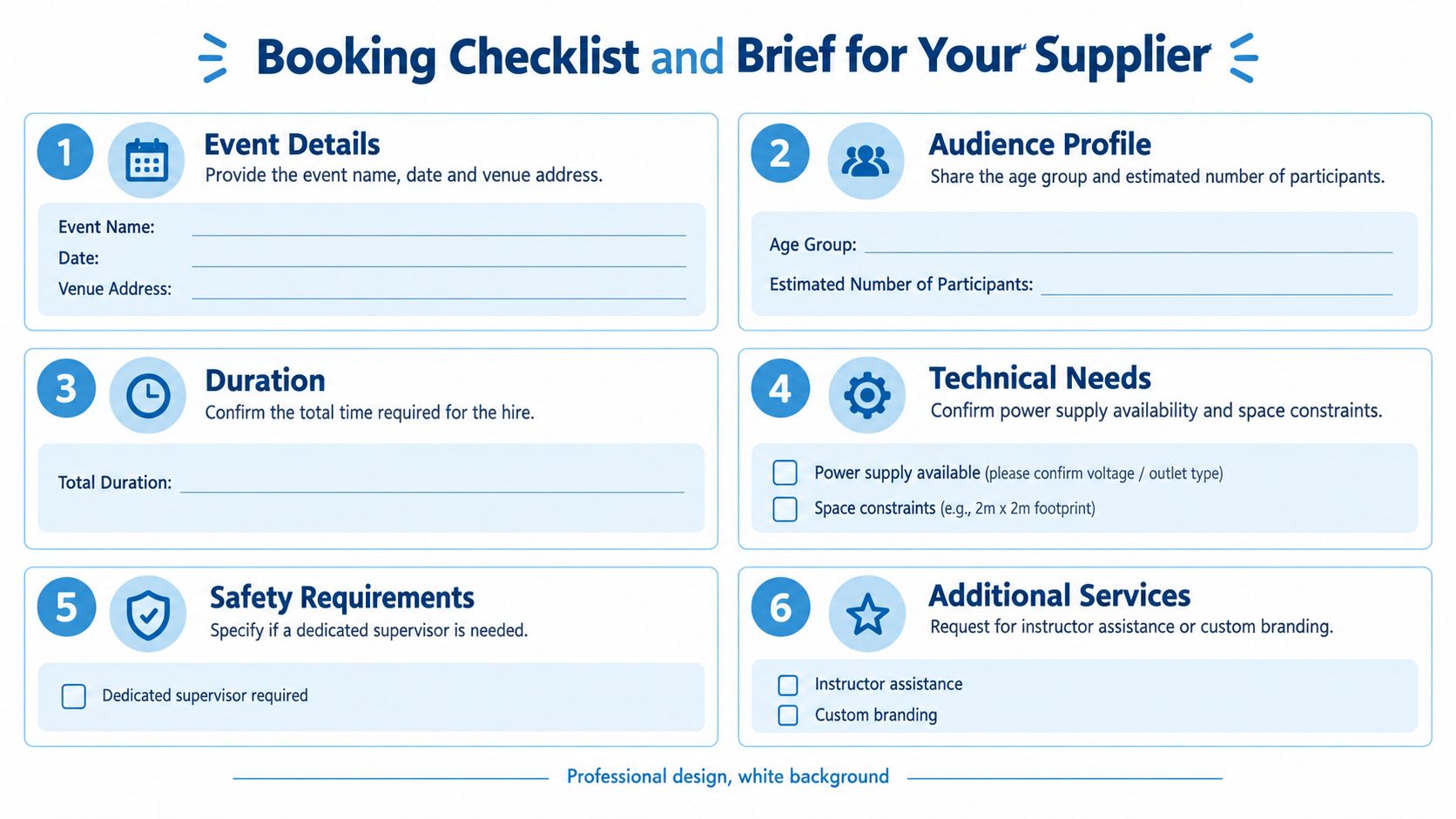
A supplier can quote accurately only when the enquiry describes the event rather than asking for “a helicopter simulator”. Copy and adapt the following structure for your first email:
- Event details: Include the event name, date, venue, room or hall, full address, build period and live operating times.
- Audience profile: State the expected age range, guest type, likely participant numbers and whether children, older guests or people with accessibility requirements will attend.
- Experience objective: Explain whether the priority is footfall, dwell time, lead capture, a launch moment, hospitality or uncomplicated entertainment.
- Realism tier: Ask for an entertainment rig, motion platform, full cockpit replica or higher-fidelity training-style device, and explain why that level is appropriate.
- Footprint: Give the available length, width and ceiling clearance. Include the operator position, queue zone and any required branding space.
- Power and access: Confirm socket availability, loading access, door and lift dimensions, delivery restrictions and whether the venue requires advance technical drawings.
- Branding: Specify cockpit graphics, seat branding, screen content, opening and closing messages, livery and any QR code or data-capture requirement.
- Staffing: Ask for one trained operator per rig and identify whether a separate queue host or brand ambassador is needed.
- Health and safety: Request RAMS, the public liability certificate, operator risk assessment, PAT information, emergency-stop procedure and any age, height, weight or motion-sickness restrictions.
- Scenario design: List the city, airfield, coastline or mission you want preloaded, along with the intended session length and briefing style.
- Throughput: Set a target per hour and ask the supplier to show how the session duration, changeover and queue process support it.
- Contingency: Agree what happens after power loss, participant sickness, software failure, motion fault or late delivery. Ask whether a replacement unit or non-motion fallback is available.
- Commercial terms: Request the day rate, multi-day rate, transport, installation, staffing, branding, overtime, VAT and cancellation terms separately.
Send the completed brief with your venue floor plan and ask for a written response. A credible operator should return equipment photographs, confirmed dimensions, power and access requirements, proposed staffing, scenario options, safety documentation and a clear quote. Use this flight simulator requirements checklist to catch technical omissions before you approve the order.
Within 48 hours, a professional supplier should be able to confirm whether the equipment fits, identify unanswered venue questions and explain what is included in the price. If the reply contains only a headline day rate and no plan for access, supervision or failure recovery, don't pay a deposit until those details are resolved.
PSW Events supplies mobile helicopter and flight simulator experiences for exhibitions, conferences, brand activations, team events and private celebrations, with planning, branding, installation, staffing and health and safety support. If you're briefing a UK event and need the simulator matched to your space, audience and throughput target, visit PSW Events to discuss the format.