
You're standing on a busy UK exhibition floor with a queue forming beside a flight simulator. Visitors who might have walked past a conventional display are waiting for their turn, talking about the cockpit, watching the screens and asking colleagues to beat their score. For the event team, the attraction is doing more than creating noise. It's generating footfall, dwell time, conversation and a clear reason to engage.
That's the opportunity behind a well-planned flight simulator experience UK activation. The simulator can support a conference, trade show, product launch, team-building day, fan zone or private event, but its value depends on how carefully you match the equipment and operating model to the brief. A motion platform that looks impressive may be unsuitable for a small hotel room, while a fixed-base cockpit may perform better at a busy exhibition stand because it can handle a steady flow of visitors.
This guide is written for corporate planners, agencies, venue teams and marketers who need practical answers rather than sales language. It covers simulator formats, technical fidelity, footprint, access, staffing, accessibility, safety, pricing logic and the measures that help you judge an activation properly. The aim is simple. You should be able to brief a supplier with enough detail to compare proposals and protect the visitor experience.

A provider such as PSW Events fits into this planning conversation because its work combines simulator hire with delivery, installation, staffing and event management. Whether you're booking for an exhibition at ExCeL London or a private celebration in a regional venue, the useful question isn't, “Will people enjoy it?” It's, “What should each visitor do, how will the queue move, and what evidence will show that the experience supported the event objective?”
Introduction to Flight Simulator Experiences for UK Events
A flight simulator earns its place at an event when it has a clear job. It might attract visitors to a stand, connect a product with a memorable activity, encourage friendly competition or give customers a reason to stay longer. The cockpit draws attention, but the marketing result depends on the operation around it.
At an exhibition, a short branded challenge can bring people into the activation area. A host explains the scenario, the operator manages the flight and the brand team continues the conversation after landing. With consent, the team can capture a lead, record a qualified conversation or use a leaderboard to encourage another attempt. That creates measurable steps between attraction and follow-up.
Start with the event objective
The same simulator can produce different results for different audiences. A corporate conference may suit a structured team challenge. A public fan zone may need simple instructions, quick sessions and easy access for a wider range of visitors. A product launch might require branded visuals, while a hospitality event may place greater value on atmosphere and one-to-one discussion.
State the intended outcome before requesting a quotation. Is the priority participation, longer conversations, guest reward, technology demonstration or support for a campaign message? Choose measures that match it, such as visitor interactions, completed sessions, qualified conversations, repeat attempts or engagement time. These measures turn the simulator from a decorative attraction into an activity that can be reviewed after the event.
Practical rule: Treat the simulator as a programmed attraction within the event, not as a piece of equipment placed in an empty space.
Why UK context matters
Venue conditions can change the operating model. At ExCeL London, a supplier may need to work through exhibition loading procedures, build rules, power planning and a defined stand footprint. In a hotel foyer, the route may involve narrower doors, lower ceiling clearance, public circulation and shorter visitor dwell time. The same cockpit may therefore need different access planning, staffing and session design.
UK venues also vary in audience expectations, public liability requirements and evacuation arrangements. Ask how the supplier will manage motion, queueing, supervision and safe separation from nearby event activity. A visually impressive system is unsuitable if it blocks a circulation route, overloads the available power or creates long waits that reduce meaningful conversations.
The brief should include the venue, event dates, audience profile, desired outcome, floor area, access route, operating hours and branding requirements. It should also state whether the experience needs to support lead capture, competition, product education or repeat participation. Providers such as PSW Events can then advise on simulator hire alongside delivery, installation, staffing and event management.
Recent UK event market analysis provides wider context, but planners still need simulator-specific measures. Track throughput, dwell time and completed interactions, then compare them with the campaign objective. That evidence helps select a format for performance and logistics, rather than appearance alone.
What a Flight Simulator Experience Really Is
A flight simulator can mean anything from a simplified amusement rig to a cockpit built around training-device principles. The difference matters because realism isn't created by a large screen alone. It comes from how the system combines the flight model, visual system, controls, motion cues and timing.
A useful analogy is the difference between a gaming chair and a professional driving simulator. Both may show a road, but the second is designed to reproduce a repeatable driving task. The steering resistance, screen response and control layout help the participant understand the vehicle, not just watch an image move.
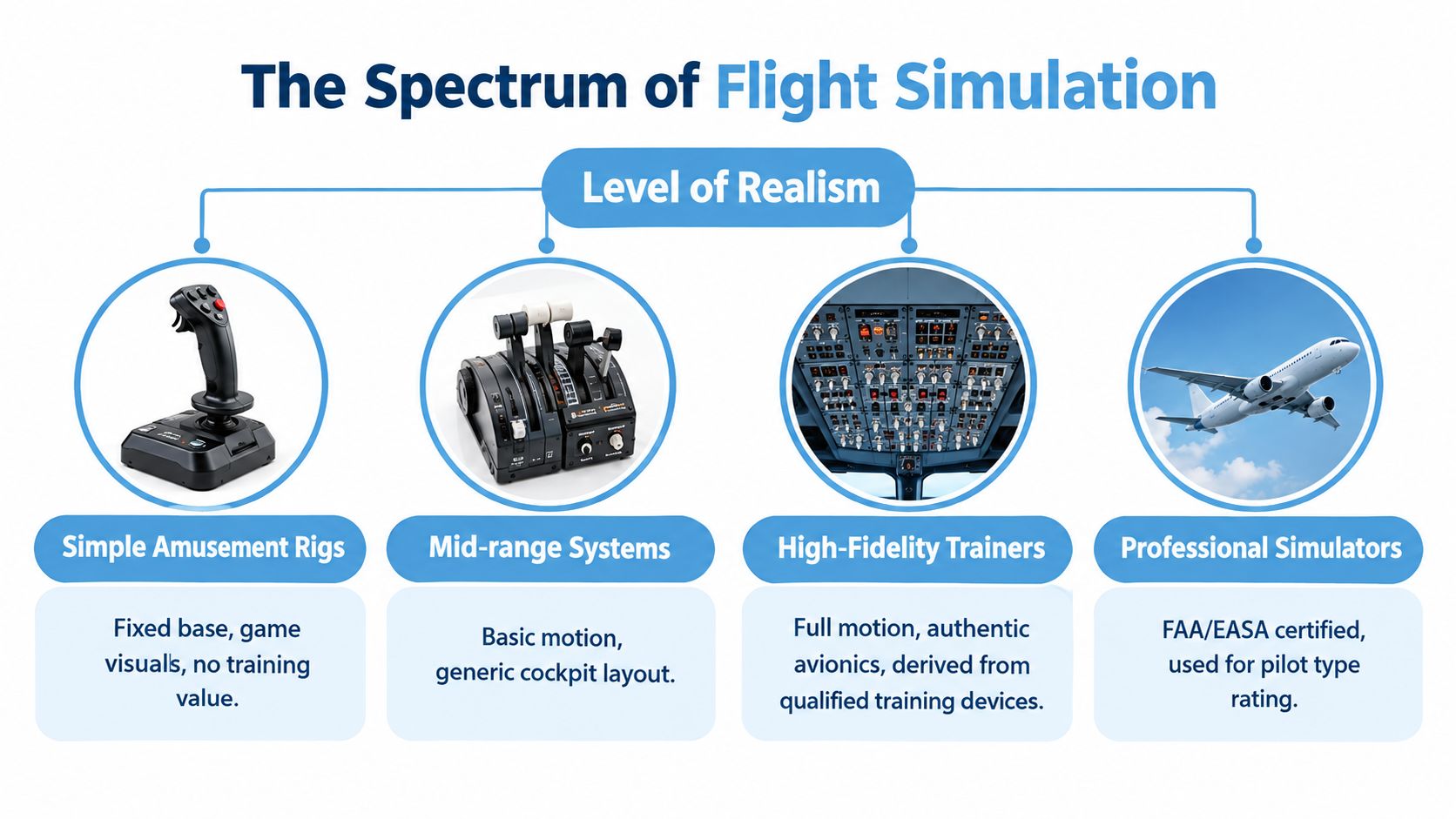
Four elements shape realism
Motion cueing translates aircraft movement into physical sensations. A platform may pitch, roll or move in other directions, but the operator has to manage how those cues begin, stop and combine. More movement doesn't automatically create a better experience. Poorly managed motion can distract participants or increase discomfort.
The visual system provides the outside world, runway, weather and scenario. A large or immersive display can improve presence, but the image must respond promptly to control inputs. If the aircraft turns on screen after the participant has already moved the controls, the delay breaks the illusion.
The flight model determines how the aircraft behaves. A simplified model may be perfectly suitable for a quick public attraction. A more detailed model can support aircraft-specific handling, instrument procedures and abnormal scenarios, provided the session is designed and supervised appropriately.
Control loading describes the resistance and feel in the controls. A realistic yoke, stick, pedals and throttle help participants understand the relationship between action and aircraft response. This is one reason a professional cockpit feels different from a generic joystick mounted in front of a screen.
The UK Civil Aviation Authority maintains a public database of UK-qualified Flight Simulation Training Devices, including active, expired and surrendered records. The CAA FSTD search links qualification records to technical criteria and organisational requirements under Part-ORA, the operational basis for qualification and recurrent evaluation.
Use the right language with suppliers
A qualified FSTD and a simplified event rig aren't interchangeable. A qualified training device is assessed against defined requirements, while an entertainment system may be designed primarily for accessibility, visual impact and fast operation. Neither is automatically the correct choice. The right decision depends on whether your event needs training-style repeatability, broad public appeal, strong motion, rapid throughput or a compact footprint.
Ask suppliers specifically about latency, control loading, scenario control, motion limits and operator intervention. Those answers will tell you more than a claim that the simulator is “realistic”. For broader context on simulator-style interactive equipment, planners can also review this golf simulator equipment range, while full-motion flight simulator hire shows how a mobile event system can be positioned within an activation.
Types of Flight Simulator Experiences Available in the UK
Choosing a format starts with the audience and the event environment. A full-motion system can create a strong visual draw, but it needs more careful access and operating planning. A fixed-base cockpit may look less dramatic while delivering better flow on a crowded exhibition stand. VR can offer flexibility, although not every visitor will want to wear a headset.
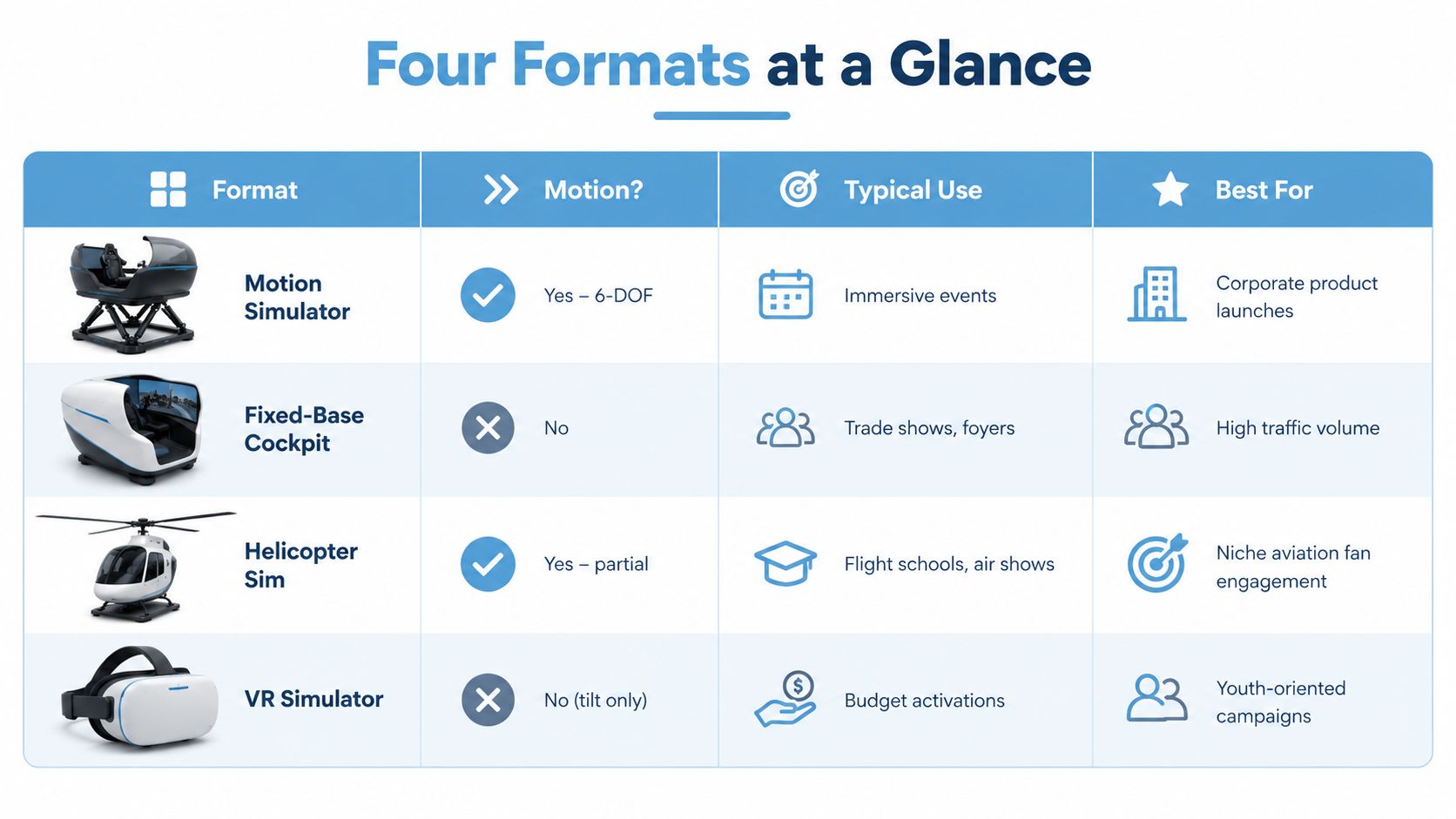
Match the format to the brief
A motion simulator suits product launches, corporate hospitality and large activations where the sensation of flight is central to the attraction. It creates a strong spectator experience because people can see the platform move, but the venue needs appropriate space, access and safety controls.
A fixed-base cockpit works well in foyers, conference areas and exhibition stands. It can reproduce an authentic cockpit layout without platform movement, which may make it easier to manage for mixed-age audiences and high visitor flow. It's also useful when the event message depends on procedure, controls or aircraft detail rather than physical sensation.
A helicopter simulator offers a distinctive aviation experience. The controls and handling feel different from a fixed-wing aircraft, making it suitable for aviation-focused audiences, air shows, recruitment activity or specialist engagement. The operator should still explain the motion profile and participant requirements before booking.
A VR flight experience can fit campaigns that need a smaller installation or a more accessible budget. It may appeal to younger audiences and works where visual immersion matters more than a physical cockpit. Hygiene, headset comfort, supervision and motion sensitivity need particular attention.
Choosing Your Flight Simulator Format
| Simulator Type | Best For | Experience Level | Footprint and Throughput |
|---|---|---|---|
| Motion simulator | Corporate launches and immersive events | High sensory impact | Larger footprint, with queue planning required |
| Fixed-base cockpit | Trade shows and foyers | Authentic controls without platform movement | Compact relative to motion systems, suitable for steady traffic |
| Helicopter simulator | Air shows and aviation engagement | Specialist and distinctive | Depends on cabin and motion configuration |
| VR simulator | Budget activations and youth-oriented campaigns | Visual immersion with headset interaction | Flexible footprint, with cleaning and supervision built in |
The format should also reflect how long visitors can wait and how much conversation you want after the flight. A short fixed-base challenge can support high traffic, while a longer motion experience may create deeper engagement but fewer completed sessions. Neither outcome is better than the other. The correct choice is the one that fits the campaign's priority.
Key Specs Footprint and Practical Requirements
A flight simulator is an operating zone, not just a cockpit. For a UK venue, the plan must cover delivery access, the equipment's working area, queue space, operator position, branding, spectator standing areas and safety clearance around moving parts. These details also determine how many useful brand interactions the activation can produce.
Start with the building and the route to the stand. Check door dimensions, lift capacity, loading restrictions, ceiling height, floor-loading guidance and the venue's approved working hours. A unit can fit within the proposed stand yet fail on arrival if it cannot pass through the service entrance, or if installers must cross a public route to reach the activation area.

Turn technical requirements into venue questions
Request a floorplan drawing, power schedule, data requirements, access plan and installation timetable before the venue signs off the layout. A product photograph rarely shows the room needed for queues, staff movement or safe observation.
Use this checklist:
- Access and build: Confirm the service entrance, delivery booking, lift route, storage position and installation window.
- Power and data: Request the socket locations, cable-protection method, network requirements and responsibility for electrical checks. Ask the supplier to state whether a 13A or 16A supply is required.
- Operating area: Reserve room for the participant, operator, queue, observers and branded information. Request a footprint drawing showing at least 1m safety clearance around moving equipment.
- Audience flow: Mark where guests enter, wait and exit, keeping neighbouring stands and fire routes clear.
- Technical support: Confirm who calibrates the system, who handles faults and what happens if the simulator pauses.
For a fuller set of planning questions, use this flight simulator requirements guidance.
Throughput is a measured planning variable, not a fixed promise. Session length, briefing time, participant confidence, operator changes and leaderboard administration all affect completed sessions. Treat the queue like a small attraction: give waiting guests a clear view, useful brand content or a simple pre-flight task instead of adding barriers around the cockpit at the last minute.
Include accessibility and comfort early
Ask about motion intensity, harnessing, transfers, seat adjustment, height or age restrictions and alternative ways to take part. A non-flying role, spectator challenge or co-pilot position may include visitors who cannot use the main seat, provided the supplier and venue agree the arrangement before the event.
Discuss motion sickness directly. Use a clear briefing, avoid unnecessarily aggressive scenarios and give operators authority to stop a session when a participant feels uncomfortable. This protects the visitor and prevents an avoidable pause from affecting the rest of the queue.
A lower-cost public attraction can set a different expectation from a branded corporate activation. Manchester Airport's Runway Visitor Park lists a fully interactive flight simulator at £6 per person, an illustrative example of how UK simulator experiences can serve both accessible consumer activity and premium event formats.
Pricing Packages and What Affects Cost in the UK
UK simulator hire is usually quoted around the operating model, not just the hardware. A day rate may cover a standard event configuration, while a multi-day package can spread delivery, installation and technical support across a longer activation. A supplier may also quote separately for transport, crew, branding, venue-specific requirements and out-of-hours work.
The headline price is therefore only useful when proposals describe the same service. One quote may include delivery, installation, an operator, insurance and removal. Another may price the simulator alone and leave the organiser responsible for staffing, barriers, technical support and venue paperwork.
Build a like-for-like quote
Give suppliers enough information to calculate the actual job:
- Event details: Share venue, dates, public opening hours, access windows and whether the equipment must remain installed overnight.
- Experience design: Specify the aircraft style, motion preference, session length, competition format and audience profile.
- Branding scope: Identify cockpit graphics, screen content, leaderboard design, staff clothing, backdrop requirements and any approval process.
- Operational support: Confirm whether you need delivery, installation, an operator, queue management, technical standby and post-event removal.
- Compliance needs: Ask for the documents required by the venue, including risk assessments, method statements and insurance evidence.
Complexity affects cost. A motion platform generally requires more transport, setup and operational control than a fixed-base cockpit. A branded activation may need artwork adaptation, content testing and production time. A remote venue can require more travel and logistics than a central London location, while a longer booking may change the commercial structure.
Measure value beyond entertainment
The commercial question is not “How cheap is the simulator?” It's “What does the experience produce for the campaign?” Track completed sessions, meaningful conversations, competition entries, consented leads, repeat participation and audience feedback. If a brand wants product education, a slower scenario with a trained operator may be more valuable than the fastest possible queue.
This approach reflects the way experiential planners are assessing live activity. A 2025 UK activation report stated that 321 brands and agencies ran 3,493 live activation days across 360 venues in 90 UK towns and cities. The same report said more than 64% of UK marketers planned to increase experiential budgets in 2025. These figures point towards a planning environment where reach, dwell time and venue spread matter alongside entertainment value.
A strong quote should show what the supplier will do, what the organiser must provide and which measures the team can capture. That clarity prevents a low initial price from becoming an expensive operational problem later.
How a Flight Simulator Event Works From Setup to Takeoff
A successful event day starts before the simulator arrives. The organiser, venue and supplier should agree the risk assessment, method statement, access route, power position, operating boundary, participant criteria and emergency procedure. The operator also needs the final scenario, branding and scoring rules before guests reach the stand.
A practical event-day sequence
Load-in: The crew checks in through the venue's agreed route, protects floors and moves the equipment into position. The venue team should keep the route clear and confirm that other contractors aren't blocking the installation area.
Technical setup: The supplier assembles the simulator, connects the visual system and controls, checks the motion platform where applicable, loads the scenario and tests the branded content. The team should allow time for calibration and a complete operator flight before opening.
Safety briefing: Each participant receives clear instructions on entering, using the controls, following the operator and stopping the session. Harnesses, seat adjustment, motion restrictions and exit arrangements should be explained in language that suits the audience.
Guest flow: A host manages the queue and explains the challenge. The operator focuses on the participant, while a separate brand representative can handle conversation, lead capture or competition administration. Separating those roles keeps the technical session moving.
Debrief: After landing, the operator can discuss the result, explain what happened and invite the participant towards the relevant brand interaction. A leaderboard can encourage friendly competition, but it should never make the experience intimidating for first-time users.
The installation requirements for a flight simulator should be confirmed with the supplier and venue before the build schedule is finalised.
Why repeatability matters
UK aviation regulations anticipate FSTD use within pilot training and competency checking. Recent legislative material states that certain pilots require two hours of initial ground training plus two hours of FSTD training for a relevant safety-related operation, as set out in the UK legislative material.
An event activation isn't automatically a training session, but the principle is useful. Simulation has value when the operator can reproduce the scenario, trigger events consistently and explain the outcome afterwards. For structured programmes, record the device type, qualification number where relevant, session time and exercise performed separately from live aircraft flight time. That discipline helps teams compare sessions, manage competitions fairly and identify technical issues.
Plan a fallback for software faults, participant discomfort, delayed access or a venue-wide power interruption. A simple spectator activity, video loop or branded challenge can keep the area active while the simulator is reset.
Booking Checklist Safety and Next Steps for Planners
A flight simulator activation is ready to book when the creative idea and the operating plan agree. The attraction should fit the venue, the audience should understand what will happen, and the supplier should be able to explain how the equipment will be delivered, operated and supported.
Use this final check before approving a proposal:
- Confirm the format: Choose motion, fixed-base, helicopter or VR according to the audience, footprint, throughput and campaign objective.
- Verify the venue: Check access, ceiling height, floor area, power, data, storage, working hours and venue-specific contractor rules.
- Review H&S documents: Request the risk assessment, method statement, operating procedure and participant guidance.
- Check insurance: Confirm the supplier can provide the venue's required cover, including £10 million products, employee and public liability insurance where applicable.
- Agree staffing: Establish who operates the simulator, manages the queue, welcomes participants, handles branding and records results.
- Plan accessibility: Ask about seat transfer, harnesses, age or height limits, motion sensitivity and alternative ways to participate.
- Define measurement: Decide how you'll record sessions, dwell time, conversations, competition entries, leads and follow-up actions.
- Prepare contingencies: Agree the response to technical faults, late deliveries, participant discomfort and changes to the event schedule.
Discovery matters because most UK searchers use Google when looking for attractions, suppliers and event ideas. StatCounter-based reporting placed Google at 91.75% of UK search market share in August 2026, compared with Bing at 5.67%, Yahoo! at 1.25%, DuckDuckGo at 0.71%, Ecosia at 0.30% and Yandex at 0.28%, according to UK search market reporting. For organisers, that makes clear, specific content important, but supplier evaluation must still go beyond search visibility and marketing claims.
Choose the provider that answers operational questions directly, supplies the required paperwork and can explain how the experience will work for your actual audience. A polished cockpit attracts attention, but disciplined planning turns that attention into a safe and measurable event result.
PSW Events provides mobile flight and motion simulator experiences for exhibitions, conferences, brand activations, team building and private events, with planning, branding, delivery, installation, on-site staffing and H&S support. Visit PSW Events to discuss your venue, audience and engagement objectives and build a flight simulator activation around the way your event needs to perform.