
The client wants something that stops delegates in their tracks, keeps them on the stand, and produces useful conversations. The venue has offered a corner of the exhibition hall, the floor plan is already tight, and someone has suggested a mobile golf simulator as though it were just a screen, a projector, and a few clubs.
On event day, the screen is rarely the difficult part. The problems usually start with access, ceiling clearance, electrical supply, venue paperwork, queue control and the question nobody answered properly: what should the simulator achieve for the business?
For UK exhibitions, conferences, hospitality programmes and brand activations, a mobile golf simulator works best when it's treated as a commercial experience. It can create dwell time, open conversations with people who might otherwise walk past and give a sales team a natural reason to follow up. It can also become an expensive queue around a screen if the brief, staffing and reporting aren't designed together.
The Brief That Actually Drives a Mobile Golf Simulator
The turning point usually comes halfway through planning. The stand design is approved, the logo has gone to print and the organiser asks how many people the golf simulator will attract. The answer depends less on the hardware than on the job it has been hired to do.
Start with the audience. A room full of club golfers can handle a competitive nearest-the-pin format with minimal explanation. A mixed corporate audience needs a faster welcome, forgiving settings and a host who can make a novice feel comfortable without turning the activity into a golf lesson. That distinction affects the launch monitor, software, club selection, scoring format and staffing plan.
Write down one primary commercial objective:
- Dwell time: Keep delegates on the stand while the sales team qualifies interest.
- Lead generation: Require consent before a scorecard or branded replay is delivered.
- Product demonstration: Use the simulator to make a technical feature visible and memorable.
- Hospitality reward: Give invited guests a relaxed competition with a more polished service layer.
Trying to make one bay do all four usually creates friction. A leaderboard may drive repeat play, but it can distract from a product demonstration. A lengthy data-capture form may support lead quality, but it can slow the queue and reduce participation.
Practical rule: Brief the outcome first, then select the specification.
The wider market supports this commercial approach. The UK golf simulator market was estimated at USD 214.5 million in 2025 and is projected to reach USD 436.6 million by 2033, with a projected 9.3% CAGR from 2026 to 2033, according to UK golf simulator market tracking from Credence Research. The same source indicates that indoor simulators represented more than 70% of UK installations in 2024, which fits the exhibition hall, hotel ballroom and temporary venue model.
Your brief should therefore answer five practical questions before a hire company quotes: who is playing, what action should follow the experience, where will people wait, who will operate the bay and how will success be reported? A brief built around outcomes creates a useful activation. A brief built around screen size and club brands can create an attractive but costly queue.
Venue, Space and Power Before You Sign Anything
Venue checks should follow the order of the physical operation, not the order in a glossy proposal. Begin at the bay position and work backwards to the loading dock.
Start with the footprint
Mark the hitting mat, screen stance, frame, projector position, host desk and queue. Include the space needed for a player to take a full swing, and check the ceiling directly above the club path. A ballroom may look generous until a driver reaches a low bulkhead, suspended sign or fire suppression head.
Then trace the load-in route. Record door widths, lift dimensions and lift capacity, ramp gradients, turning points and the distance from the loading bay to the final position. A compact rig can still become difficult when it has to pass through a service corridor, share a goods lift or cross a carpeted foyer.
Power needs more attention than a convenient floor socket. Confirm whether the venue supplies single-phase or three-phase power, whether the circuit is dedicated, how long the cable run will be and where voltage drop could affect equipment. A projector, launch monitor, control PC, impact-screen lighting and ancillary displays can quickly overload the standard 13A socket provision commonly scattered around a stand.
| Requirement | Minimum Spec | Why It Matters |
|---|---|---|
| Hitting area | Full-swing clearance with no overhead obstruction | Prevents club strikes against venue fabric, lighting or fire equipment |
| Screen and frame | Stable, weighted and suitable for ball containment | Protects guests and nearby displays |
| Access route | Confirmed door, lift and corridor dimensions | Prevents a rig arriving at the dock but failing to reach the stand |
| Electrical supply | Dedicated, protected circuits agreed with venue operations | Reduces nuisance trips and unsafe trailing cables |
| Documentation | Method statement, risk assessment and equipment details | Gives the venue evidence for its approval process |
Ask the supplier for a method statement and risk assessment covering the frame, cabling, ball containment, projector and guest movement. For temporary structures, Manchester City Council asks organisers for drawings, structural calculations, certificates, risk-management details, measurements, weights, loading statements and operational and maximum wind-speed information. It also requires evidence of public liability and professional indemnity insurance, with a minimum liability of £10 million, as set out in its temporary structure event conditions.
The exact venue process varies, but the principle doesn't. Hastings Borough Council states that the Construction (Design and Management) Regulations 2015 apply to entertainment-industry construction projects involving temporary demountable structures, and it requires a construction phase plan for such events. Its guidance also covers marquee separation, emergency lighting and escape routes. These requirements are why PSW Events' installation requirements should be treated as a planning reference rather than something to open after the hire is booked.
Get venue approval before artwork, freight and labour are locked. A late refusal rarely affects only the simulator. It can force a stand redesign, move the queue into an emergency route or remove the activation altogether.
Choosing the Right Launch Monitor for an Event Day
A launch monitor translates a swing into feedback. For an event, the useful question isn't whether it matches tour-level equipment in every metric. It's whether a guest receives a credible result quickly, consistently and without a host apologising for the numbers.
Radar systems track the ball through flight and tend to suit long-shot formats. They're quick to deploy, generally tolerant of ordinary indoor lighting and forgiving when a mixed-ability guest doesn't produce a perfect strike. Camera systems observe the ball and club around impact, which can provide more detailed short-shot, club and putting information. They're valuable for coaching tie-ins or a product launch where the quality of the data is part of the message, but they normally need tighter positioning, controlled lighting and more calibration discipline.
UK comparative testing found a budget radar unit tracked ball speed within 2% of a premium camera system on full shots, with launch angle within 1 degree on full shots, as reported in UK testing of budget launch monitors. The same testing identified spin as the weak point for portable event use. On full 7-iron shots averaging about 6,200 rpm on the benchmark system, the budget radar showed a 1,700 rpm spread, compared with a 400 rpm spread on the premium system, and it sometimes failed to register 50-yard pitches.
That doesn't make a budget unit unusable. It means the operator should prioritise alignment and repeatability, then validate the setup with a driver, mid-iron and wedge before guests arrive. Ball speed, carry distance and launch angle are usually more useful to a casual participant than a questionable spin figure.
| Factor | Radar Systems | Camera Systems |
|---|---|---|
| Event setup | Fast and comparatively forgiving | More demanding positioning and calibration |
| Long shots | Strong fit for ball speed, carry and flight | Also capable, depending on the system |
| Short shots and putting | Can be limited on portable units | Often the stronger choice |
| Lighting | Usually more tolerant of venue variation | May need controlled conditions |
| Staffing | Requires less technical hand-holding | Benefits from a trained host on every bay |
| Best use | Fast mixed-audience competitions | Coaching, fitting and data-led demonstrations |
UK guidance places typical consumer launch-monitor accuracy at approximately ±2 to 3 mph for ball speed, ±3 to 5% for carry distance, ±1 to 2 degrees for launch angle and around ±200 to 400 rpm for spin on models that measure it, according to UK indoor golf guidance from SportsCover Direct. Choose software licensing, tee flexibility, impact-screen durability and host capability alongside the monitor. A visually impressive system that needs constant intervention won't improve an event queue.
Branding the Bay and Integrating Lead Capture
A mobile golf simulator has three branding surfaces. The player sees the turf, ball and impact screen. People waiting see the surround, side panels and overhead elements. Photographers often capture the monitor housing, host position and the player in the bay.
Treat those surfaces as one composition. Supply fabric artwork, logos and sponsor rules early enough for the hire company to pre-fit printed panels at its warehouse. Taping a logo to a frame during load-in looks temporary, catches light badly and tends to move when the queue starts leaning on the surround.
The outer edge of the activation should work even when nobody is swinging. A leaderboard on a nearby display can attract passers-by, while a totem or replay screen can explain the competition without forcing the host to repeat the same introduction. Keep the bay sightline open to the stand's main message, and don't let the queue block a product display or reception point.
Lead capture belongs inside the experience. An email gate before a scorecard or branded replay creates a clear exchange, while an optional LinkedIn scan can support a faster conversation with delegates who prefer not to type. A QR code offers a useful fallback for privacy-conscious European audiences, provided the wording explains what data is collected, why it's collected and how the client will use it.
The captured record should travel into the client's CRM through a webhook or agreed export, not sit on a clipboard until somebody rekeys it. The PSW Events guide to lead capture at events is relevant when the simulator is one part of a wider stand journey. Give the host a secondary tablet too, because the strongest lead conversation often happens beside the bay rather than at the consent screen.
Prize mechanics alter behaviour. A leaderboard encourages repeat attempts, a random draw keeps the barrier low for novices, and a photo-led reward prioritises sharing over competitive accuracy. If the event team is also planning premium swag options for trade shows, make the reward clear at the point of entry. Guests should understand the exchange before they pick up a club.
On-Site Logistics, Staffing and the Live Run-Sheet
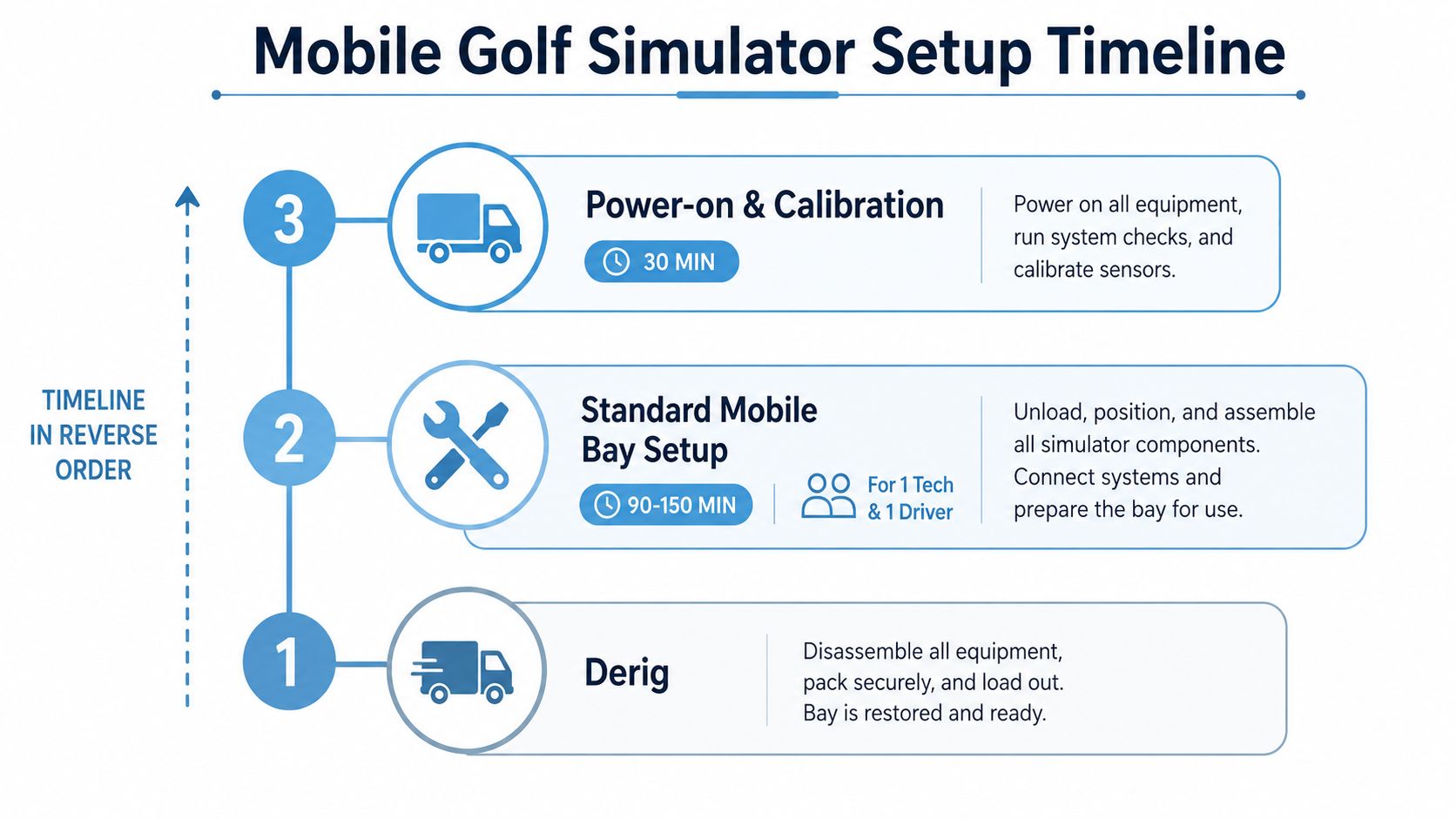
The safest run-sheet is built backwards from derig. Work out when the kit must leave the venue, then reserve the teardown window, final guest slot, equipment check, calibration record, power-down and loading sequence. This prevents a late-running reception from pushing a crew into a dock slot they no longer have.
For a standard mobile bay, allow 90 to 150 minutes for load-in and setup with one technician and one driver, followed by a 30-minute power-on and calibration window. These timings are operational planning allowances, not a promise to use for every venue. Freight lifts, union rules, long corridors and restricted dock access can alter the schedule.
Assign named responsibilities
- Producer: Owns client decisions, venue escalation, schedule changes and final sign-off.
- Lead technician: Handles assembly, alignment, software, calibration and fault response.
- Two brand ambassadors: Manage the queue, welcome guests, explain consent and keep the competition moving.
- Roamer: Watches dwell time, observes bottlenecks and reports to the producer every 30 minutes.
The roamer role is easy to remove from a budget and difficult to replace once the stand is busy. Without it, the producer often learns too late that the queue has stalled, the sales team is ignoring captured leads or the attraction is drawing people who aren't entering the intended conversation.
Protect the calibration window
Calibrate after the equipment reaches its final position, not in the warehouse. Check tee location, screen alignment, projector image, ball type, software login and club availability. In a glass-roofed exhibition hall, ambient temperature can shift after lunch, so schedule a mid-event check rather than waiting for players to complain about carry numbers.
Brief the team on queue capping and on how to hand clubs to senior delegates without making the interaction awkward. Keep left-handed options available where the equipment supports them, and make the first shot simple. If a ball cracks or damages the screen, staff should stop play, protect the area and call the technician. The response must be rehearsed, not improvised.
Confirm parking, dock time, lift dimensions and the route from loading bay to stand in writing with the venue at least seven days before the event. Keep a printed contact sheet on the kit with venue security, the supplier's 24-hour line, the client's account lead and the nearest A&E. A simulator can support networking formats, including hospitality networking events from Purple, but only if the operational team can manage the social flow as carefully as the technical setup.
Measuring ROI, Dwell Time and Genuine Engagement
A full leaderboard looks impressive in a debrief, but it doesn't prove that the activation helped the client. The report should separate people who glanced at the screen, people who played, people who consented to follow-up and people who entered a meaningful commercial conversation.
For a corporate audience, the planning benchmark is often 6 to 9 minutes of dwell time per participant, as specified in the event brief. Treat that as a working reference rather than a guaranteed result. The roamer should record start and finish times on a simple tally sheet, then compare those observations with session data from the simulator software.
Track four outputs:
- Average dwell time: Measure the depth of engagement, not just footfall.
- Qualified leads: Report consented contacts and compare cost per lead with the client's other experiential formats.
- Social sharing: Count branded replays, selfies and posts where tracking is available.
- Brand recall: Send a short survey within 72 hours, using the same brand questions agreed before the event.
Leaderboard entries are useful as a proxy for repeat-play enthusiasm, but they shouldn't become the primary KPI. A visitor may submit several attempts without speaking to sales, while a single well-hosted session can produce a valuable conversation.
The commercial distinction: A simulator is usually a depth play, not a mass-throughput channel.
Compare cost per engaged minute with a seated lunch or keynote panel, but don't pretend the formats do the same job. The mobile golf simulator can hold attention through an active interaction, while a lunch or panel may reach more people at once. A fair report explains that trade-off instead of declaring a winner based on raw visitor totals.
Deliver the debrief within a week. Include a one-page visual showing sessions, average dwell, qualified leads, social actions, recall responses and notable operational observations. The guidance on experiential marketing ROI from PSW Events can help structure the conversation around business outcomes rather than flattering activity counts.
Pre-Event Checklist Your Producer Will Thank You For
Put the following into the handover document and assign an owner to every line. The producer should be able to walk the venue with the document, confirm each dependency and know what remains open before the truck reverses towards the loading bay.
| Area | Tickable action | Owner |
|---|---|---|
| Venue sign-off | Confirm floor loading, ceiling clearance and emergency egress with venue operations | Producer |
| Venue sign-off | Submit drawings, method statement, risk assessment and insurance evidence | Supplier |
| Access | Verify dock booking, door widths, lift capacity and route to the bay | Venue manager |
| Power and cabling | Reserve dedicated circuits, confirm RCD protection and approve cable routing | Lead technician |
| Technical readiness | Check firmware, software login, course pack, tee height and competition settings | Lead technician |
| Calibration | Test a driver, mid-iron and wedge from the final tee position | Lead technician |
| Branding | Approve panel artwork, screen layouts and sponsor hierarchy before print | Client |
| Consent | Approve data-capture wording, CRM route, UTM tags and QR fallback | Marketing lead |
| Staffing | Issue briefing notes, shift plan, queue cap and escalation contacts | Producer |
| Event flow | Confirm run-sheet, prize mechanic, leaderboard rules and reporting method | Client and producer |
| Reporting | Prepare lead export, dwell-time tally and post-event recall survey | Marketing lead |
Don't leave emergency planning as a venue-only task. Hastings Borough Council's temporary-structure guidance highlights construction phase planning, emergency lighting and escape routes, while Manchester's event conditions show the level of technical and insurance evidence some councils request. Your venue may use a different approval pack, but the supplier still needs enough time to answer those questions.
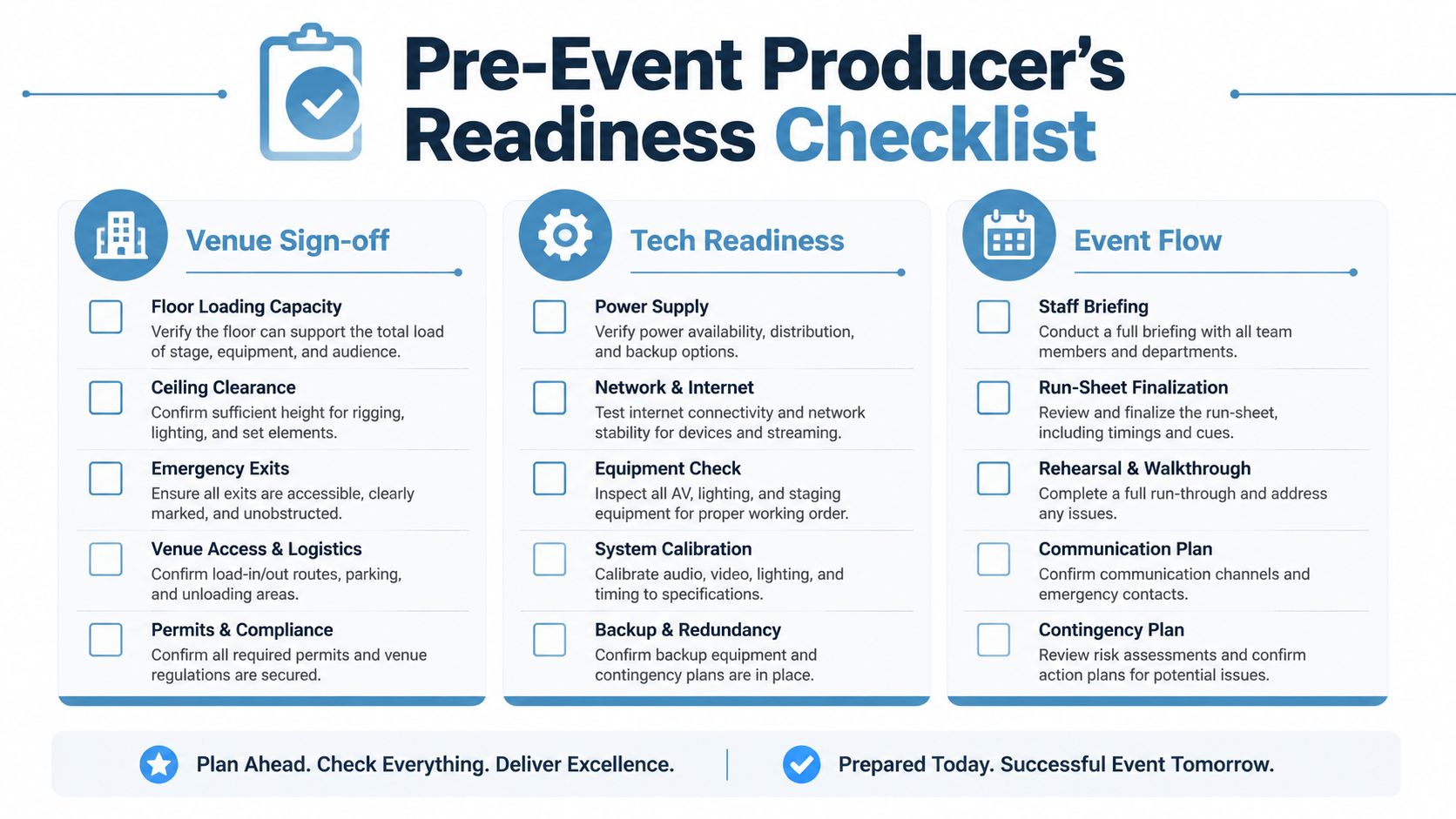
The final handover should include the approved floor plan, power confirmation, artwork sign-off, contact sheet and live measurement method. That packet gives the technician something practical to build from and gives the client a clear basis for judging whether the activation worked.
PSW Events can plan, brand, deliver and operate a mobile golf simulator for UK exhibitions, conferences, hospitality events and brand activations, including venue logistics and health and safety coordination. If you're assessing a simulator as a lead-capture and dwell-time asset rather than a standalone game, visit PSW Events to discuss the space, audience, commercial objective and reporting plan.